Access
Splash and version check, sign-in, password reset and the permissions and location-consent gate of the delegate app (DA-01 to DA-04).
These four screens get a délégué (field sales delegate) from a cold start to the home screen: version policy, session, account status, and the consent that every later position depends on (cahier §6, §9, §10). Shared rules — offline recording, sync badges, settings, error fallbacks — are on the delegate app overview.
DA-01 — Splash & version check
| Field | Value |
|---|---|
| French title | « Démarrage » |
| Release | V1 |
| Design day | Day 11 — DES-11 |
| Build task | MOB-05 — Navigation, app shells & system states |
| Requirements | AUTH-09 · ADM-07 |
| Reference screen | None — system screen (cahier §9, §13.4) |
Purpose. Open the app in under 3 seconds on a mid-range phone (NFR-01), restore the session, enforce the minimum version (AUTH-09, ADM-07) and route the delegate to the right screen — without ever waiting for a network that may not be there.
Entry points & exits. Entry: app launch; tap on a notification while the process was killed (the route is kept and opened after the splash). Exits: DA-02 (no session), change-password sheet (temporary password), DA-04 (consent missing or outdated), DA-10 (a visit is CHECKED_IN or IN_PROGRESS), the pending notification route, DA-05 (default), DA-28 (forced update, start-up error).
Layout.
- Full-bleed brand background, HOCO logo centred, app name « HOCO Délégué ».
- Progress indicator, shown only if routing takes more than 1 s.
- Version line at the bottom (
1.4.2, with the flavor suffixstagingordevoutside production).
Data.
| Field | API source | Offline source | Freshness |
|---|---|---|---|
| Session token | — | Secure storage (flutter_secure_storage) | Until a 401 |
| Version policy | appConfig.get → minVersion, latestVersion, forceUpdate, updateAvailable, storeUrl, releaseNotes | app_config | Every cold start and after one hour in the background, timeout 2 s; cached copy otherwise |
| Maintenance | appConfig.get → maintenance.enabled, .message, .until | app_config | Same |
| Public settings and server time | appConfig.get → settings.field.*, settings.sync.*, serverTime | app_config, clock offset in sync_state | Same |
| User, status, temporary password, consent | me.get → status, mustChangePassword, consents.locationTrackingVersion, delegate.zones | profile | Refreshed in the background after routing |
| Visit to resume | — | visits where status is CHECKED_IN or IN_PROGRESS | Live-local |
| Push registration | me.devices.register | sync_state (last registered token and version) | Every start, after the session check |
Actions (automatic, no user input).
- Open the drift database and run its migrations; in parallel read the token. Migrations are additive and never touch
outbox,upload_queueorlocation_pings. - Call
appConfig.getwithapp=DELEGATE_APP&platform=android&version=<installed>; store the result and the clock offset. - Route with the table below.
- After routing, in the background:
me.get,delegate.profile,me.devices.register(Idempotency-Keygenerated per registration attempt and reused until it succeeds), then a sync cycle (push the outbox, thensync.delta, thendelegate.tours.todayif no snapshot exists for today).
| Condition, checked in this order | Destination |
|---|---|
| Database cannot be opened | DA-28 start-up error |
Installed version below minVersion (fresh or cached policy) | DA-28 forced update |
| No token | DA-02 |
Cached Me.status is SUSPENDED or DISABLED | DA-02 with the explicit message |
mustChangePassword | Change-password sheet (auth.password.change) |
consents.locationTrackingVersion empty or older than the notice version | DA-04 |
A visit is CHECKED_IN or IN_PROGRESS | DA-10 of that visit, stacked on DA-06 |
| A notification route is pending | That route |
| Otherwise | DA-05 |
Rules.
- The forced update applies even offline when the cached policy demands it; queued data survives the store update (MOB-09).
maintenance.enableddoes not block the delegate app: it opens on local data with the maintenance banner, and the sync engine pauses untiluntil(calls would answer503 MAINTENANCE).- A
426 UPGRADE_REQUIREDreceived later on any call leads to the same forced-update state. - Sessions last 30 days and slide with activity; a
401sends the delegate to DA-02 with the phone prefilled and the outbox kept.
States.
| State | Trigger | UI |
|---|---|---|
| Loading | Cold start | Splash; never more than 3 s before routing |
| Offline | appConfig.get times out | Cached policy used; Home shows the offline banner |
| Maintenance | maintenance.enabled | Home banner « Maintenance en cours jusqu'à 14:00. Vous pouvez continuer hors ligne. » |
| Update available | updateAvailable | Dismissible sheet once per version: « Une nouvelle version est disponible » with releaseNotes, « Mettre à jour » / « Plus tard » |
| Forced update | Below minVersion | DA-28 |
| Start-up error | Database corrupt or migration failed | « Impossible d'ouvrir les données de l'application. » with « Réessayer » and « Envoyer un rapport » (Sentry); local data is never wiped automatically |
Copy. « HOCO Délégué » · « Une nouvelle version est disponible » · « Mettre à jour » · « Plus tard » · « Impossible d'ouvrir les données de l'application. » · « Réessayer » · « Envoyer un rapport ».
Acceptance criteria.
- With a cached session, the interactive Home appears within 3 s of a cold start on the reference mid-range phone, online and in airplane mode.
- In airplane mode the app opens on DA-05 with cached data and the offline banner; no error dialog appears.
- With
minVersionabove the installed version the forced-update screen is shown, and the items queued before the update are still in DA-27 after installing the new version. - Killing the app during a visit and reopening it lands on DA-10 of that visit with the correct elapsed duration.
- A notification tapped while the app was killed opens its target screen after the splash.
DA-02 — Sign in
| Field | Value |
|---|---|
| French title | « Connexion » |
| Release | V1 |
| Design day | Day 11 — DES-11 |
| Build task | MOB-06 — Authentication flows (both apps) |
| Requirements | AUTH-02 · AUTH-08 |
| Reference screen | delegate-01-login-profile — shown below |
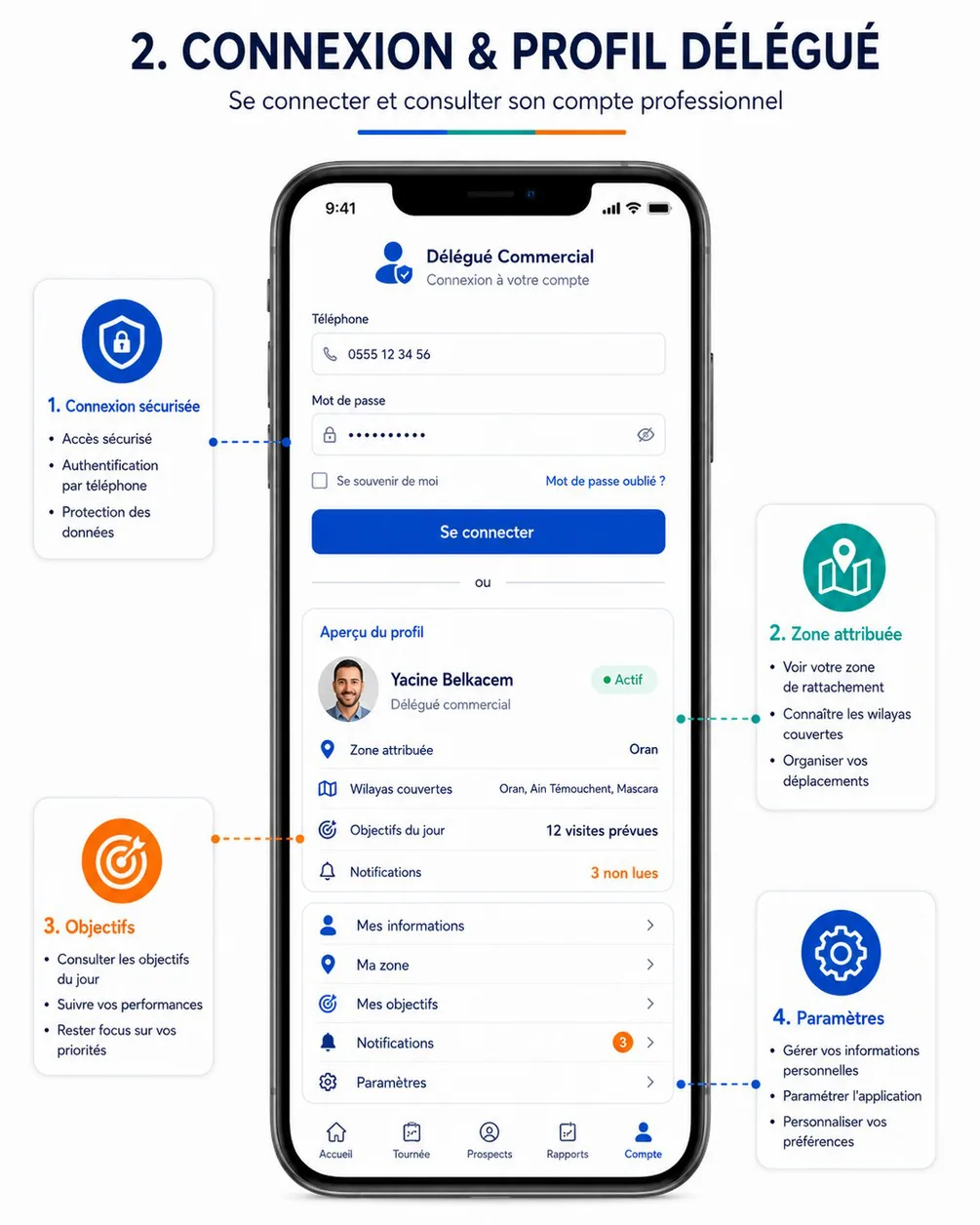
Purpose. Let a delegate open a session with their phone number and password; refuse suspended or disabled accounts with an explicit message (cahier §6 acceptance criterion; AUTH-02, AUTH-08).
Entry points & exits. Entry: DA-01 without a session, sign-out (DA-24), 401 on any call, password reset done (DA-03). Exits: DA-03 (« Mot de passe oublié ? »), change-password sheet, data-preparation sheet, then DA-04 or DA-05.
Layout.
- Header: delegate icon, « Délégué Commercial », sub-title « Connexion à votre compte ».
- Text field « Téléphone » with a phone icon, numeric keyboard, formatted as typed (
0555 12 34 56), prefilled with the last phone used on this device. - Password field « Mot de passe » with a lock icon and a show/hide eye.
- Link « Mot de passe oublié ? » aligned to the end.
- Primary button « Se connecter » (full width, 56 dp).
- Footer: « Un problème pour vous connecter ? Contactez votre responsable. » and the version line.
The reference's « Se souvenir de moi » checkbox is removed: mobile sessions last 30 days and the phone is prefilled. Its « ou » separator and profile preview are DA-24.
Data.
| Field | API source | Offline source | Freshness |
|---|---|---|---|
| Phone (input) | Sent as identifier to auth.login | Last phone in secure storage (never the password) | Written after each successful sign-in |
| Session | auth.login → token, expiresAt, sessionId, user (Me) | Secure storage; profile | — |
| Delegate context | me.get → delegate.code, delegate.zones; delegate.profile | profile | At sign-in |
| Initial data | delegate.tours.today, sync.delta (full pull), reference.lists, reference.wilayas, reference.communes for the zone's wilayas | tours, visits, resellers, tasks, reference_items, visit_types, wilayas, communes | At sign-in, then per freshness class |
Actions.
- Se connecter →
auth.loginwith{ identifier, password, app: "DELEGATE", deviceName }and the mobile headers (X-App-Platform,X-App-Version,X-Device-Id). NoIdempotency-Key(ignored by this operation); the button is disabled while the call runs so a double tap sends one request. On success: token to secure storage,Metoprofile, then:user.mustChangePassword→ change-password sheet (current temporary password, new password twice) →auth.password.change.- Local data belonging to another delegate on this phone: if their outbox is empty it is wiped; otherwise the sheet « Des données d'un autre délégué ne sont pas synchronisées sur ce téléphone » offers « Annuler » or « Supprimer ces données » (destructive, second confirmation).
- Data-preparation sheet « Préparation de vos données… » with four lines ticked as they finish (Profil, Tournée du jour, Points de vente (412), Listes et communes); after 10 s the button « Continuer » lets the rest finish in the background.
- Then DA-04 when consent is missing, else DA-05. Haptic
mediumImpacton success,heavyImpacton an error.
Rules.
- Client validation before the call: phone normalisable to an Algerian mobile E.164 number (
05,06,07followed by 8 digits, or+213form) — « Numéro invalide »; password not empty. - Only
UserType = DELEGATEmay sign in to this app (403 WRONG_APP). - Throttling (server): 5 attempts per minute per phone and IP, 15-minute lock after 5 consecutive failures (
429 TOO_MANY_ATTEMPTSwithdetails.lockedUntil). ACCOUNT_SUSPENDEDis revealed only after a correct password (server rule), so the explicit message never helps an attacker.- A new sign-in from the same device replaces the previous session of that device.
- The password is never stored on the phone; no biometric unlock in V1.
States.
| State | Trigger | UI |
|---|---|---|
| Idle | — | Phone prefilled, focus on the password |
| Submitting | Tap | Spinner in the button, fields disabled |
| Wrong credentials | 401 INVALID_CREDENTIALS | Inline error under the password: « Numéro ou mot de passe incorrect. » |
| Locked | 429 TOO_MANY_ATTEMPTS | Banner « Trop de tentatives. Réessayez à 10:42. », button disabled until lockedUntil |
| Suspended / disabled | 403 ACCOUNT_SUSPENDED | Full-width error card « Votre compte est suspendu. Contactez votre responsable. » (or « désactivé »), no session created |
| Wrong app | 403 WRONG_APP | « Ce compte n'est pas un compte délégué. Utilisez l'application HOCO Revendeur. » |
| Offline | No network | « Pas de connexion Internet. La première connexion nécessite le réseau. » |
| Outdated app | 426 UPGRADE_REQUIRED | DA-28 forced update |
Copy. « Délégué Commercial » · « Connexion à votre compte » · « Téléphone » · « Mot de passe » · « Mot de passe oublié ? » · « Se connecter » · « Numéro invalide » · « Préparation de vos données… » · « Continuer » · « Choisissez un nouveau mot de passe pour continuer. »
Acceptance criteria.
- An active delegate signs in and reaches DA-04 (first time) or DA-05; the session survives an app restart.
- A suspended delegate with the right password sees the explicit suspension message and no screen behind it (cahier §6).
- After 5 wrong passwords the button stays disabled until the lock time shown.
- A reseller's credentials are refused with the wrong-app message.
- After sign-in and data preparation, switching to airplane mode still shows today's tour and the sheets of its points of sale.
- A temporary password forces the change-password sheet before any other screen.
DA-03 — Forgot password
| Field | Value |
|---|---|
| French title | « Mot de passe oublié » |
| Release | V1 |
| Design day | Day 11 — DES-11 |
| Build task | MOB-06 — Authentication flows (both apps) |
| Requirements | AUTH-07 |
| Reference screen | None — standard reset flow (cahier §10) |
Purpose. Let a delegate set a new password with a one-time SMS code, without contacting the back-office (AUTH-07).
Entry points & exits. Entry: « Mot de passe oublié ? » on DA-02. Exits: back to DA-02 (phone prefilled, snackbar « Mot de passe modifié. Connectez-vous. »), or back without change.
Layout. One screen, three steps with a progress indicator:
- « Votre numéro » — phone field, primary « Recevoir un code ».
- « Code reçu par SMS » — 6 boxes with SMS autofill (Android SMS User Consent API), countdown « Renvoyer le code dans 0:42 », link « Renvoyer le code » when allowed, link « Modifier le numéro ».
- « Nouveau mot de passe » — new password and confirmation with show/hide, live checklist of the policy (8 characters minimum, a letter, a digit), primary « Enregistrer ».
Data.
| Field | API source | Offline source | Freshness |
|---|---|---|---|
| Code sending | auth.otp.send { phone, purpose: "PASSWORD_RESET" } → expiresAt, resendAvailableAt | — | Online only |
| Code check | auth.otp.verify → verificationToken (single use, 10 min) | Memory only | — |
| New password | auth.password.reset { verificationToken, newPassword } | — | — |
| OTP length and resend delay | appConfig.get → settings.auth.otpLength, settings.auth.otpResendSeconds | app_config | Reference |
Actions. Recevoir un code → auth.otp.send; the next step always opens with the same neutral text, whether or not the phone has an account. Valider (automatic when the 6th digit is typed) → auth.otp.verify. Enregistrer → auth.password.reset; on success other sessions are revoked by the server, the app returns to DA-02. No Idempotency-Key needed (the token is single-use).
Rules. Code: 6 digits, valid 5 minutes, 5 attempts, one active code per phone and purpose; sending limited to 1 per 60 s and 5 per hour per phone. Password policy from the authentication page (PASSWORD_TOO_WEAK). The flow never reveals whether a phone has an account.
States.
| State | Trigger | UI |
|---|---|---|
| Code sent | Any answer to send | « Si ce numéro correspond à un compte, un code vous a été envoyé par SMS. » |
| Too soon | 429 OTP_RESEND_TOO_SOON | Countdown from details.retryAfterSeconds |
| Wrong code | 422 OTP_INVALID | « Code incorrect. Il reste 3 essais. » |
| Expired code | 422 OTP_EXPIRED | « Ce code a expiré. Demandez-en un nouveau. » |
| Too many attempts | 429 TOO_MANY_ATTEMPTS | « Trop d'essais. Demandez un nouveau code. » |
| Weak password | 400 VALIDATION_FAILED / PASSWORD_TOO_WEAK | Inline under the field |
| Token expired | 422 VERIFICATION_TOKEN_INVALID | Back to step 1 with « La vérification a expiré. Recommencez. » |
| Offline | No network | « Connexion requise pour réinitialiser votre mot de passe. » |
Copy. « Mot de passe oublié » · « Recevoir un code » · « Code reçu par SMS » · « Renvoyer le code » · « Modifier le numéro » · « Nouveau mot de passe » · « Confirmer le mot de passe » · « Enregistrer » · « Mot de passe modifié. Connectez-vous. »
Acceptance criteria.
- An unknown phone and a known phone show exactly the same confirmation text.
- « Renvoyer le code » stays disabled for 60 s after each sending.
- The fifth wrong code forces a new code request.
- After a reset the delegate signs in with the new password, and the session on their other device is revoked.
DA-04 — Permissions & location consent
| Field | Value |
|---|---|
| French title | « Autorisations et consentement » |
| Release | V1 |
| Design day | Day 11 — DES-11 |
| Build task | MOB-10 — Location, maps & consent foundation |
| Requirements | SEC-07 · FLD-15 |
| Reference screen | None — required by cahier §8 and §10 (consent and transparency of geolocation) |
Purpose. Before any position is read, explain what the app records about the delegate's location, collect the consent with its version, then obtain the Android permissions the field day needs (SEC-07, FLD-15).
Entry points & exits. Entry: after the first sign-in; when the notice version changes; when a location action (tour start, check-in, GPS capture) finds consent or permission missing; « Revoir le consentement » in DA-26. Exits: DA-05 (or back to the action that triggered it).
Layout. A gate of three to four steps with progress dots, each with an illustration, a short text and one primary button:
- Notifications — « Recevez vos tournées, relances et messages de votre responsable. » · « Autoriser » (Android 13+ notification permission) · « Plus tard ».
- Localisation et transparence — the notice, values filled from the settings:
- « Ce que HOCO enregistre : votre position (latitude, longitude, précision) au démarrage de la tournée, à chaque arrivée chez un point de vente, à la création d'une fiche, et toutes les 5 minutes ou tous les 200 m pendant une tournée en cours. »
- « Jamais en dehors d'une tournée en cours. Le partage s'arrête quand vous suspendez ou clôturez la tournée. »
- « Qui la voit : votre responsable et l'administration HOCO. Conservation : 90 jours. »
- Link « Politique de confidentialité »; checkbox « J'ai lu et j'accepte »; primary « Accepter et continuer »; secondary « Plus tard ».
- Autoriser la localisation — instructions « Choisissez « Pendant l'utilisation de l'appli » et « Position exacte ». » then the system prompt.
- Fiabilité pendant la tournée (only on manufacturers known to stop background services) — how to exclude the app from battery optimisation, « Ouvrir les réglages » / « Passer ».
The camera permission is asked later, at the first photo.
Data.
| Field | API source | Offline source | Freshness |
|---|---|---|---|
| Frequency, distance, retention shown in the notice | appConfig.get → settings.field.locationIntervalSeconds, settings.field.locationDistanceMeters, settings.field.locationRetentionDays | app_config | Reference |
| Privacy policy link | appConfig.get → settings.legal.privacyUrl (assumption — today sent to the reseller apps only; to be sent to the delegate app too) | app_config | Reference |
| Consent already given | me.get → consents.locationTrackingVersion, consents.locationTrackingAcceptedAt | profile | At sign-in |
| Consent recording | me.update { consents: { locationTracking: { accepted: true, version } } } | outbox | Queued |
| OS permissions | Android (notifications, fine location, battery optimisation state) | — | Read on every resume |
Actions.
- Accepter et continuer → local
profileupdated and an outbox item forme.update(Idempotency-Key= item id,occurredAt= time of the tap; works offline). Then step 3. - Autoriser (localisation) → system prompt. Granted precise → ✓. Approximate only (Android 12+) → « La position exacte est nécessaire pour valider vos arrivées. » with « Réessayer » / « Ouvrir les réglages ». Denied → explanation and « Continuer sans localisation ». Permanently denied → « Ouvrir les réglages ».
- Location services off → the Google Play services dialog « Activer la localisation ».
- Plus tard on the notice → limited mode (rules below).
Rules.
- No position is read before the notice is accepted (cahier §10).
- Consent is per user and versioned; OS permissions are per device: on a new phone only steps 1, 3 and 4 are shown.
- Without consent the delegate can sign in and consult everything, but cannot start a tour (consent is the precondition of sampling, see
me.updaterule 4). Home shows the banner « Localisation non acceptée : vous ne pouvez pas démarrer de tournée » with « Revoir ». - Consent given but OS permission missing: the tour can start without a position (recorded
startPositionMissing, cahier §6.1 « selon les permissions GPS »), but check-ins and the GPS capture of a prospect need the permission; the banner says « Localisation désactivée : vos arrivées ne pourront pas être validées » with « Activer ». - Withdrawing consent in DA-26 sends
accepted: falseand stops sampling immediately.
States.
| State | UI |
|---|---|
| Permission granted precise | Step marked ✓, next step |
| Approximate only | Explanation card, « Ouvrir les réglages » |
| Denied / permanently denied | Explanation, « Continuer sans localisation » or « Ouvrir les réglages » |
| Location service off | « Activez la localisation du téléphone » with the system dialog |
| Offline | Consent queued; the step completes normally |
Copy. « Localisation et transparence » · « J'ai lu et j'accepte » · « Accepter et continuer » · « Plus tard » · « Autoriser la localisation » · « Position exacte » · « Ouvrir les réglages » · « Continuer sans localisation » · « Fiabilité pendant la tournée ».
Acceptance criteria.
- On a first sign-in the gate appears before Home and no location request reaches Android before « Accepter et continuer ».
- The consent reaches the server with its version and time, also when given offline (visible on the user's record in the back-office once synced).
- Refusing consent opens Home in limited mode with the banner, and « Commencer la tournée » leads back to the notice.
- Granting only approximate location shows the precise-location explanation.
- The values in the notice change when the back-office changes the sampling settings, without an app update.
Delegate app
The délégué's day, the navigation model, offline-first, location and outdoor-readability rules, and the index of the 28 delegate-app screens.
Day and tour
Home, tour programme, tours calendar, map and navigation, tour closing, reports and objectives of the delegate app (DA-05 to DA-08, DA-20 to DA-22).