Day and tour
Home, tour programme, tours calendar, map and navigation, tour closing, reports and objectives of the delegate app (DA-05 to DA-08, DA-20 to DA-22).
These screens carry the délégué's day from the start button to the closing report: what is planned, where to go next, what is done, and how the day compares with the objectives (cahier §4.5, §6.1, §6.2, §6.3, §6.9). The visit itself is on Visits; shared rules (offline recording, badges, settings, errors) on the overview.
Tour lifecycle seen from the app
| Value | UI label (fr) | Meaning |
|---|---|---|
PLANNED | Planifiée | Scheduled for a future day. |
TO_START | À démarrer | Day of the tour has come (set by the 00:05 job); the start button is enabled. |
IN_PROGRESS | En cours | Started by the assigned delegate (time + position recorded). |
SUSPENDED | Suspendue | Paused with a reason (break, incident); location sampling stops. |
COMPLETED | Terminée | Closed with the final report; definitive unless reopened. |
CANCELLED | Annulée | Cancelled by the back-office with a reason. |
| App rule | Detail |
|---|---|
| Only the assigned delegate starts the tour | Cahier §4.5. A tour reassigned after the snapshot answers 403 NOT_ASSIGNED_DELEGATE; the app removes it and stops sampling |
Start only on the tour day, from TO_START | Other statuses answer 409 TOUR_TRANSITION_NOT_ALLOWED; a start whose occurredAt falls on another Africa/Algiers date answers 409 TOUR_NOT_TODAY |
| One open tour at a time | A tour of a previous day still IN_PROGRESS or SUSPENDED must be closed first (409 TOUR_ALREADY_IN_PROGRESS); delegate.tours.today returns that tour first |
Positions sampled only while IN_PROGRESS | See location and consent |
| Closing is definitive | Only the back-office reopens, within field.reopenMaxDays (7) days (BO-23) |
DA-05 — Home
| Field | Value |
|---|---|
| French title | « Accueil délégué » |
| Release | V1 |
| Design day | Day 11 — DES-11 |
| Build task | MDA-01 — home, profile, zone, objectives |
| Requirements | FLD-05 · FLD-02 |
| Reference screen | delegate-02-home — shown below |
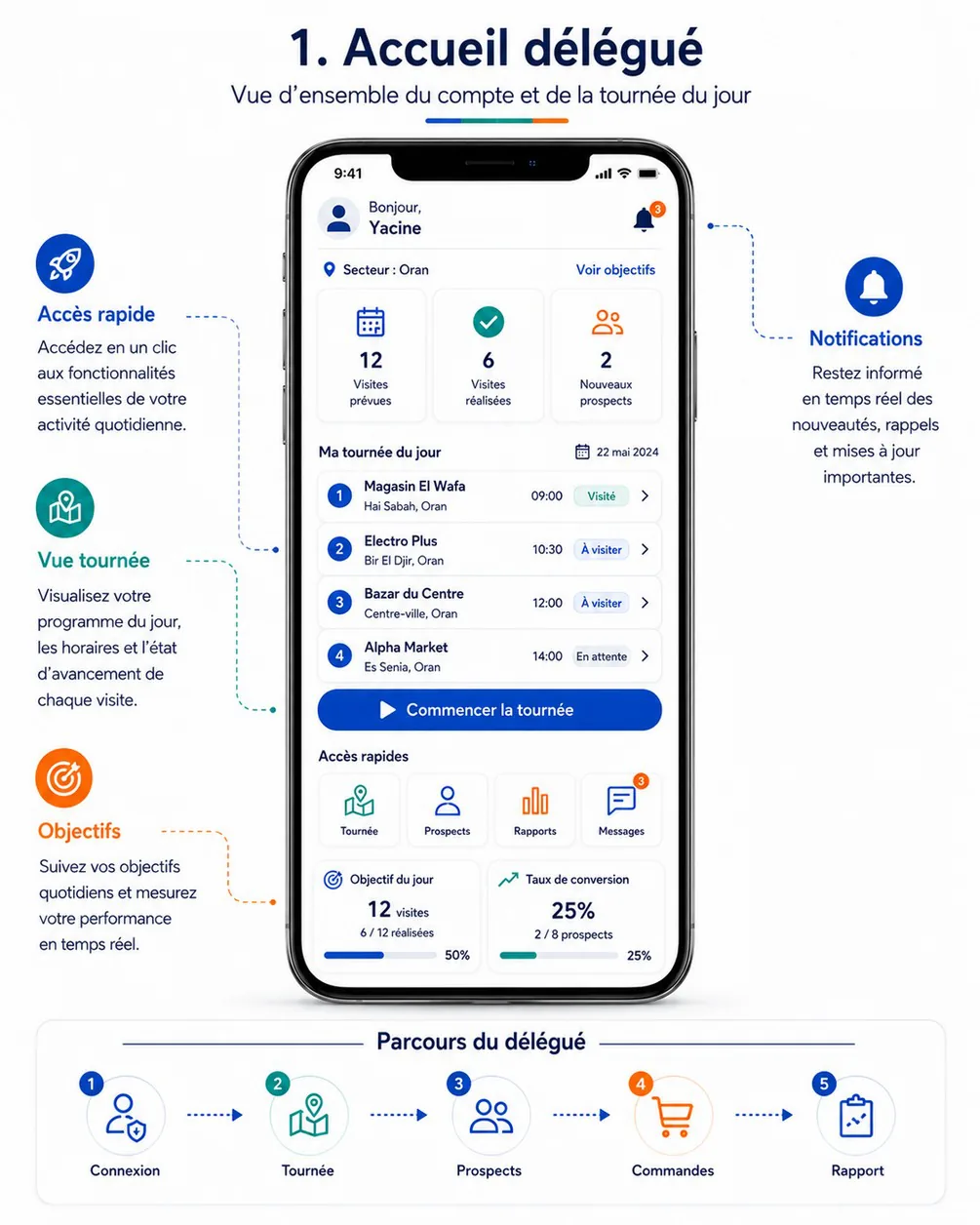
Purpose. Give in one glance the state of the day: where the delegate works, how many visits are planned and done, the next stops, the single action to take now (start, continue, resume or close the tour), the objective of the day and the conversion rate (cahier §6.1, FLD-05, FLD-02).
Entry points & exits. Entry: Accueil tab, DA-01 and DA-02 after routing, back from any tab root. Exits: DA-06 (tour card, « Voir tout », primary button), DA-10 (tap on a stop), DA-20 (« Clôturer la tournée »), DA-22 (« Voir objectifs », objective card), DA-21 (conversion card), DA-23 (bell, Messages tile), DA-14, DA-19, DA-18 (quick access), DA-27 (sync indicator), DA-04 (consent banner).
Layout (top to bottom).
- App bar — avatar, « Bonjour, » and the first name on two lines; global sync indicator; location-sharing chip when sampling; bell with the unread badge.
- Banners (stacked, most severe first, each dismissible except the first two): previous tour not closed (« Votre tournée du 21 mai n'est pas clôturée » · « Clôturer »); location consent missing or permission off; offline; data older than 48 h waiting for sync.
- Sector line — pin icon « Secteur : Oran » · link « Voir objectifs » at the end.
- KPI cards ×3 (one row, tappable): Visites prévues · Visites réalisées · Nouveaux prospects. When
visitsLate > 0the first card shows a second line « dont 2 en retard » in the warning tone. - Tour card « Ma tournée du jour » — date at the end (« Mer. 4 nov. »), tour number in small type, status pill, offline readiness line « Disponible hors ligne · 07:42 »; then up to 4 stop rows (sequence circle, store name, commune, planned time,
VisitStatuspill or « En retard », chevron); « Voir tout (12) ». - Primary button (full width, 56 dp), driven by
primaryAction: « Commencer la tournée » (START), « Continuer la tournée » (CONTINUE), « Reprendre la tournée » (RESUME), « Clôturer la tournée » (CLOSE); hidden forNONE. In the thumb zone: it sticks to the bottom of the viewport while the tour card is visible. - Accès rapides — four tiles with badges: Nouveau revendeur · Relances (due today + overdue) · Commandes (assisted orders awaiting confirmation) · Messages (unread). The reference's Tournée / Prospects / Rapports tiles duplicate the bottom bar and are replaced (see reference decisions).
- Objective card « Objectif du jour » — « 12 visites », « 6 / 12 réalisées », progress bar and percentage.
- Conversion card « Taux de conversion » — « 25 % », « 2 / 8 prospects », progress bar, info icon with the definition, « Mois en cours ».
Data.
| Field | API source | Offline source | Freshness |
|---|---|---|---|
| First name, avatar | delegate.home → delegate.firstName, delegate.avatarUrl | profile (avatar cached by file id) | On open |
| Sector | delegate.home → sector.name | home_snapshot, else the primary zone in profile | On open |
| Visites prévues / réalisées / late | delegate.home → counters.visitsPlanned, counters.visitsDone, counters.visitsLate | Recomputed from visits of today's tour (not CANCELLED / DONE / isLate) | Live-local: the local count is shown whenever the outbox holds visit items; otherwise the server value |
| Nouveaux prospects | delegate.home → counters.newProspects | Server value + records created on this phone today and not yet acknowledged (resellers, created locally) | Live-local |
| Tour card | delegate.home → tour.number, tour.status, tour.previewStops[] (sequence, plannedAt, status, isLate, priority, reseller.storeName, reseller.communeName) | tours, visits (first 4 not-ended stops by sequence, then the ended ones) | Day snapshot + live-local |
| Readiness line | — | sync_state.snapshot_at for today | Day snapshot |
| Primary action | delegate.home → tour.primaryAction, tour.nextVisitId | Derived locally from tours.status and the visits (see rules) | Live-local |
| Objective of the day | delegate.home → objective.target, objective.achieved, objective.percent | objectives (target); achieved = local DONE count when higher | On open + live-local |
| Conversion | delegate.home → conversion.converted, conversion.prospects, conversion.rate | home_snapshot | On open; never recomputed offline |
| Quick-access badges | delegate.home → followUps.dueToday + followUps.overdue, unread.messages + unread.notifications; assisted orders awaiting confirmation from delegate.orders.list | tasks (local count), orders, notifications, announcements | On open + live-local for tasks |
| Previous tour not closed | delegate.tours.today → tour with date before businessDate | tours | Day snapshot |
Actions.
- Commencer la tournée →
delegate.tours.start, queued (works offline).- Client checks: consent given (else DA-04); tour
TO_STARTand dated today inAfrica/Algiers; no other tour open (else the banner, button disabled); clock offset under 5 min (else DA-28 warning, start still allowed). - Position: if the permission is granted, the best fix within 20 s (high accuracy); otherwise none.
- One transaction:
tours.status = IN_PROGRESS,started_at, start position; outbox item with body{ occurredAt, location, isMockLocation }(location: nullwhen no fix — the server recordsstartPositionMissing).Idempotency-Key= outbox item id;occurredAt= the tap. - The location sampler (foreground service) starts when the permission is granted; the Android notification appears.
- Feedback:
mediumImpact, snackbar « Tournée démarrée à 08:02 », switch to the Tournée tab with the next stop highlighted. - When the item is rejected later (tour cancelled or reassigned meanwhile) the local tour reverts to the server state, sampling stops, and DA-27 shows the item and its blocked dependants.
- Client checks: consent given (else DA-04); tour
- Continuer la tournée → DA-06 scrolled to
nextVisitId. - Reprendre la tournée →
delegate.tours.resume(queued, body{ occurredAt }); sampling restarts; snackbar « Tournée reprise ». - Clôturer la tournée → DA-20.
- Pull to refresh → push the outbox,
sync.delta,delegate.home(withIf-None-Match). - Tap on a stop → DA-10; tap on a KPI card → DA-06 with the matching tab or filter.
Rules.
- The start button exists only for a tour
TO_START(cahier §6.1 « disponible uniquement pour une tournée planifiée », read as planned for today); it records date, time and position « selon les permissions GPS » (cahier §6.1 acceptance criterion). - Local derivation of the primary action, used offline and while the outbox is not empty:
TO_START→START;SUSPENDED→RESUME;IN_PROGRESSwith every visitDONE,NOT_DONEorCANCELLED→CLOSE;IN_PROGRESSotherwise →CONTINUE;COMPLETED,CANCELLED,PLANNEDor no tour →NONE. - Counters move right after each local action (cahier §6.1 « Les compteurs se mettent à jour après chaque visite »).
- Conversion uses the single definition of the delegate-day API: prospects visited or created this month that reached
FIRST_ORDER, over those prospects. The info icon says so: « Prospects visités ou créés ce mois-ci qui ont passé leur première commande. » - Late: a stop still
PLANNEDwhose time slot has ended, tourTO_STARTorIN_PROGRESS.
States.
| State | UI |
|---|---|
| Loading (first launch only) | Skeletons of the KPI row and the tour card; never a full-screen spinner |
| No tour today | Tour card replaced by an empty state « Aucune tournée prévue aujourd'hui » with « Voir mes tournées » (DA-07) and « Mes relances » (DA-19) |
Tour COMPLETED | Tour card shows « Tournée terminée à 18:42 » and « Voir le bilan » (DA-20 read-only) |
Tour CANCELLED | Card with the cancellation reason from the tour.updated notification |
| Offline | Offline banner; figures from local data; the conversion card shows « Mis à jour à 07:42 » |
| Consent missing / permission off | Banner and « Commencer » opens DA-04 / starts without position after confirmation « Démarrer sans localisation ? Vos arrivées ne pourront pas être validées. » |
| Start rejected later | Error badge on the tour card; message from the item: TOUR_TRANSITION_NOT_ALLOWED « Cette tournée ne peut plus être démarrée. », NOT_ASSIGNED_DELEGATE « Cette tournée est affectée à un autre délégué. », TOUR_ALREADY_IN_PROGRESS « Clôturez d'abord votre tournée du 21 mai. » |
| Server error on refresh | Cached data kept; snackbar « Actualisation impossible. Réessayez. » |
Copy. « Bonjour, » · « Secteur : » · « Voir objectifs » · « Visites prévues » · « Visites réalisées » · « Nouveaux prospects » · « Ma tournée du jour » · « Voir tout » · « Commencer la tournée » · « Continuer la tournée » · « Reprendre la tournée » · « Clôturer la tournée » · « Accès rapides » · « Objectif du jour » · « Taux de conversion » · « Disponible hors ligne » · « Tournée démarrée à 08:02 ».
Acceptance criteria.
- With a tour
TO_START, « Commencer la tournée » records the start time and, when permitted, the position; the back-office live map (BO-06) shows the delegate on tour once synced (cahier §6.1). - In airplane mode, starting the tour and ending a visit update Visites réalisées and the objective card immediately; after reconnection the server values match.
- With yesterday's tour still
IN_PROGRESS, the start button of today's tour is disabled and the banner leads to its closing. - A tour
PLANNEDfor tomorrow never shows a start button. - The home is interactive within 1 s from local data on a warm start, online or offline.
DA-06 — Tour programme
| Field | Value |
|---|---|
| French title | « Programme de tournée » |
| Release | V1 |
| Design day | Day 12 — DES-12 |
| Build task | MDA-02 — tour programme & calendar |
| Requirements | FLD-06 · FLD-04 · FLD-17 |
| Reference screen | delegate-03-tour-program — shown below |
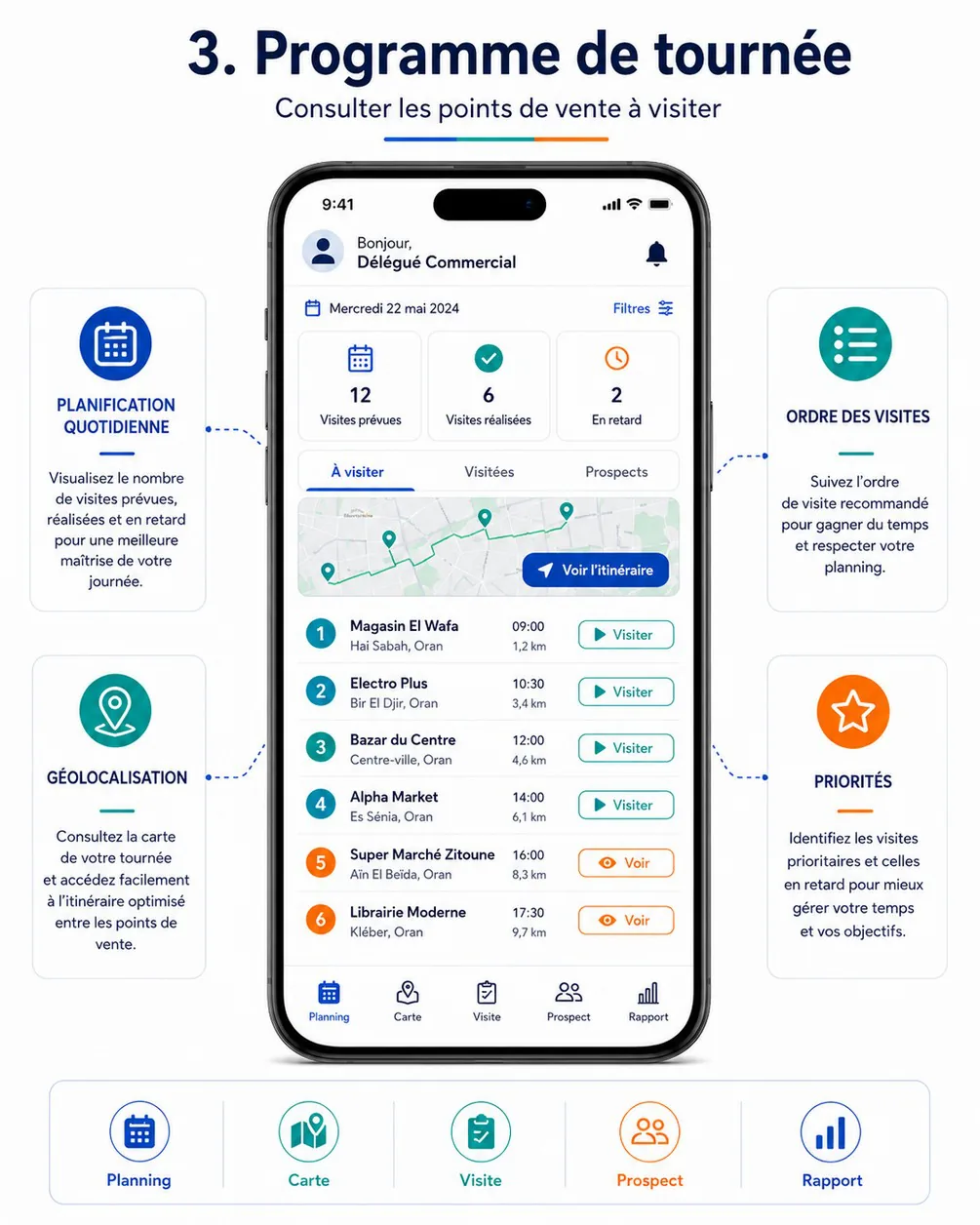
Purpose. Show the stops of a tour in their order, with times, distances, priorities and delays, on a list and a map that always agree; and let the delegate run the tour: start, suspend, resume, reorder when allowed, add an unplanned visit, open a visit (cahier §6.2, FLD-06, FLD-04, FLD-17).
Entry points & exits. Entry: Tournée tab (today's tour), Home tour card and primary button, DA-07 (any tour, read-only when not today's), notifications tour.updated (/tours/:tourId). Exits: DA-10 (row or « Visiter »), DA-08 (« Voir l'itinéraire », map toggle, row map icon), DA-07 (calendar icon), DA-11 (row menu « Visite non réalisée »), DA-14 (add visit → new point of sale), DA-20 (« Clôturer »).
Layout (top to bottom).
- App bar — title « Ma tournée », sub-title with the date (« Mercredi 4 novembre ») and the number
TRN-2026-000045; calendar icon (→ DA-07); overflow menu: Suspendre, Réorganiser (RECOMMENDEDonly), Ajouter une visite, Clôturer la tournée; sync indicator; location chip. - Status strip —
TourStatuspill, ordering mode (« Ordre recommandé » / « Ordre imposé » with a lock icon), readiness « Disponible hors ligne · 07:42 »; planner instructions in an info banner when present (« Commencer par les grossistes de Hai Sabah »). - KPI cards ×3 — Visites prévues · Visites réalisées · En retard; tapping one filters the list.
- Tabs — À visiter (6) · Réalisées (5) · Non réalisées (1), plus the « Filtres » button with the active-filter count.
- Mini-map (160 dp) — numbered markers in sequence colours, straight segments joining the stops in order, the delegate's position; button « Voir l'itinéraire » (→ DA-08); a list/map toggle in the tab row switches to the full map in place.
- Ordered list — one row per visit (64 dp minimum): sequence circle (orange for
HIGHpriority, green check forDONE, red cross forNOT_DONE), store name, commune, time slot (« 10:30 – 11:00 »), distance, pills (« Prioritaire », « En retard », « Non planifiée »,VisitStatuswhen notPLANNED), sync badge, and the row action button « Visiter » or « Voir ». Row menu (long press or ⋮): Itinéraire, Appeler, Visite non réalisée, Fiche point de vente. - Sticky action bar — state-driven: « Commencer la tournée » (
TO_START) · « Prochaine visite : Electro Plus · 1,2 km » (IN_PROGRESS, opens DA-08 on that stop) · « Reprendre la tournée » (SUSPENDED) · « Clôturer la tournée » (every visit resolved). - Reorder mode (overlay state) — drag handles on
PLANNEDrows only; ended rows locked at the top; bar « Annuler » / « Enregistrer l'ordre ».
Filters sheet — Prioritaires, En retard, Prospects (status before FIRST_ORDER), Revendeurs, visit type, commune. Filters apply to the list and the map; sequence numbers never change when filtering.
Data.
| Field | API source | Offline source | Freshness |
|---|---|---|---|
| Tour header | delegate.tours.today (or delegate.tours.get for another day) → tour.number, tour.date, tour.status, tour.orderingMode, tour.instructions, tour.allowedActions, tour.version | tours | Day snapshot + delta |
| Counters | tour.counters.planned, .done, .notDone, .remaining, .late | Recomputed from visits | Live-local |
| Stops | tour.visits[] → id, number, sequence, plannedAt, slotEndAt, priority, status, isLate, isUnplanned, visitTypeId, reseller.storeName, reseller.communeName, reseller.location, distanceFromPreviousMeters | visits joined with resellers, ordered by sequence | Live-local + delta |
| Distance on the row | Straight line from the current fix to reseller.location when a fix of 30 s or less exists; otherwise distanceFromPreviousMeters with the label « depuis l'étape précédente » | Computed on the phone | Every 30 s or 50 m while the screen is visible |
| Visit types | visitTypes[] (name, requirements) | visit_types | Day snapshot |
| Suspend reasons | reference.lists → TOUR_SUSPEND_REASON | reference_items | Reference |
| Field settings | fieldSettings (allowOutOfToleranceCheckIn, closingRequiresSync, location…) | app_config | Day snapshot |
| Sync badges | — | outbox, upload_queue per visit | Live-local |
Actions.
- Commencer la tournée — as on DA-05.
- Suspendre → sheet with the
TOUR_SUSPEND_REASONitems (Pause, Problème de véhicule, Météo, Réunion, Urgence, Autre) and a comment (required for Autre, ≤ 300 characters) →delegate.tours.suspendqueued, body{ reasonCode, comment, occurredAt, location }. Refused locally while a visit isCHECKED_INorIN_PROGRESS(« Terminez d'abord la visite en cours », server409 VISIT_IN_PROGRESS). Sampling stops at once; the chip changes to « Position non partagée ». - Reprendre →
delegate.tours.resumequeued; sampling restarts. - Réorganiser (
RECOMMENDEDonly) → drag, then « Enregistrer l'ordre » →delegate.tours.reorderqueued, body{ visitIds, baseVersion, occurredAt }with exactly thePLANNEDvisits in their new order. Compacted: a second reorder replaces a still-queued one (new key). A409 VERSION_CONFLICT(the planner changed the stops) is a conflict: the server order is applied and the snackbar says « L'ordre a été modifié par votre responsable. » - Ajouter une visite (tour
TO_STARTorIN_PROGRESS) → sheet: search a point of sale in scope (localresellers) or « Nouveau point de vente » (DA-14 then back); visit type (defaultdefaultVisitTypeId); position « À la fin » or « Après la visite en cours » (RECOMMENDEDonly); optional purpose note →delegate.tours.addVisitqueued with a client UUIDv7id. The row appears at once with « Non planifiée » and the pending badge. Refused locally when the store already has an open visit in the tour (server409 VISIT_ALREADY_PLANNED). - Visiter / Voir → DA-10 (see rules for which one is shown).
- Clôturer la tournée → DA-20.
Rules.
- Same visits, same order in the list and on the map: both read the same
visitsquery ordered bysequence, with the same filters (FLD-06; cahier §6.2 acceptance criterion). - Recommended vs imposed order (cahier §4.5, §6.2): in
RECOMMENDEDmode everyPLANNEDrow shows « Visiter » and the delegate may reorder; the recommended order comes from the planner (nearest-neighbour suggestion, FLD-17). InIMPOSEDmode there are no drag handles, « Réorganiser » is hidden, and only the first stop stillPLANNEDin sequence shows « Visiter »; the others show « Voir » with « Ordre imposé : visitez d'abord l'étape 3 ou indiquez pourquoi elle n'est pas réalisée. » Skipping a stop therefore means marking it not done (DA-11); a stop marked not done can still be checked in later the same tour if the shop reopens. - A visit added or moved is synchronised like any other action (cahier §6.2 « Une visite ajoutée ou déplacée doit être synchronisée »).
- Back-office changes arrive through
sync.deltaand thetour.updatedpush: added stops appear with the snackbar « Votre tournée a été modifiée : 2 visites ajoutées. »; a removed stop disappears unless it already has local actions, in which case it stays with an error badge and the conflict is explained in DA-27. - Tours of other days open read-only: no start, no reorder, rows open DA-10 in preview.
States.
| State | UI |
|---|---|
| No tour | Empty state « Aucune tournée aujourd'hui » with « Voir mes tournées » |
Tour TO_START | Rows show « Voir »; sticky « Commencer la tournée » |
SUSPENDED | Warning strip « Tournée suspendue depuis 12:30 — Pause »; rows read-only; sticky « Reprendre la tournée » |
| Empty tab or filter | « Aucune visite ne correspond aux filtres » with « Effacer les filtres » |
| Offline | Banner; everything works; the mini-map shows markers on a grey background if tiles are not cached |
| Location off | Row distances fall back to « depuis l'étape précédente » |
| Conflict | Error badge on the affected rows, snackbar with « Voir » (→ DA-27) |
| Tour cancelled while open | Full-width banner « Tournée annulée par votre responsable : motif »; actions disabled; sampling stopped |
Copy. « Ma tournée » · « Ordre recommandé » · « Ordre imposé » · « À visiter » · « Réalisées » · « Non réalisées » · « Filtres » · « Voir l'itinéraire » · « Visiter » · « Voir » · « Prioritaire » · « En retard » · « Non planifiée » · « Suspendre la tournée » · « Motif de la pause » · « Réorganiser » · « Enregistrer l'ordre » · « Ajouter une visite » · « Prochaine visite ».
Acceptance criteria.
- The list and the map show the same visits with the same numbers in the same order, with and without filters (cahier §6.2).
- In
IMPOSEDmode the delegate cannot reorder and can open only the first remaining stop; marking it not done unlocks the next one. - A reorder and an unplanned visit made offline appear in the back-office tour detail (BO-23) after reconnection, in the new order, with their original times.
- Suspending stops location sampling within one interval; resuming restarts it.
- A stop added by the planner during the day appears in the list within one delta cycle when online, with a notification.
DA-07 — Tours calendar & history
| Field | Value |
|---|---|
| French title | « Mes tournées » |
| Release | V1 |
| Design day | Day 12 — DES-12 |
| Build task | MDA-02 — tour programme & calendar |
| Requirements | FLD-03 · FLD-19 |
| Reference screen | None — layout derived from DA-06 and the reports of DA-21 |
Purpose. Let the delegate see the coming tours to prepare them and the past ones with their results (cahier §4.5 « Planification quotidienne, hebdomadaire ou mensuelle », FLD-03, FLD-19).
Entry points & exits. Entry: calendar icon of DA-06, DA-05 empty state, notification tour.assigned, DA-21. Exits: DA-06 for the chosen tour (read-only unless today's), the closing report of a completed tour (DA-20 read-only).
Layout.
- App bar « Mes tournées ».
- Segmented control « À venir » · « Historique ».
- Week strip (month view on tap of the month name) with one dot per tour coloured by
TourStatus; today outlined. - Tour list: date (« Jeu. 5 nov. »), number, status pill, « 8 / 10 visites », first stop, « Non clôturée » warning when
isNotClosed.
Data.
| Field | API source | Offline source | Freshness |
|---|---|---|---|
| Tours in range | delegate.tours.list (from, to) → items[]: number, date, status, orderingMode, counters, firstStop, isNotClosed | tours (30 days back, 14 days ahead) | On open + delta |
| Tour detail | delegate.tours.get | tours, visits | On open |
| Closing report | closingReport of the tour | tours | On open |
Actions. Tap a day → scroll the list; tap a tour → DA-06 for that tour; past completed tour → its report. No mutation on this screen.
Rules. Future tours (PLANNED) are visible read-only so the delegate can prepare the route; they cannot be started before their day. Only the caller's tours are listed (ACL-03).
States. Loading (skeleton rows) · empty « Aucune tournée planifiée pour cette période » · offline (cached range only; outside it « Connectez-vous pour voir cette période ») · error (retry).
Copy. « Mes tournées » · « À venir » · « Historique » · « Non clôturée » · « Aucune tournée planifiée pour cette période ».
Acceptance criteria.
- A tour planned in the back-office for next week appears in À venir after a delta and a
tour.assignednotification. - Past tours show their status and visit counts, and completed tours open their closing report, also offline for the last 30 days.
- A previous tour left open is marked « Non clôturée » and opens its closing.
DA-08 — Map & navigation
| Field | Value |
|---|---|
| French title | « Carte et navigation » |
| Release | V1 |
| Design day | Day 12 — DES-12 |
| Build task | MDA-03 — map, navigation & arrival check-in |
| Requirements | FLD-07 · GEO-03 |
| Reference screen | delegate-04-map-navigation — shown below |
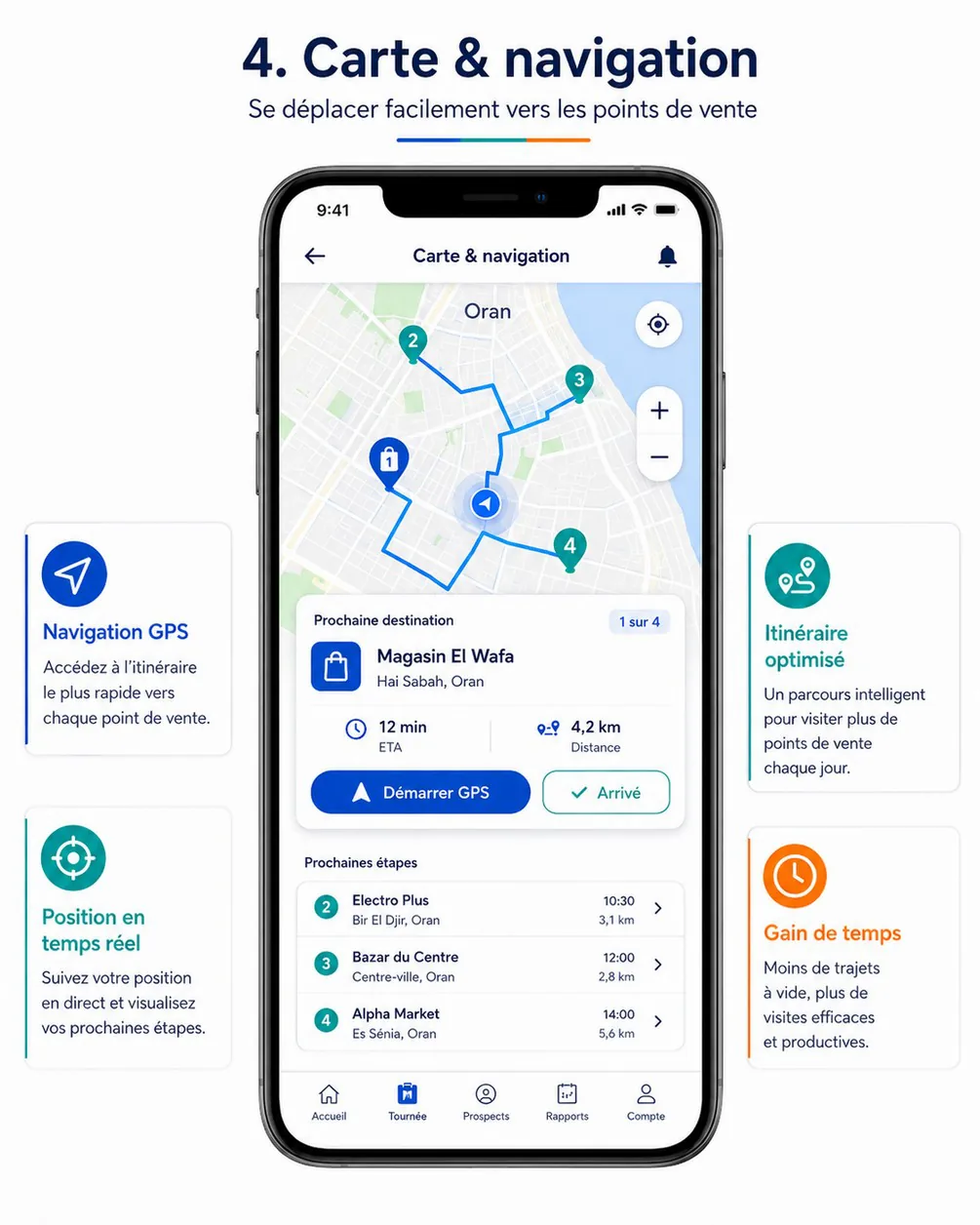
Purpose. Guide the delegate to the next point of sale, show the following steps, hand over to a navigation app, and record the arrival when the delegate is within the GPS tolerance (cahier §6.3, FLD-07, GEO-03).
Entry points & exits. Entry: « Voir l'itinéraire », the map toggle and the sticky « Prochaine visite » of DA-06; Itinéraire on DA-10 and DA-09. Exits: DA-10 after a successful « Arrivé » or a tap on the destination card; the external navigation app; back to DA-06.
Layout (top to bottom).
- App bar — back, « Carte & navigation », bell.
- Map (full width, about 55 % of the height) — numbered markers (≥ 32 dp) in
VisitStatuscolours,HIGHpriority outlined orange, ended stops faded; straight dashed segments joining the stops in order; the delegate's position (blue dot with accuracy circle); the tolerance circle (field.gpsToleranceMeters) around the destination. Floating buttons on the end side: recentre, zoom +, zoom − (one-hand use; pinch also works). - Destination card (bottom sheet, half-expanded) — « Prochaine destination » and « 1 sur 4 »; store icon or façade thumbnail, store name, address and commune; ETA (« 12 min ») and distance (« 4,2 km ») with their labels; two buttons side by side: « Démarrer GPS » (primary) and « Arrivé » (secondary; becomes primary inside the tolerance radius).
- Prochaines étapes — the next three stops (sequence, name, commune, time, distance, chevron); dragging the sheet up shows all stops.
Data.
| Field | API source | Offline source | Freshness |
|---|---|---|---|
| Stops and order | delegate.tours.today → tour.visits[] (sequence, status, priority, reseller.location, reseller.storeName, reseller.addressLine, reseller.communeName, plannedAt) | visits, resellers | Live-local (same query as DA-06) |
| Next destination | tour.visits[] first PLANNED by sequence (or the stop chosen from DA-06) | Same | Live-local |
| Current position | Android location (one-shot stream while visible, high accuracy) | — | Every 5 s or 10 m while the screen is visible; never stored unless the tour sampler records it |
| ETA and road distance | Maps provider routes API for the next leg only (INT-01) | Offline estimate: straight line × 1.3 at 25 km/h, labelled « ≈ » | On open, then every 2 min or 200 m moved while visible |
| Tolerance radius | fieldSettings.gpsToleranceMeters, fieldSettings.gpsMaxAccuracyMeters | app_config | Day snapshot |
Actions.
- Démarrer GPS → external navigation:
google.navigation:q=<lat>,<lng>&mode=dwhen Google Maps is installed, otherwise ageo:<lat>,<lng>?q=<lat>,<lng>(<store name>)chooser (Waze, others). Nothing is recorded. On return to the app, if the fix is inside the tolerance radius, a sheet asks « Vous êtes arrivé chez Magasin El Wafa ? » with « Je suis arrivé ». - Arrivé → the check-in flow of DA-10 (same component, same tolerance algorithm), then DA-10 opens on the visit
CHECKED_IN. Queued; works offline. - Tap a marker → it becomes the destination (
RECOMMENDEDmode; inIMPOSEDmode only the firstPLANNEDstop can be selected and other markers show their details read-only). - Recentre / zoom buttons.
Rules.
- The position is used only per the client's validated rules (cahier §6.3): shown on the map, never stored by this screen; storage happens only through the tour sampler and the check-in.
- Arrival may be subject to a maximum distance (cahier §6.3): « Arrivé » runs the tolerance check; acceptance criterion « Le bouton Arrivé enregistre la position et ouvre la visite lorsque la tolérance GPS est respectée ».
- The map and the list are two views of one query (FLD-06).
- Entering the radius triggers one
lightImpacthaptic per stop and promotes « Arrivé » to the primary button; the arrival is never recorded automatically. - Routes API cost control: only the next leg, only while the screen is visible, never in the background.
States.
| State | UI |
|---|---|
| Offline | Markers and segments drawn on cached tiles or a neutral grid; ETA « ≈ 15 min »; « Démarrer GPS » still works (the navigation app may have offline maps) |
| GPS off / permission denied | No blue dot; card line « Localisation désactivée » with « Activer » (system dialog or settings); « Arrivé » disabled |
| Weak accuracy | Accuracy circle drawn; « Précision ± 140 m » under the distance |
| All stops ended | Card « Toutes les visites sont terminées » with « Clôturer la tournée » |
| Store without coordinates | Marker missing; card « Position du magasin inconnue »; « Démarrer GPS » uses the address text; check-in proposes this position to the back-office |
Tour not IN_PROGRESS | « Arrivé » replaced by « Commencer la tournée » (TO_START) or « Reprendre » (SUSPENDED) |
Copy. « Carte & navigation » · « Prochaine destination » · « 1 sur 4 » · « ETA » · « Distance » · « Démarrer GPS » · « Arrivé » · « Prochaines étapes » · « Vous êtes arrivé chez … ? » · « Je suis arrivé » · « Localisation désactivée ».
Acceptance criteria.
- Within 150 m of the store with an accuracy of 100 m or better, « Arrivé » records the check-in with position and time and opens the visit (cahier §6.3).
- The map shows the same stops with the same numbers as the list of DA-06.
- « Démarrer GPS » opens turn-by-turn navigation to the destination in Google Maps (or the chooser) without recording anything.
- Offline, the screen still shows the stops, the next destination and an estimated ETA, and « Arrivé » works.
- No position is sent to the server by this screen outside the tour sampler and the check-in.
DA-20 — Tour closing & results
| Field | Value |
|---|---|
| French title | « Clôture de tournée » |
| Release | V1 |
| Design day | Day 14 — DES-14 |
| Build task | MDA-10 — tour closing, reports & performance |
| Requirements | FLD-12 · SYN-06 |
| Reference screen | delegate-10-tour-closing — shown below |
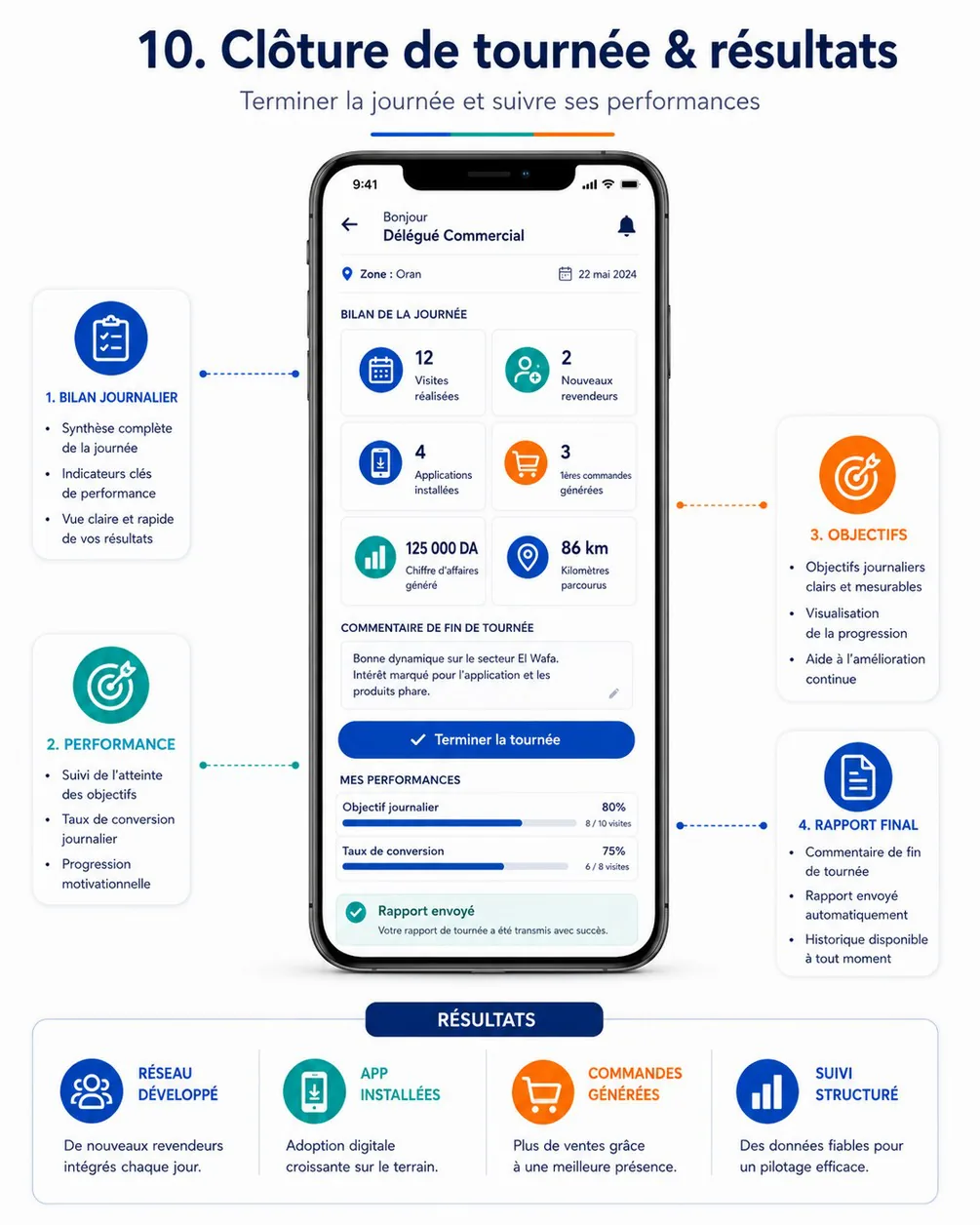
Purpose. End the day: show the summary (visits, new resellers, installs, first orders, revenue, kilometres), make the delegate settle every blocking point (unvisited stops without a reason, data not yet synchronised), collect the end-of-day comment, close the tour definitively and confirm that the final report reached HOCO (cahier §4.5, §6.9, FLD-12, SYN-06).
Entry points & exits. Entry: « Clôturer la tournée » on DA-05 and DA-06; the Home banner of a previous tour not closed; the tour.reopened notification (/tours/:tourId/closing); a completed tour in DA-07 (read-only). Exits: DA-11 (a reason per unvisited stop), DA-10 (a visit not ended), DA-27 (sync problems), DA-05 or DA-21 after closing.
Layout (top to bottom).
- App bar — back, « Clôture de tournée », bell. Line with « Zone : Oran » and the date.
- Bilan de la journée — six KPI tiles in a 2 × 3 grid: Visites réalisées (« 12 » and « sur 14 prévues »), Nouveaux revendeurs, Applications installées, 1ères commandes générées, Chiffre d'affaires généré (« 125 000 DA »), Kilomètres parcourus (« 86 km »). Offline estimates are prefixed « ≈ ».
- Points à régler avant la clôture (only when blocking items exist; danger-tone card): one row per item —
- « 3 visites sans motif » with the stores listed and « Indiquer un motif » (one sheet for all, or one per visit);
- « 1 visite en cours chez Electro Plus » with « Terminer la visite »;
- « 4 éléments non synchronisés (2 photos) » with « Synchroniser maintenant » and progress;
- « 1 erreur de synchronisation » with « Voir » (→ DA-27).
- Visites non réalisées — read-only list of stops already marked not done with their reason.
- Commentaire de fin de tournée — multiline field (≤ 1000 characters, counter), placeholder « Ce qui a marché, les difficultés, les besoins des clients… »; autosaved to
drafts. - Mes performances — Objectif journalier (progress bar, « 80 % · 8 / 10 visites ») and Taux de conversion (« 25 % · 2 / 8 prospects »).
- Sticky action bar — « Terminer la tournée » (primary, disabled while a blocking item remains, with the reason under it). The reference places it above the performances; it moves to the bottom for one-hand use.
- After closing — success card « Rapport envoyé — Votre rapport de tournée a été transmis avec succès. » with « Voir le rapport » and « Retour à l'accueil ».
Data.
| Field | API source | Offline source | Freshness |
|---|---|---|---|
| Summary tiles | delegate.tours.closingPreview → summary.visitsDone, summary.visitsPlanned, summary.newResellers, summary.appsInstalled, summary.firstOrders, summary.revenueTtc, summary.kmTraveled | Visits from visits; new resellers = server value + local creations of the day; installs, first orders, revenue = last server values in home_snapshot; km ≈ sum of distances between consecutive local location_pings with accuracy ≤ 100 m | Online: fetched on open and after each resolved item; offline: local estimate marked « ≈ » |
| Blocking items | canClose, blockingItems[] (code: UNVISITED_STOPS_WITHOUT_REASON, VISIT_NOT_ENDED, UNSYNCED_DATA; message, visits[], pending) | Computed locally: visits PLANNED / CHECKED_IN (no outcome), visits IN_PROGRESS, outbox + upload_queue + location_pings counts for this tour, items in error | Live-local; the server preview confirms when online |
| Warnings | warnings[] (e.g. objective not reached, report missing on an optional visit) | — | On open |
| Not-done stops | tour.visits[] with status = NOT_DONE and their reason | visits + reference_items | Live-local |
| Objective and conversion | summary.objectiveAttainment[], summary.conversion (converted, prospects, rate) | objectives, home_snapshot | On open |
| Comment draft | — | drafts (kind TOUR_CLOSING) | Local |
| Closing setting | fieldSettings.closingRequiresSync | app_config | Day snapshot |
| Final report | delegate.tours.close → closingReport (version, closedAt, summary, comment, notDoneVisits[]) | tours.closing_report | Once |
Actions.
- Indiquer un motif → DA-11 sheet for the listed visits; the « Même motif pour toutes » option writes one
delegate.visits.notDoneitem per visit, each with its ownIdempotency-Keyand the sameoccurredAt. - Terminer la visite → DA-10 of the visit in progress.
- Synchroniser maintenant → flushes uploads then
sync.batchandsync.locationPings; per-item progress; disabled offline with « Connexion requise ». - Terminer la tournée →
- Confirmation dialog « Terminer la tournée ? La clôture est définitive : seule l'administration peut la rouvrir. » · « Terminer » / « Annuler ».
- With
field.closingRequiresSync = true(default): requires the network and an empty outbox, upload queue and ping queue for this tour; the call is direct (not queued). Withfalse: when offline, the close is queued as the last outbox item and the screen shows « Clôture enregistrée — envoi dès que possible ». delegate.tours.closewith body{ comment, occurredAt, location, deviceQueue: { pendingMutations, pendingUploads, pendingPings } }.Idempotency-Keygenerated at the tap and reused on every retry, so a double tap or a timeout never closes twice;occurredAt= the tap;location= a one-shot fix when permitted.- Sampling stops when the delegate confirms (even before the answer); if the call fails with a blocking error, the tour is still
IN_PROGRESSand sampling restarts. - On
200:tours.status = COMPLETED, closing report stored, comment draft deleted,mediumImpacthaptic and the success card.
Rules.
- Unvisited stops need a reason (cahier §4.5, §6.9 « Les visites non réalisées doivent avoir un motif »): every visit must end
DONE,NOT_DONEwith a reason, orCANCELLED. - Offline data must be synchronised (cahier §6.9 « Les données hors ligne doivent être synchronisées »): enforced by
field.closingRequiresSync; the server double-checks throughdeviceQueueand answers409 TOUR_CLOSING_BLOCKEDwithUNSYNCED_DATAwhen it is not empty. - Closing requires a final report (cahier §4.5): the server generates it from the summary and the comment; the comment is optional in V1 (assumption — HOCO may make it mandatory).
- Definitive unless reopened (cahier §6.9): after closing, every visit and the comment are read-only. A reopening by the back-office (within
field.reopenMaxDays) brings the tour backIN_PROGRESSwith a banner « Tournée rouverte par Karim B. : motif »; finished visits stay locked unless unlocked one by one; a new closing produces report version 2. Sampling does not restart for a past day. - The summary uses the counting rules of the delegate-day API (same numbers as the back-office); revenue counts only orders confirmed by the back-office (
VALIDATED), so it can be lower than the amounts prepared during the day. - Only
IN_PROGRESSandSUSPENDEDtours can be closed (409 TOUR_TRANSITION_NOT_ALLOWEDotherwise); aTO_STARTtour that was never started is cancelled by the back-office, not closed.
States.
| State | UI |
|---|---|
| Loading | Local summary at once; server preview replaces it when it arrives |
| Blocking items | Card « Points à régler avant la clôture »; button disabled with « Réglez les points ci-dessus pour terminer » |
| Offline, sync required | Local summary with « ≈ »; button disabled with « Connexion requise pour clôturer : vos données doivent d'abord être synchronisées. » |
| Syncing | Progress « Envoi de 4 éléments… »; button disabled until done |
| Server refusal | 409 TOUR_CLOSING_BLOCKED: the items returned by the server replace the local list; 409 TOUR_TRANSITION_NOT_ALLOWED: « Cette tournée est déjà clôturée » and the report is fetched; 403 NOT_ASSIGNED_DELEGATE: « Cette tournée est affectée à un autre délégué. » |
| Old pending items | An item older than 72 h rejected with OCCURRED_AT_OUT_OF_RANGE stays blocking: « Contactez votre responsable » (the back-office resolves it before reopening or closing on the delegate's behalf) |
| Success | « Rapport envoyé » card; the tile values are the server's final ones |
| Read-only (completed) | Summary, comment and not-done list; no action; « Clôturée le 4 nov. à 18:42 » |
| Reopened | Banner with who and why; editing allowed as described in the rules |
Copy. « Clôture de tournée » · « Bilan de la journée » · « Visites réalisées » · « Nouveaux revendeurs » · « Applications installées » · « 1ères commandes générées » · « Chiffre d'affaires généré » · « Kilomètres parcourus » · « Points à régler avant la clôture » · « Indiquer un motif » · « Synchroniser maintenant » · « Commentaire de fin de tournée » · « Mes performances » · « Objectif journalier » · « Taux de conversion » · « Terminer la tournée » · « La clôture est définitive. » · « Rapport envoyé » · « Votre rapport de tournée a été transmis avec succès. »
Acceptance criteria.
- With one stop still
PLANNED, « Terminer la tournée » is disabled and the blocking card lists that stop with « Indiquer un motif »; once the reason is given, the button enables. - With
field.closingRequiresSync = trueand two items in the outbox, closing is impossible until they are synchronised; then the tour closes in one tap. - After closing, the back-office tour detail (BO-23) shows the summary, the comment and the not-done reasons, and the delegate's indicators are recalculated (cahier §6.9 acceptance criterion).
- No location ping has a
capturedAtlater than the confirmation of the closing. - A double tap on « Terminer la tournée » or a retry after a timeout closes the tour once (same
Idempotency-Key). - After a back-office reopening the delegate is notified, can complete the requested points and close again; the report shows version 2.
- In airplane mode the summary appears with estimated values and the screen explains why closing is not possible yet.
DA-21 — Reports & performance
| Field | Value |
|---|---|
| French title | « Rapports » |
| Release | V1 |
| Design day | Day 14 — DES-14 |
| Build task | MDA-10 — tour closing, reports & performance |
| Requirements | FLD-19 |
| Reference screen | Partly the lower half of delegate-10-tour-closing (Mes performances); no dedicated reference |
Purpose. Let the delegate follow their own results over a day, week or month and find past visit and tour reports (cahier §6.1, §6.9 « Consulter l'atteinte des objectifs et le taux de conversion », FLD-19).
Entry points & exits. Entry: Rapports tab, conversion card of DA-05, DA-20 « Voir le rapport ». Exits: DA-22 (« Mes objectifs »), a visit report (DA-12 read-only), a tour closing report (DA-20 read-only), DA-07.
Layout.
- App bar « Rapports ».
- Period selector: Jour · Semaine · Mois · Personnalisée (date range, 92 days maximum), with previous/next arrows.
- KPI grid (2 columns): Visites réalisées (« 48 / 55 », completion rate), Inscriptions, Installations, 1ères commandes, Commandes confirmées, Chiffre d'affaires, Kilomètres, Taux de conversion.
- Daily bar chart of visits done (one bar per working day), switchable to revenue.
- Objectives summary (link « Mes objectifs »).
- Segmented list « Rapports de visite » · « Rapports de tournée »: date, store or tour number, interest level pill or summary line, next action.
Data.
| Field | API source | Offline source | Freshness |
|---|---|---|---|
| KPIs | delegate.performance (from, to) → visits.done, visits.planned, visits.completionRate, signups, installs, firstOrders, orders, revenueTtc, kmTraveled, conversion | Last response per period in home_snapshot (performance cache) | On open; offline « Mis à jour à 18:40 » |
| Daily series | daily[] (date, visitsDone, revenueTtc…) | Same cache | On open |
| Objectives | objectives[] | objectives | On open |
| Report history | delegate.reports (cursor) → VISIT_REPORT items (visit.number, reseller.storeName, interestLevel, nextAction, followUpAt, commentExcerpt) and TOUR_REPORT items (tour.number, tour.date, summary, comment, version) | First page cached; local reports of the day from visit_reports | On open + pagination |
Actions. Change the period; open a report; pull to refresh. Read-only screen.
Rules. One counting definition shared with Home, the closing and the back-office (delegate-day API): revenue and Commandes confirmées count orders confirmed by the back-office only; conversion = prospects visited or created in the period that reached their first order, over those prospects (assumption to confirm with HOCO). Only the caller's figures (ACL-03). No purchase prices or margins (ACL-04).
States. Loading (skeleton tiles) · empty period « Aucune activité sur cette période » · offline (cached periods only) · kmTraveled = null → « Kilomètres indisponibles (localisation désactivée) ».
Copy. « Rapports » · « Jour » · « Semaine » · « Mois » · « Personnalisée » · « Rapports de visite » · « Rapports de tournée » · « Commandes confirmées » · « Kilomètres ».
Acceptance criteria.
- The figures for a day equal those of that day's closing report and of the back-office delegate page (BO-17).
- A visit report saved today appears in the history, offline included (from local data), and opens read-only.
- The conversion rate shows its numerator and denominator and the same definition on every screen.
DA-22 — Objectives
| Field | Value |
|---|---|
| French title | « Mes objectifs » |
| Release | V1 |
| Design day | Day 11 — DES-11 |
| Build task | MDA-01 — home, profile, zone, objectives |
| Requirements | FLD-02 |
| Reference screen | None — the objective card of delegate-02-home is its entry point |
Purpose. Show the delegate's objectives per period and how far they are reached: visits, sign-ups, app installs, first orders, orders and revenue (cahier §4.5, FLD-02).
Entry points & exits. Entry: « Voir objectifs » and the objective card on DA-05, Mes objectifs on DA-24 and DA-21. Exit: back.
Layout.
- App bar « Mes objectifs ».
- Tabs Jour · Semaine · Mois, with the period dates and « 3 jours ouvrés sur 5 ».
- One card per objective: metric icon and label (
ObjectiveMetriclabels: Visites, Inscriptions, Installations, Premières commandes, Commandes, Chiffre d'affaires), « 8 / 10 » (or amounts in DA), progress bar, percentage (can exceed 100 %), pace hint « En avance » / « En retard » comparing the percentage with the share of working days elapsed. - Footnote on the counting rules.
Data.
| Field | API source | Offline source | Freshness |
|---|---|---|---|
| Period and progress | delegate.objectives (period) → from, to, daysElapsed, daysTotal, objectives[] (metric, target, achieved, percent, source) | objectives | On open |
| Today's visits achieved | — | Local DONE count of today (when higher than the cached value) | Live-local |
Actions. Switch period; pull to refresh. Read-only.
Rules. Objectives are set by the back-office (BO-20); when none exists for the day, the tour plan provides the visits target (source = TOUR_PLAN). Orders and revenue count back-office-confirmed orders only.
States. No objective « Aucun objectif défini pour cette période » · offline (cached, « Mis à jour à … ») · loading skeleton.
Copy. « Mes objectifs » · « Jour » · « Semaine » · « Mois » · « En avance » · « En retard » · « Aucun objectif défini pour cette période ».
Acceptance criteria.
- Ending a visit offline increases today's Visites progress immediately.
- The week view counts Sunday to Thursday working days and matches the back-office objectives page.
- A revenue objective shows amounts in DA, French format.