Client reference screens
The 16 reference screens HOCO attached to the cahier — what each one asks for, what we keep, what we change and why, and which inventory screens it maps to.
The cahier illustrates each screen page of §5 (reseller app) and §6 (delegate app) with an « Écran de référence fourni par le client ». These 16 posters are the best evidence of what HOCO expects to see, and Akram starts from them on Day 1 (design plan). They are intent, not specification:
- they mix two navigation models;
- their mock numbers do not add up;
- they show V2 features (points, levels, rewards, packs);
- they predate the product decisions of 17 October.
This page records, poster by poster, what we keep, what we change, and the inventory screens each one feeds. It ends with the decisions that go into the design system.
No reference exists for the back-office, the reseller web or the reseller onboarding: the reseller set is numbered 1, 3, 4, 5, 6, 7, and number 2 is missing. Those surfaces are designed from the design system and the requirements.
Changes from the references decided on 17 October (binding)
- Stock is never shown as a number. The product-detail poster shows « En stock — Plus que 20 pièces ». V1 shows availability only, En stock or En rupture (STK-07). There is no « Plus que N pièces », no « Stock limité » and no exact quantity anywhere outside the back-office.
- One price per customer type. « Prix revendeur conseillé » becomes « Votre prix », the price of the reseller's declared type (Super-gros, Demi-gros or Détail; PRC-02), shown next to the « Prix de vente conseillé ».
- Guest browsing without prices (AUTH-10). None of the posters show it. Every catalog screen has a guest variant with the price lock « Créez un compte pour voir les prix ».
- A fixed regional WhatsApp button in the reseller app and web (SUP-05). It is added next to the Assistance entry of the posters.
- Orders are always confirmed by HOCO (ORD-14), and every status change reaches the reseller live (ORD-15). The order poster's tracker gains a live indicator.
- After-sales claims and returns are V1 (SUP-04, ORD-13). The order poster's « Contacter le support » becomes « Signaler un problème » and « Demander un retour ».
Overview
| Reference | Title on the poster | Cahier | Maps to | Designed on |
|---|---|---|---|---|
| reseller-01-home | 1. Accueil revendeur | §5 | RA-09 (plus RA-10, RA-11, RA-26, RA-29) | Day 7 |
| reseller-02-catalog | 3. Catalogue produits | §5.1 | RA-12, RA-13 (plus RA-10, RA-16) | Day 7 |
| reseller-03-product-detail | 4. Détail produit | §5.2 | RA-14, RA-15 (plus RA-16) | Day 8 |
| reseller-04-cart-checkout | 5. Panier & commande | §5.3 | RA-17, RA-18, RA-19, RA-20 | Day 8 |
| reseller-05-orders-tracking | 6. Suivi des commandes | §5.4 | RA-21, RA-22 (plus RA-30, RA-33, RA-40) | Day 9 |
| reseller-06-promotions-loyalty | 7. Promotions & fidélité | §5.5 | RA-24, RA-25; V2: RA-37, RA-38, RA-39 | Day 10; V2 in DES-30 |
| delegate-01-login-profile | 2. Connexion & profil délégué | §6 | DA-02, DA-03, DA-24, DA-25, DA-22, DA-26 | Days 6 and 11 |
| delegate-02-home | 1. Accueil délégué | §6.1 | DA-05 (plus DA-22, DA-23) | Day 11 |
| delegate-03-tour-program | 3. Programme de tournée | §6.2 | DA-06 (plus DA-07, DA-08) | Day 12 |
| delegate-04-map-navigation | 4. Carte & navigation | §6.3 | DA-08 (plus DA-10, DA-28) | Day 12 |
| delegate-05-visit-checkin | 5. Visite & check-in | §6.4 | DA-10 (plus DA-09, DA-11) | Days 12–13 |
| delegate-06-reseller-signup | 6. Inscription revendeur | §6.5 | DA-14, DA-15 | Day 14 |
| delegate-07-invitation | 7. Téléchargement de l'application | §6.6 | DA-16 | Day 14 |
| delegate-08-first-order | 8. Aide à la 1ère commande | §6.7 | DA-17, DA-18 (plus RA-23) | Day 14 |
| delegate-09-visit-report | 9. Rapport de visite | §6.8 | DA-12, DA-19 | Day 13 |
| delegate-10-tour-closing | 10. Clôture de tournée & résultats | §6.9 | DA-20, DA-21 (plus DA-27) | Day 14 |
The file names do not follow the poster numbers. delegate-01 is poster 2 and delegate-02 is poster 1. The file names are used everywhere in these docs.
Reseller app references
reseller-01-home — Accueil revendeur
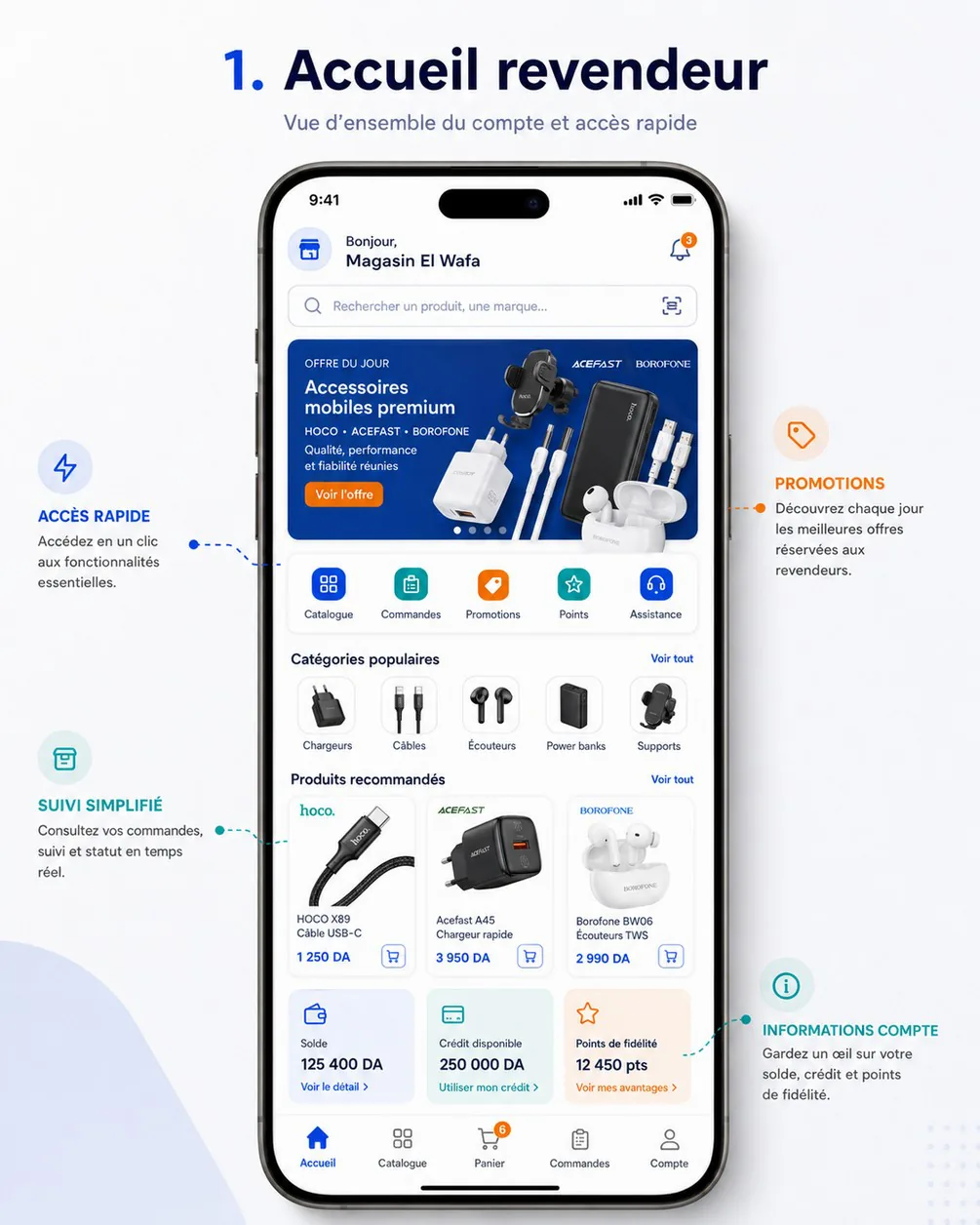
Intent. One screen with everything a store owner needs every morning (annotations Accès rapide, Promotions, Suivi simplifié, Informations compte): the offer of the day, shortcuts, popular categories, recommended products, and the account's money.
Keep.
- The greeting header with the store name and the bell with an unread badge.
- The pill search bar with a scan icon (RA-10, RA-11).
- The blue offer banner with an orange CTA and carousel dots.
- Quick-access tiles in tinted squares; popular categories as image tiles; recommended product cards with a cart button.
- Account tiles on tinted backgrounds.
- Bottom navigation Accueil · Catalogue · Panier · Commandes · Compte with a cart badge.
Change.
- Remove the Points quick tile and the « Points de fidélité 12 450 pts » tile. Loyalty is V2 (cahier §14.2). With four tiles (Catalogue, Commandes, Promotions, Assistance), the row fits a 360 dp screen; five tiles at 360 dp leave labels of under 60 dp.
- « Solde 125 400 DA » is ambiguous: an amount owed or a credit balance? Label it « Reste à payer » (unpaid invoices) and link it to RA-29.
- « Utiliser mon crédit » is not an action, because credit is chosen at checkout. It becomes « Voir mon crédit ».
- Home cards show brand logos but catalog cards do not. Decision: an optional brand line in capitals on every card, with logos only in filters and banners.
- Define the card cart button: it adds the minimum quantity, then turns into a stepper, and the cart badge bumps.
- White text on the bright orange « Voir l'offre » button is 3.56:1 at best. Use
orange.700(5.18:1). - Add the states the poster lacks:
- the guest variant: price lock on cards, no finance tiles, a sign-up card;
- the pending-validation banner;
- offline and loading;
- the fixed WhatsApp button.
- Store names longer than the header truncate with an ellipsis, never wrap.
Maps to. RA-09, with the entries to RA-10, RA-11, RA-26, RA-29 and RA-24. Guest variant: RA-41. V2: the loyalty tile goes to RA-38 (DES-30).
reseller-02-catalog — Catalogue produits
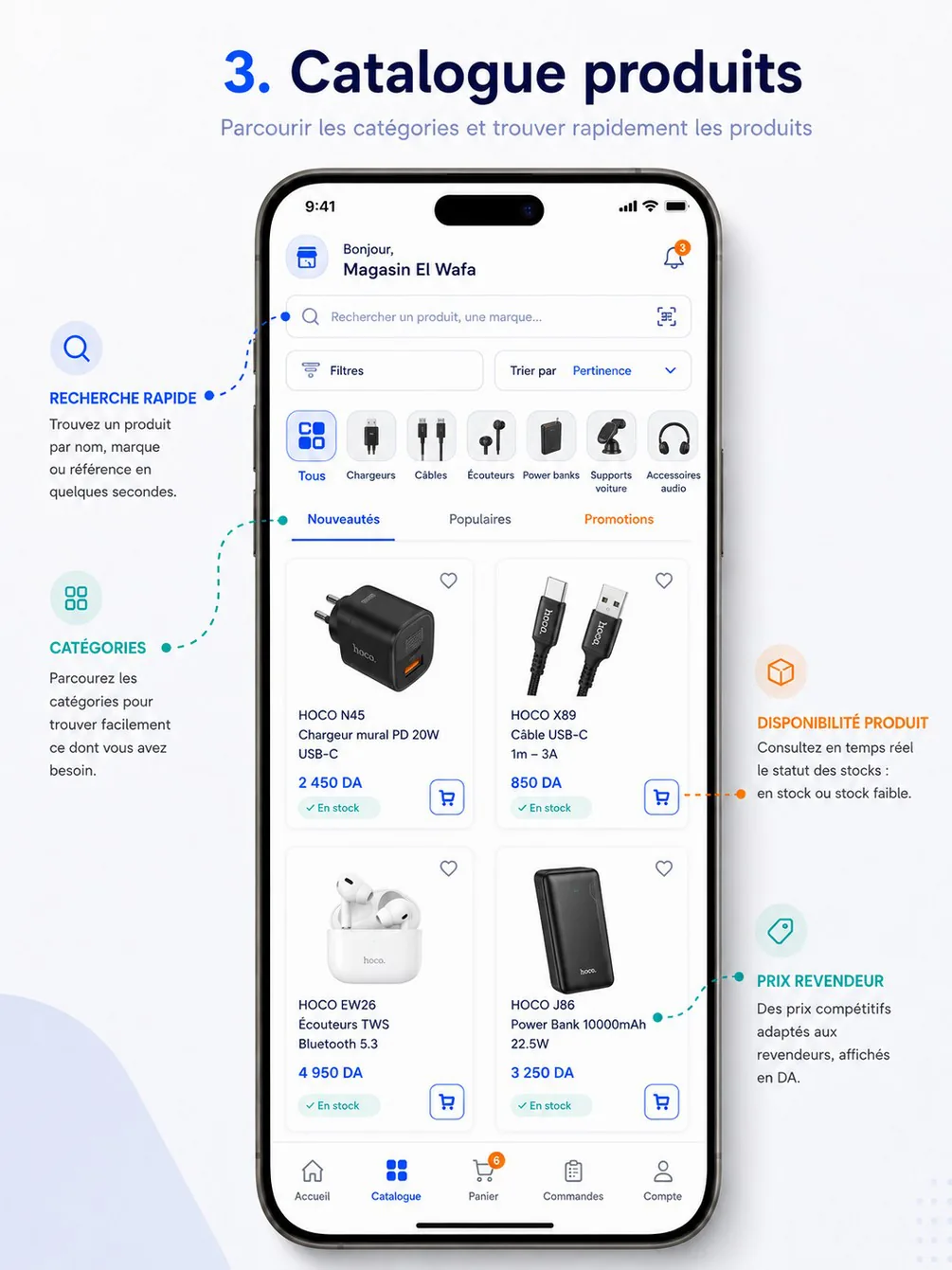
Intent. Find a product quickly by search, category and sort, and see the reseller price and availability right away (annotations Recherche rapide, Catégories, Disponibilité produit, Prix revendeur).
Keep.
- The Filtres and Trier par buttons; category chips with images and a Tous chip; tabs Nouveautés / Populaires / Promotions.
- The 2-column grid; the favourite heart; the green En stock pill; the outlined cart button.
Change.
- Filters become the advanced filter sheet (CAT-12, RA-13): category and sub-category, brand, price range (signed-in only), attributes per category, availability, promotion and new arrivals, with counts. The Filtres button shows the active count (« Filtres (3) »), and an active-filter chip row sits above the grid.
- The Promotions tab is orange while inactive. Tabs get one active colour (primary); promotions are signalled with a badge instead.
- The category chips must follow the category tree (CAT-02). Montres is missing, and sub-categories open from the chip.
- Product names wrap to 3 lines. Limit them to 2 lines with an ellipsis; the full name is on the product detail.
- Only En stock is shown. Add the En rupture card, with the add button disabled. No low-stock state exists in V1.
- No result count. Show « 128 produits » and the filtered-empty state.
- The greeting header repeats on the Catalog tab. Use a search-first app bar to give the grid more room.
- Category labels such as « Supports voiture » are about 10 px on 2 lines. The minimum is 12 sp; shorten the labels (« Supports »).
Maps to. RA-12, RA-13, RA-10, RA-16 (heart); web counterpart RW-03 with the filter sidebar.
reseller-03-product-detail — Détail produit
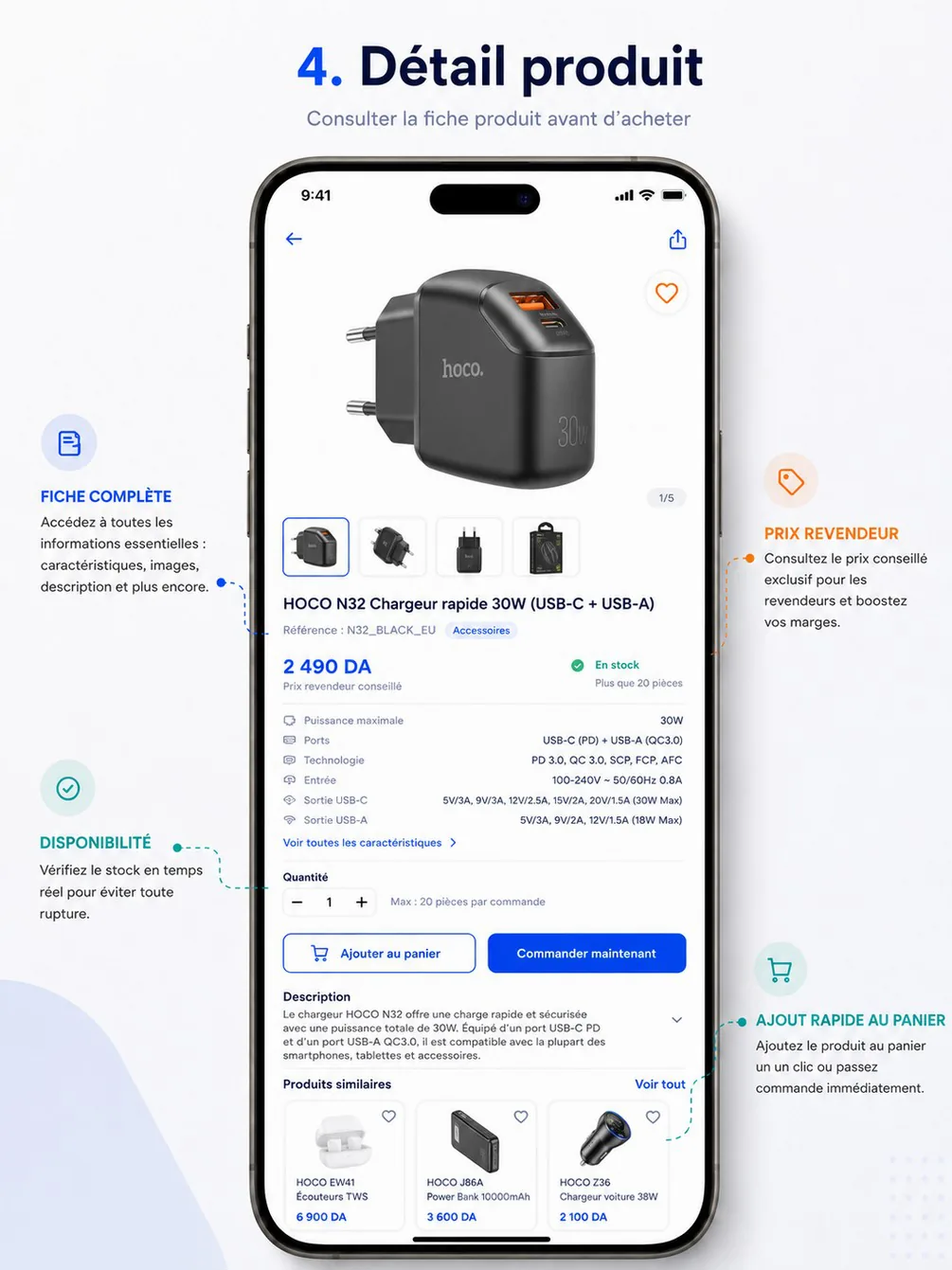
Intent. Everything needed before adding to the cart: gallery, key specifications, price, availability and quantity (annotations Fiche complète, Prix revendeur, Disponibilité, Ajout rapide au panier).
Keep.
- Back and share in the app bar; the floating favourite button; the image counter 1/5 and thumbnails.
- The specification preview with « Voir toutes les caractéristiques » (RA-15).
- The quantity stepper with « Max : 20 pièces par commande »; the two CTAs; the expandable description; similar products.
Change.
- Stock: « En stock — Plus que 20 pièces » becomes « En stock ». No quantity is ever shown to resellers or guests (decision of 17 October). The stepper's maximum is the per-order limit, not the stock.
- Price: « 2 490 DA — Prix revendeur conseillé » mixes two prices.
- Show « Votre prix » with the customer type (« Demi-gros ») as the main price.
- Show « Prix de vente conseillé » as the secondary line (cahier §5.2, PRC-01).
- Guests see the price lock.
- Proposal to validate with HOCO: an estimated margin line (recommended price minus your price), as the poster's « boostez vos marges » suggests.
- The category chip says Accessoires on a charger. Show the real category and sub-category (« Chargeurs › Chargeurs muraux »).
- The specification table uses about 10–11 px grey text. Use 14 sp, with labels in
text.secondaryand values intext.primary. - Quantity tiers are not in V1, so no tier hints appear.
- « Ajouter au panier » becomes the primary button: B2B orders combine many references. « Commander maintenant » stays (cahier §5.2) but is defined as add, then open the cart. It never checks out a partial cart.
- Add the missing states:
- variant selector (colour), when the product has variants;
- En rupture with add disabled;
- promo price (struck original price and a discount badge);
- complementary products (« similaires et complémentaires », cahier §5.2);
- unavailable product.
Maps to. RA-14, RA-15, RA-16; web RW-04.
reseller-04-cart-checkout — Panier & commande
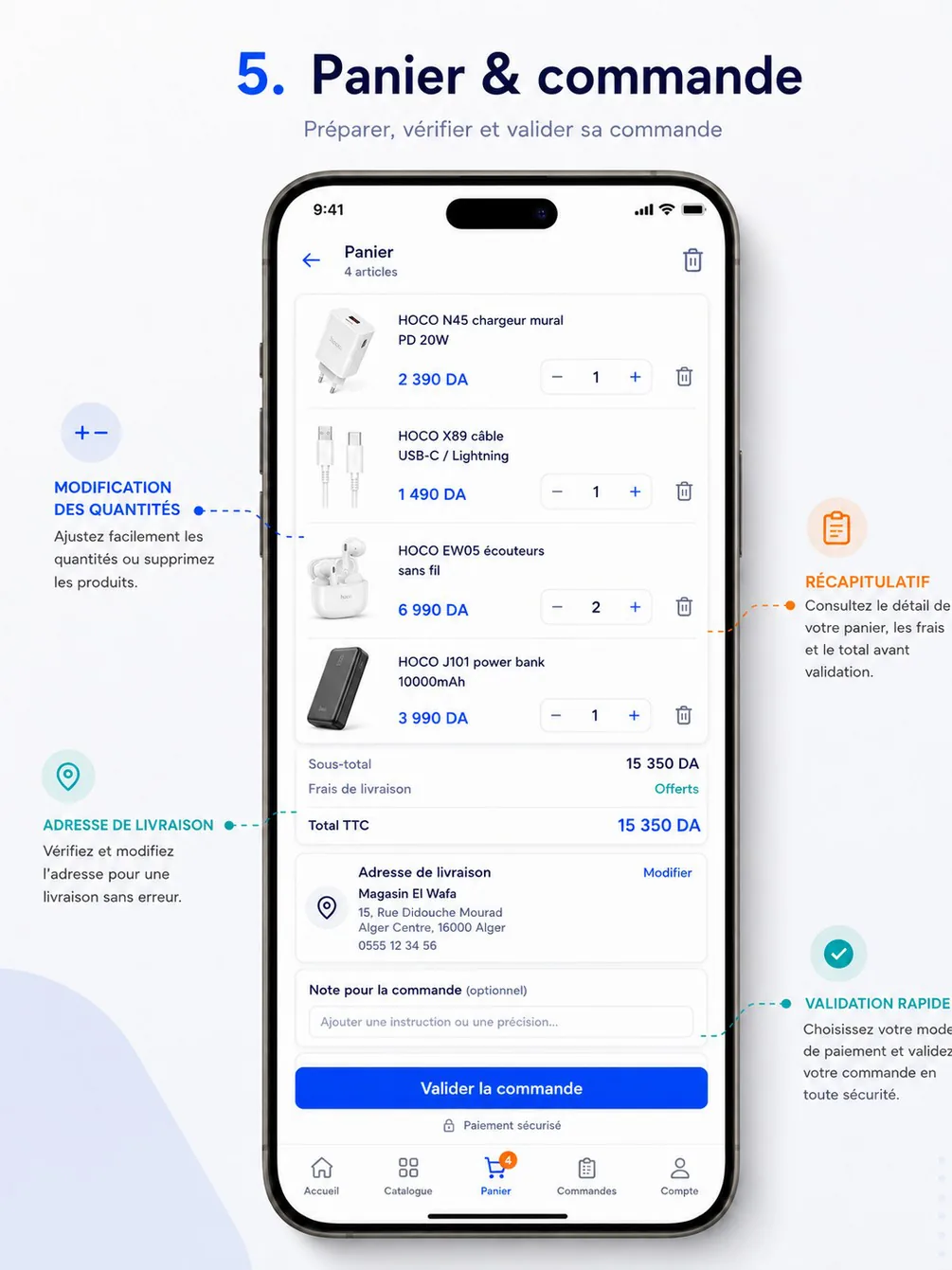
Intent. Prepare, check and send an order on one screen (annotations Modification des quantités, Récapitulatif, Adresse de livraison, Validation rapide).
Keep.
- Cart lines with image, name, price, stepper and delete.
- The summary block (Sous-total, Frais de livraison — Offerts, Total TTC).
- The address card with « Modifier »; the optional order note; the sticky full-width « Valider la commande ».
Change.
- The totals do not add up. The four lines sum to 14 860 DA, or to 21 850 DA if 6 990 DA is the unit price of the earphones at quantity 2. The summary says 15 350 DA. Every line shows unit price × quantity = line total, and the summary is the sum of the lines.
- « 4 articles » while 5 units are ordered: write « 4 références · 5 pièces ».
- The payment method is missing, although cahier §5.3 requires it and the Validation rapide annotation mentions it.
- « Paiement sécurisé » with a padlock implies online card payment, which does not exist in V1. Remove it.
- Missing rules and states:
- the minimum order amount, with progress (
ORDER_MIN_AMOUNT_NOT_MET); - price changes since adding (PRC-05);
- a quantity no longer available. Its message never shows the stock figure.
- the minimum order amount, with progress (
- « Offerts » needs its rule: the free-delivery threshold (DLV-06). Total TTC needs a « dont TVA » line.
- The screen shows a back arrow and the tab bar with Panier active, so it is both a tab and a pushed screen. Decision: the cart (RA-17) is a tab without a back arrow; checkout (RA-18) is a pushed step without the tab bar; confirmation is RA-20.
- The trash icon in the app bar clears the whole cart with no safeguard. Add a confirmation dialog.
- The confirmation must say what happens next: « Envoyée — HOCO va confirmer votre commande ». No order is confirmed automatically (ORD-14).
Maps to. RA-17, RA-18, RA-19, RA-20; web RW-06, RW-07.
reseller-05-orders-tracking — Suivi des commandes
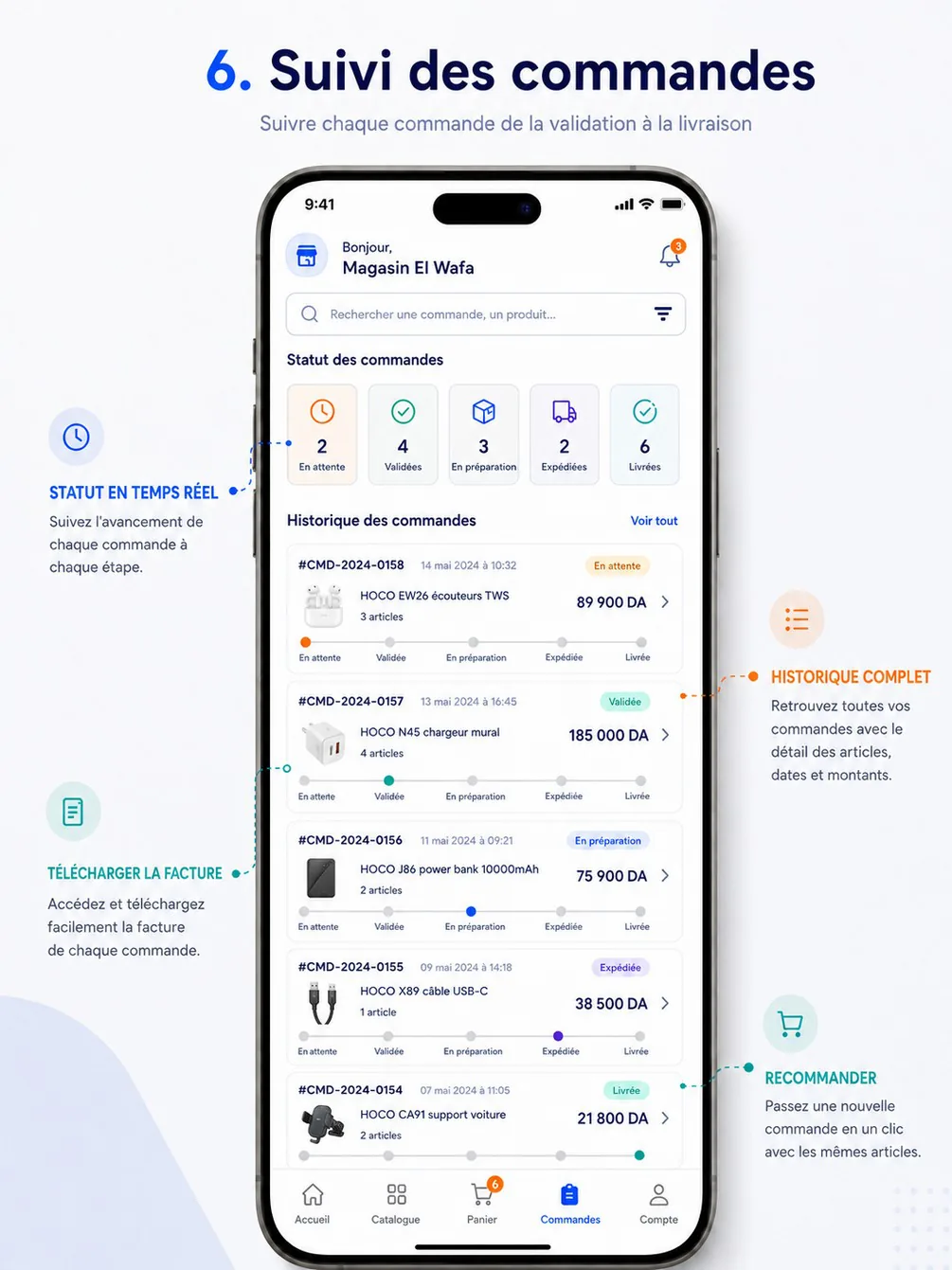
Intent. Follow every order from validation to delivery, download the invoice and reorder (annotations Statut en temps réel, Historique complet, Télécharger la facture, Recommander).
Keep.
- Status counter tiles that act as filters; search by order or product.
- Order cards with number, date, status pill, first product and article count, amount and a 5-step tracker.
- The date format « 14 mai 2024 à 10:32 », which is our format.
Change.
- Make the Statut en temps réel annotation literal. Add a live indicator (« En direct »). A changed card updates its pill and tracker in place with a highlight, and the detail screen shows a toast (ORD-15,
events.stream). - Order numbers « #CMD-2024-0158 » become
CMD-2026-000158: canonical format, no#. - The tracker En attente → Validée → En préparation → Expédiée → Livrée starts with the wrong step and misses others.
- Orders start as Envoyée and wait for HOCO's confirmation; En attente is a hold, not a step.
- The tracker becomes Envoyée → Validée → En préparation → Expédiée → Livrée, with Prête folded into En préparation on the list and shown on the detail screen.
- Add terminal branches for Refusée, Annulée and Retournée.
- Only the current dot is coloured and the previous steps are grey, so progress does not read as progress. Fill the completed segments.
- Each status has its own colour (orange, teal, blue, purple, green). Pills take their colour from the tone in
enums.jsoninstead: Validée and Livrée are bothsuccess; En préparation and Expédiée are bothprogress(status tones). - Tracker labels are about 9 px. On the list, show the current label and a mini progress bar; the full tracker with dates is on RA-22.
- Télécharger la facture and Recommander are annotated but not visible. They live on the detail screen, together with « Signaler un problème » (after-sales claim, RA-33) and « Demander un retour » (RA-40).
- The greeting header on a tab: use the title « Commandes ».
Maps to. RA-21, RA-22, RA-40, RA-33, RA-30; web RW-08, RW-09.
reseller-06-promotions-loyalty — Promotions & fidélité
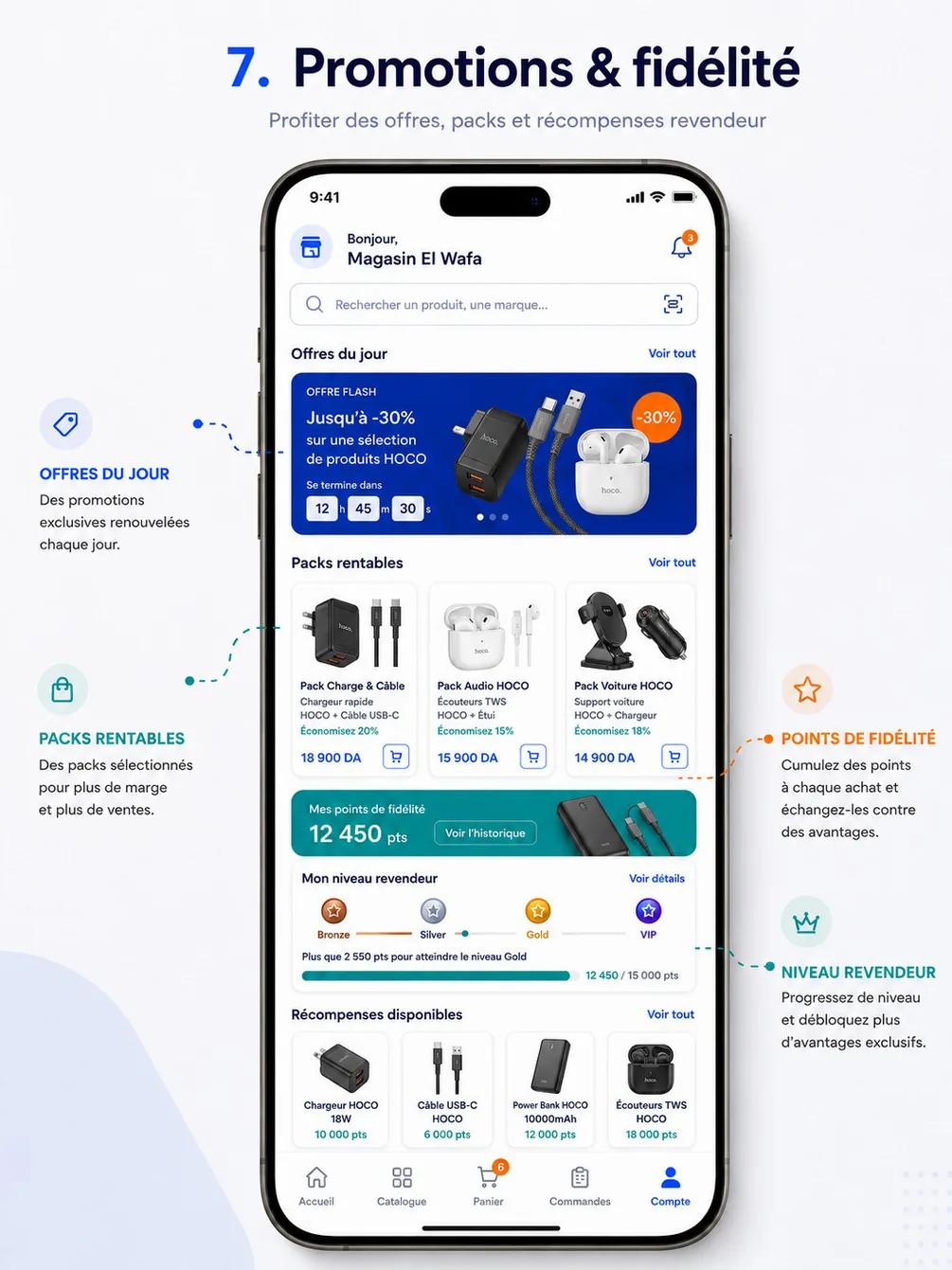
Intent. Make offers, profitable packs and loyalty visible, so resellers order more often (annotations Offres du jour, Packs rentables, Points de fidélité, Niveau revendeur).
Keep (V1). The daily-offer carousel with a countdown and a round discount badge; « Voir tout » sections.
Change.
- Packs, points, levels (Bronze, Silver, Gold, VIP) and rewards are V2 (cahier §14.2; PRM-06, LOY-01…LOY-05). They are designed in DES-30 (RA-37, RA-38, RA-39), not in V1 frames, and V1 frames reserve no empty space for them.
- The bottom nav highlights Compte on a promotions screen, but promotions are not a tab. They are reached from the home quick access, the banners and the catalog Promotions tab.
- Vocabulary: « OFFRE FLASH » next to « Offres du jour ». Use Offre du jour (PRM-05) and Promotion.
- The countdown ticks seconds for a 12-hour offer. Show seconds only in the last hour (« Se termine dans 12 h 45 min »).
- « -30% » becomes
−30 %: minus sign and no-break space. - Add what V1 needs:
- the promotion detail (RA-25), with mechanics, dates and eligible products;
- an ended offer;
- the guest variant: offers visible, prices locked.
Maps to. RA-24, RA-25; V2 RA-37, RA-38, RA-39, RW-15.
Delegate app references
delegate-01-login-profile — Connexion & profil délégué
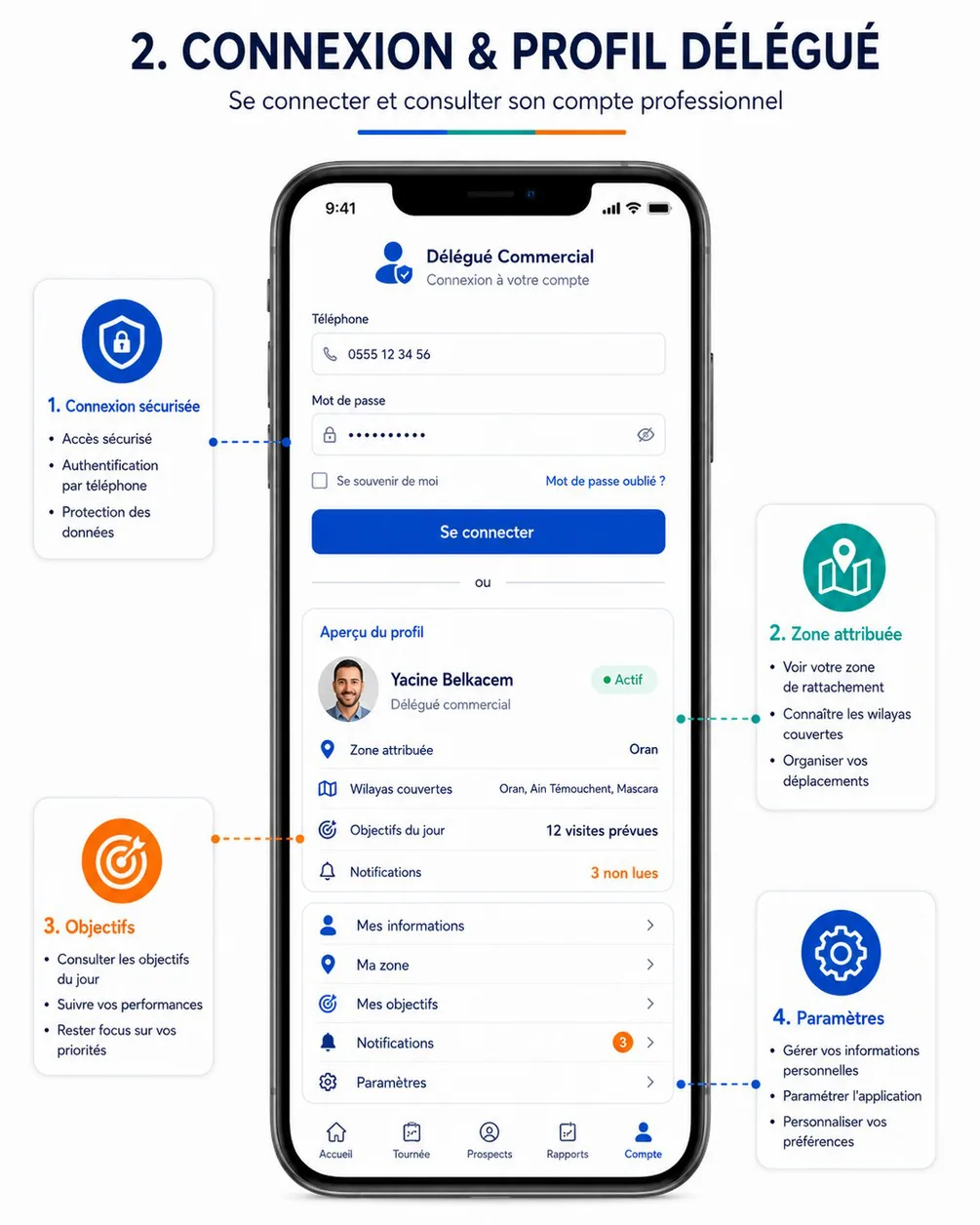
Intent. Secure sign-in by phone, and a professional profile showing the zone, the wilayas covered, today's objectives and notifications (callouts Connexion sécurisée, Zone attribuée, Objectifs, Paramètres).
Keep.
- The phone and password fields with icons and a show/hide toggle; « Mot de passe oublié ? »; a single primary « Se connecter ».
- The profile card: photo, name, role, Actif pill, zone, wilayas, objectives, unread count in orange.
- The menu list with chevrons.
- The bottom navigation Accueil · Tournée · Prospects · Rapports · Compte.
Change.
- Sign-in and profile are two screens, DA-02 and DA-24; the poster stacks them with an « ou » divider.
- Remove « Se souvenir de moi »: delegate sessions are 30-day sliding sessions by default.
- Add the suspended account state with an explicit message (cahier §6 acceptance criterion), the disabled account and the 15-minute lockout after 5 failed attempts.
- The location consent screen (DA-04, SEC-07) comes after the first sign-in and before any tour. The poster has none.
- Sign-out from the profile must be blocked while items wait to sync.
Maps to. DA-02, DA-03, DA-24, DA-25, DA-22, DA-26.
delegate-02-home — Accueil délégué
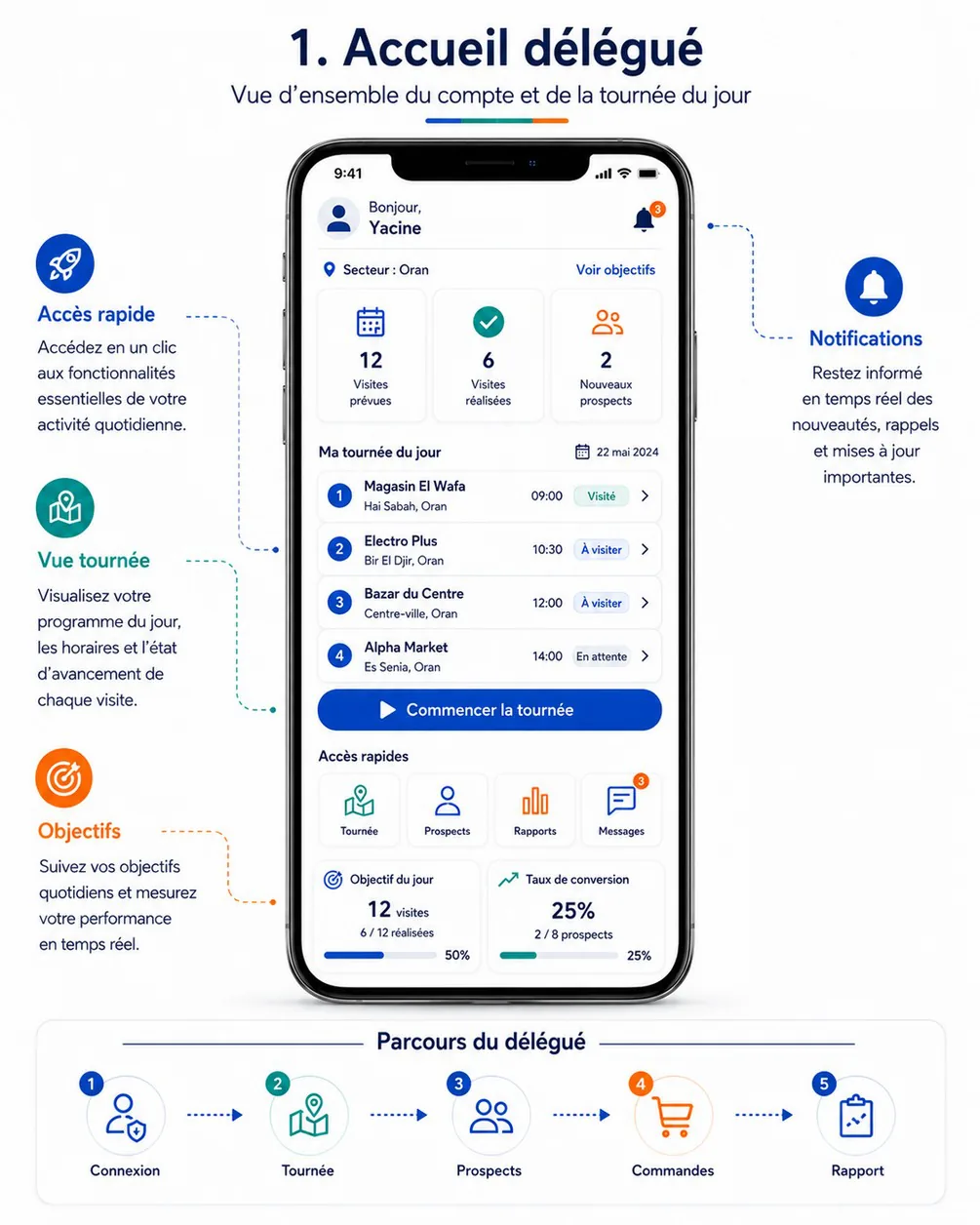
Intent. The day at a glance: planned and completed visits, new prospects, today's ordered tour, one big start button, quick access, objective and conversion (callouts Accès rapide, Vue tournée, Objectifs, Notifications).
Keep.
- The KPI tiles; the numbered visit list with time and status pill; the full-width « Commencer la tournée ».
- Quick access (Tournée, Prospects, Rapports, Messages); the objective and conversion bars.
- The Parcours du délégué strip. It is a poster element, not UI, but it defines the delegate-day prototype order.
Change.
- « Secteur : Oran » here and « Zone » elsewhere. Use Zone everywhere.
- Impossible state: visit 1 is Visité while the tour has not started. The CTA follows
TourStatus:- « Démarrer la tournée » only when À démarrer (cahier §6.1);
- « Continuer » when En cours;
- « Reprendre » when Suspendue;
- the summary when Terminée.
- « En attente » is not a visit status. Use À visiter, plus the derived En retard with icon and label (VisitStatus).
- Conversion is « 2 / 8 prospects » here and « 6 / 8 visites » on poster 10. Define one formula and annotate it on every KPI.
- Add the sync badge, the offline state, the no-tour-today state and the bottom navigation, which the poster crops.
- Dates read 2024. Mock data uses the current year and canonical formats.
delegate-03-tour-program — Programme de tournée
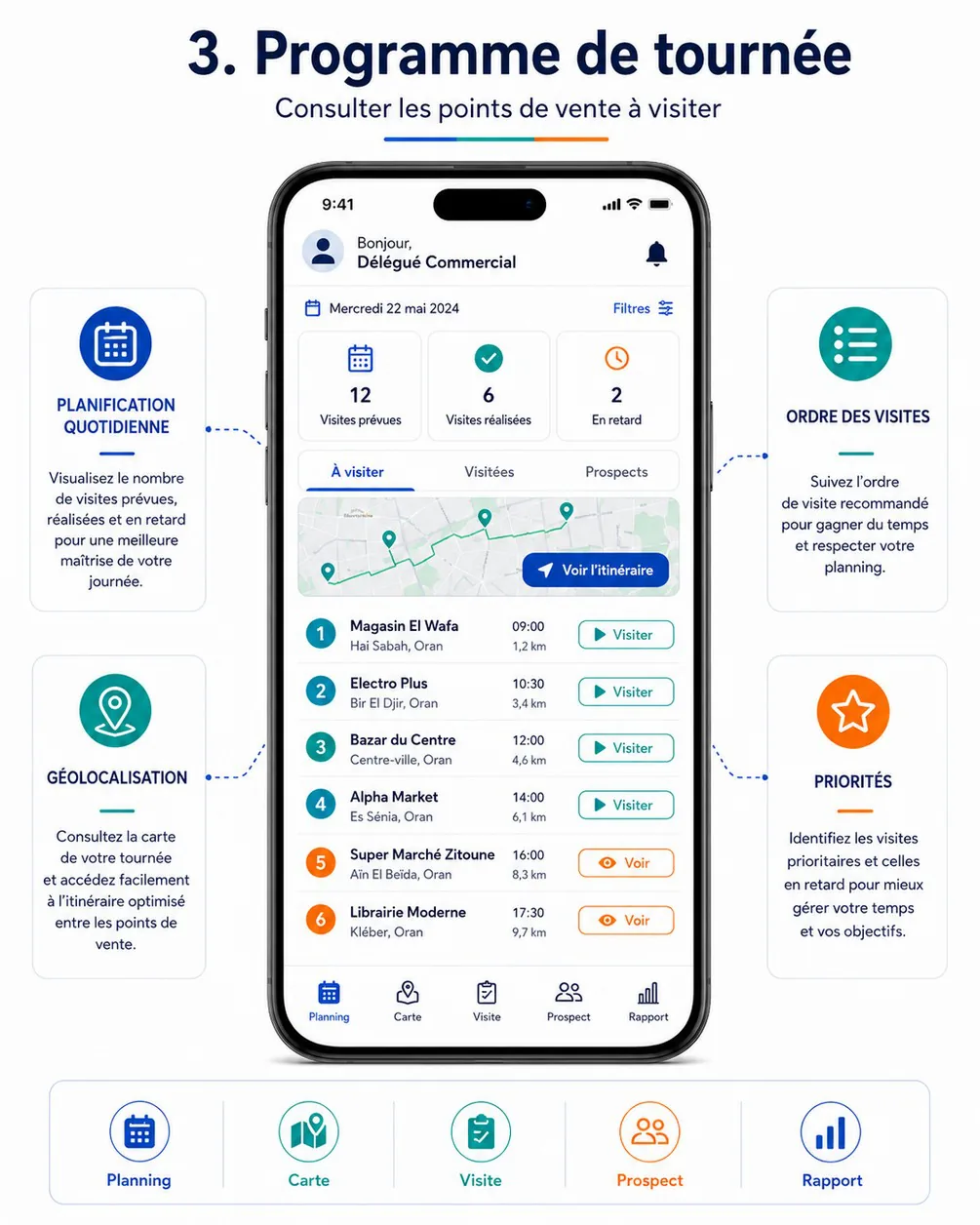
Intent. The ordered list of points of sale with time, distance and priority, plus the route on a map (callouts Planification quotidienne, Ordre des visites, Géolocalisation, Priorités).
Keep.
- The date row with Filtres; the counters including En retard.
- The mini-map with the route and « Voir l'itinéraire ».
- The numbered rows with time, distance (« 1,2 km », French decimal) and one action per row.
Change.
- The bottom navigation Planning · Carte · Visite · Prospect · Rapport conflicts with the other delegate posters. The app keeps Accueil · Tournée · Prospects · Rapports · Compte: the map is a view inside Tournée, and a visit is always opened from a stop, never from a tab.
- The header « Bonjour, Délégué Commercial » is a placeholder on a pushed screen. Use the title « Ma tournée » with the date.
- Orange numbers and orange « Voir » buttons carry an unexplained meaning. Priority (Prioritaire flag) and lateness (En retard, derived) get separate indicators, each with icon and label.
- The « Prospects » tab inside the tour duplicates the Prospects tab. Use the tabs À visiter / Terminées.
- Missing: the ordering mode (imposé or recommandé) and the reorder affordance (FLD-03, FLD-06), suspending the tour, adding an unplanned visit, and offline.
delegate-04-map-navigation — Carte & navigation
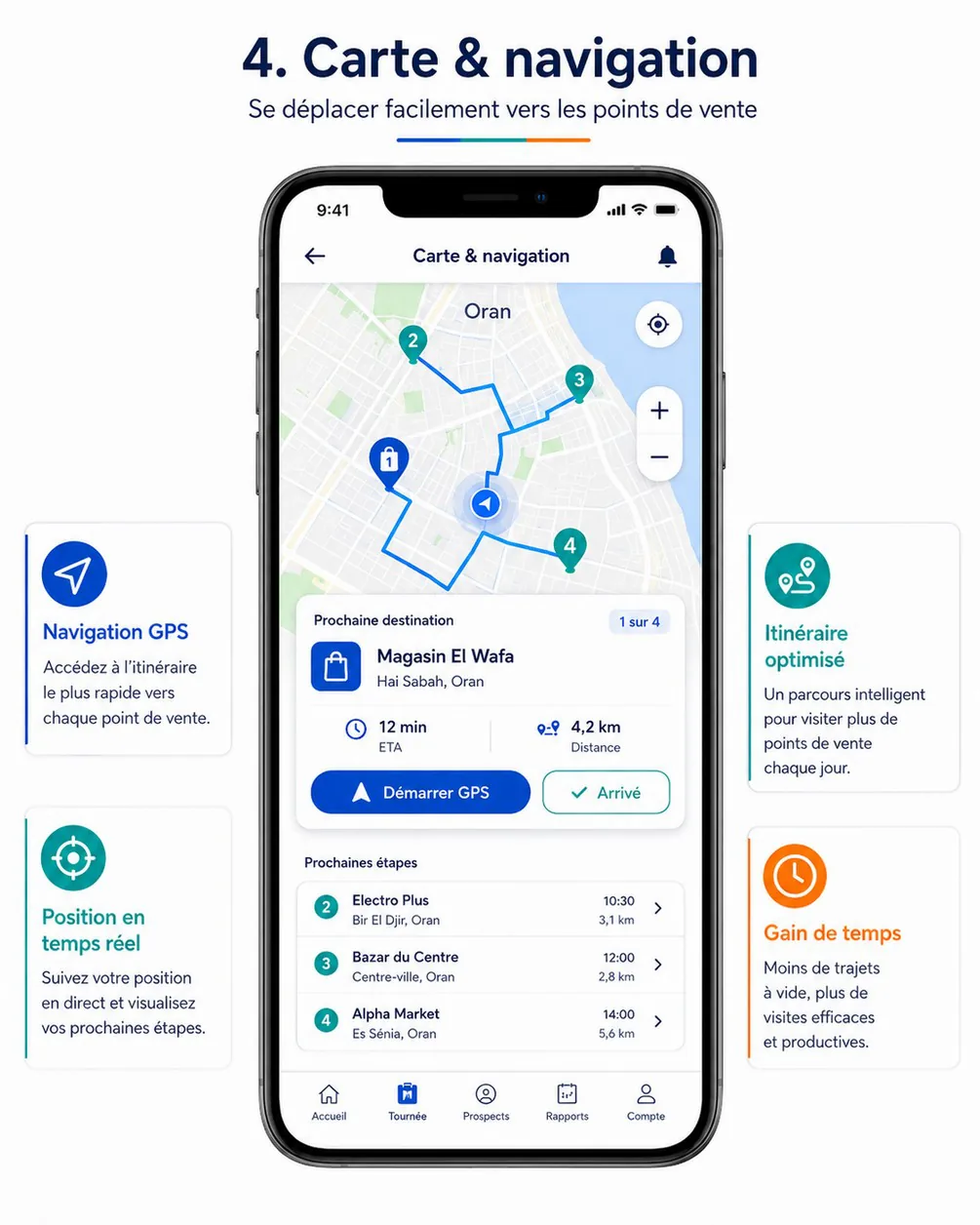
Intent. Guide the delegate to the next point of sale, then confirm arrival (callouts Navigation GPS, Position en temps réel, Itinéraire optimisé, Gain de temps).
Keep.
- The full map, the current-position dot with halo, numbered pins and the route.
- The Prochaine destination card (« 1 sur 4 », ETA, distance) with two actions.
- The Prochaines étapes list; recentre and zoom controls.
Change.
- The « Arrivé » button is active 4,2 km away. It is gated by the GPS validation banner: within 150 m, with an accuracy of 100 m or better (defaults). Otherwise it shows « Vous êtes à 420 m du point de vente » (
GPS_OUT_OF_TOLERANCE) or « Signal GPS faible » (cahier §6.3 acceptance criterion). - Pins differ only by colour (blue for next, teal for the others). The design system's pin set adds fill style and glyphs; colour alone fails for colour-blind users.
- « Démarrer GPS » opens an external navigation app. Label it « Itinéraire » with an external-link icon.
- The bell on a pushed screen is removed; the Tournée tab stays active.
- The same stop is 3,4 km away in poster 3 and 3,1 km here. Distances have one source and say what they measure (« à 3,1 km » as the crow flies).
- Add GPS off, permission denied and map not loaded (list fallback).
- « Itinéraire optimisé » promises route optimisation, which is V2 (FLD-18). V1 offers a recommended order (nearest neighbour, FLD-17) and must not claim more.
delegate-05-visit-checkin — Visite & check-in
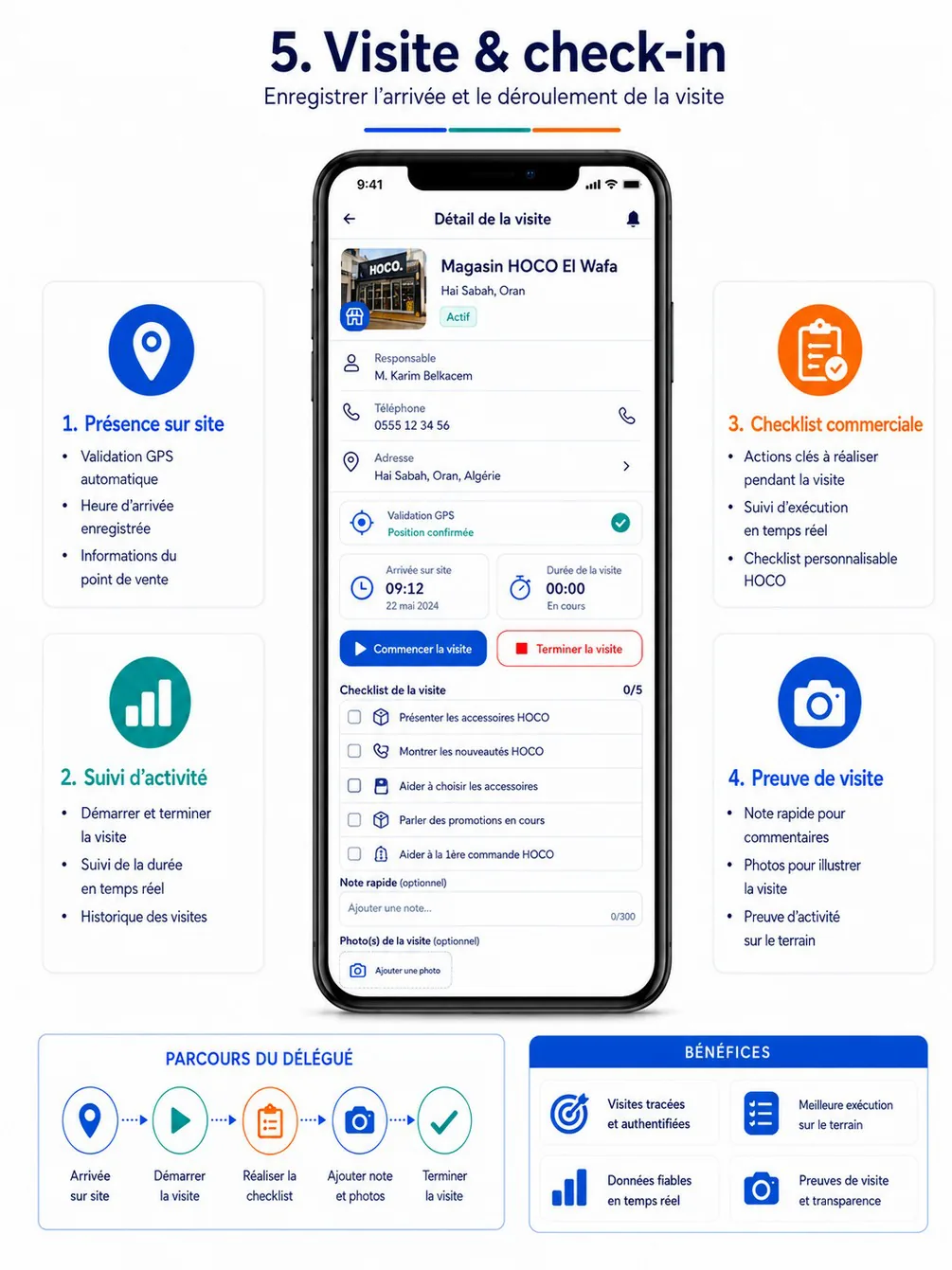
Intent. Record the arrival, the duration, the actions and the proof of the visit (callouts Présence sur site, Suivi d'activité, Checklist commerciale, Preuve de visite).
Keep.
- The store header (façade photo, name, commune, status pill); responsible person with a call button; the address row.
- The « Validation GPS — Position confirmée » row; the arrival-time and duration tiles.
- The checklist with a counter (0/5); the quick note with a character counter; photos.
Change.
- « Commencer la visite » and « Terminer la visite » are shown together, while the duration reads « 00:00 — En cours ». Show one primary action per
VisitStatus: arrive, then start, then end. - « Terminer la visite » is red. Finishing a visit is the normal outcome, so it uses primary; red is reserved for destructive actions.
- Photos are marked « (optionnel) », but they can be required by visit type (FLD-08). Add the required state, which blocks « Terminer » with the reason.
- The checklist text is about 11 px. Use 14 sp, with the whole row as the touch target.
- The store is « Magasin HOCO El Wafa » here and « Magasin El Wafa » elsewhere. Mock data must be consistent across frames.
- Add:
- the not done path (DA-11, a reason is mandatory, FLD-09);
- the locked state after the end (
VISIT_LOCKED); - offline and the per-photo upload state;
- the GPS accuracy (« ± 12 m »).
Maps to. DA-10, DA-09 (store information), DA-11.
delegate-06-reseller-signup — Inscription revendeur
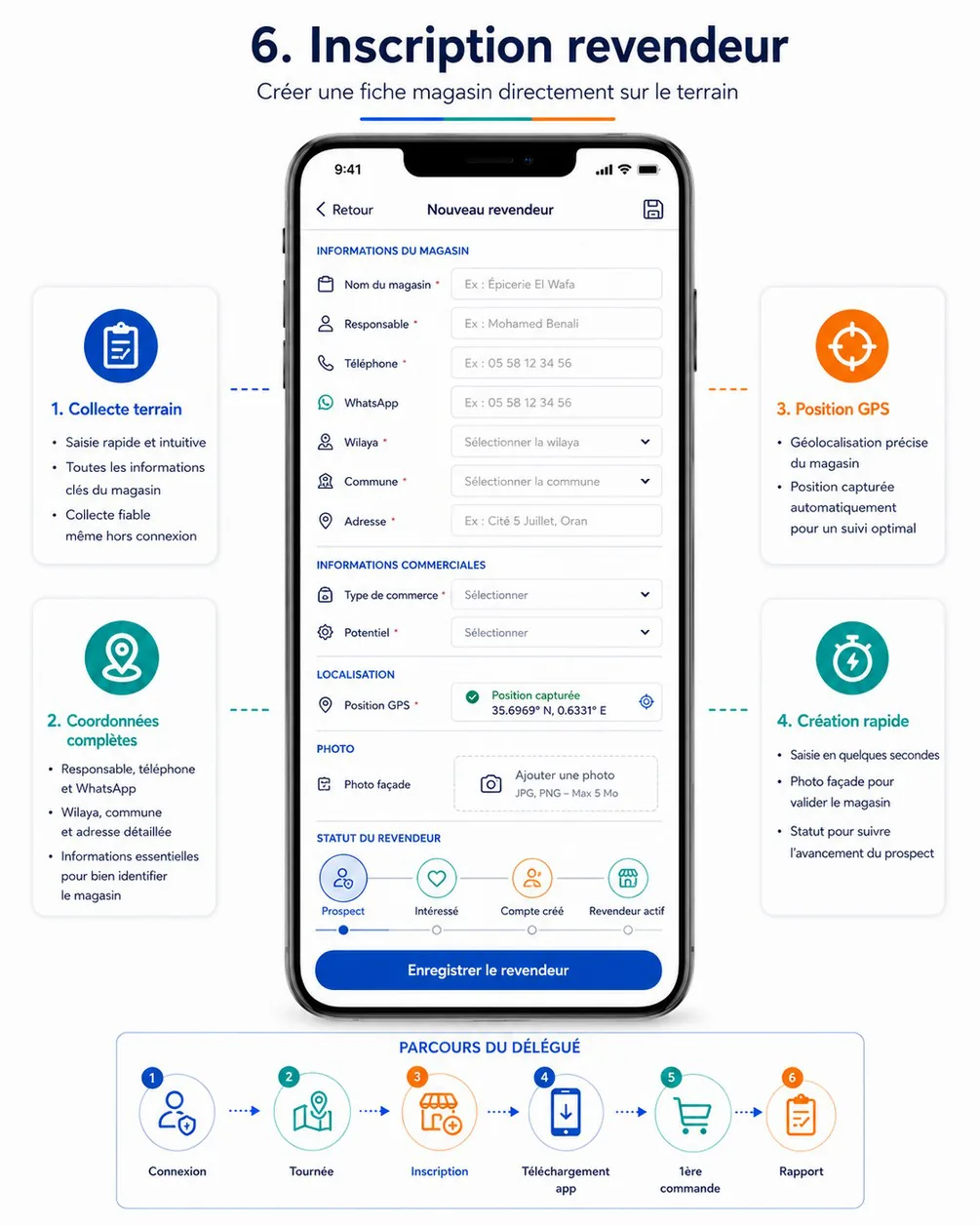
Intent. Create a store record in the field, offline if needed, with GPS and a façade photo (callouts Collecte terrain, Coordonnées complètes, Position GPS, Création rapide).
Keep.
- Sections (Informations du magasin, Informations commerciales, Localisation, Photo); icons on fields; required markers.
- Wilaya and commune pickers; GPS capture with a confirmation and a recapture button; the façade-photo dropzone with its limits; one save CTA.
Change.
- Labels sit to the left of half-width inputs, which is too narrow at 360 dp. Put labels above full-width fields, the system's single input style.
- The phone example « 05 58 12 34 56 » becomes
0555 12 34 56. - The Statut du revendeur stepper lets the delegate pick Compte créé or Revendeur actif. These are automatic statuses (CRM-04). The initial choice is limited to Nouveau prospect, À contacter, Intéressé, Non intéressé.
- The coordinates read « 35.6969° N, 0.6331° E », but Oran is at about 0.63° W. Display the device's signed decimal degrees (« 35.6969, −0.6331 ») with the accuracy.
- Missing:
- The save icon in the app bar duplicates the CTA; keep one. « ‹ Retour » as text becomes the standard back arrow, with an unsaved-changes dialog.
- Assumption: the delegate may record the customer type the reseller announces, as a hint for the back-office. The reseller still declares it at sign-up (AUTH-11). To confirm on Day 5.
delegate-07-invitation — Téléchargement de l'application
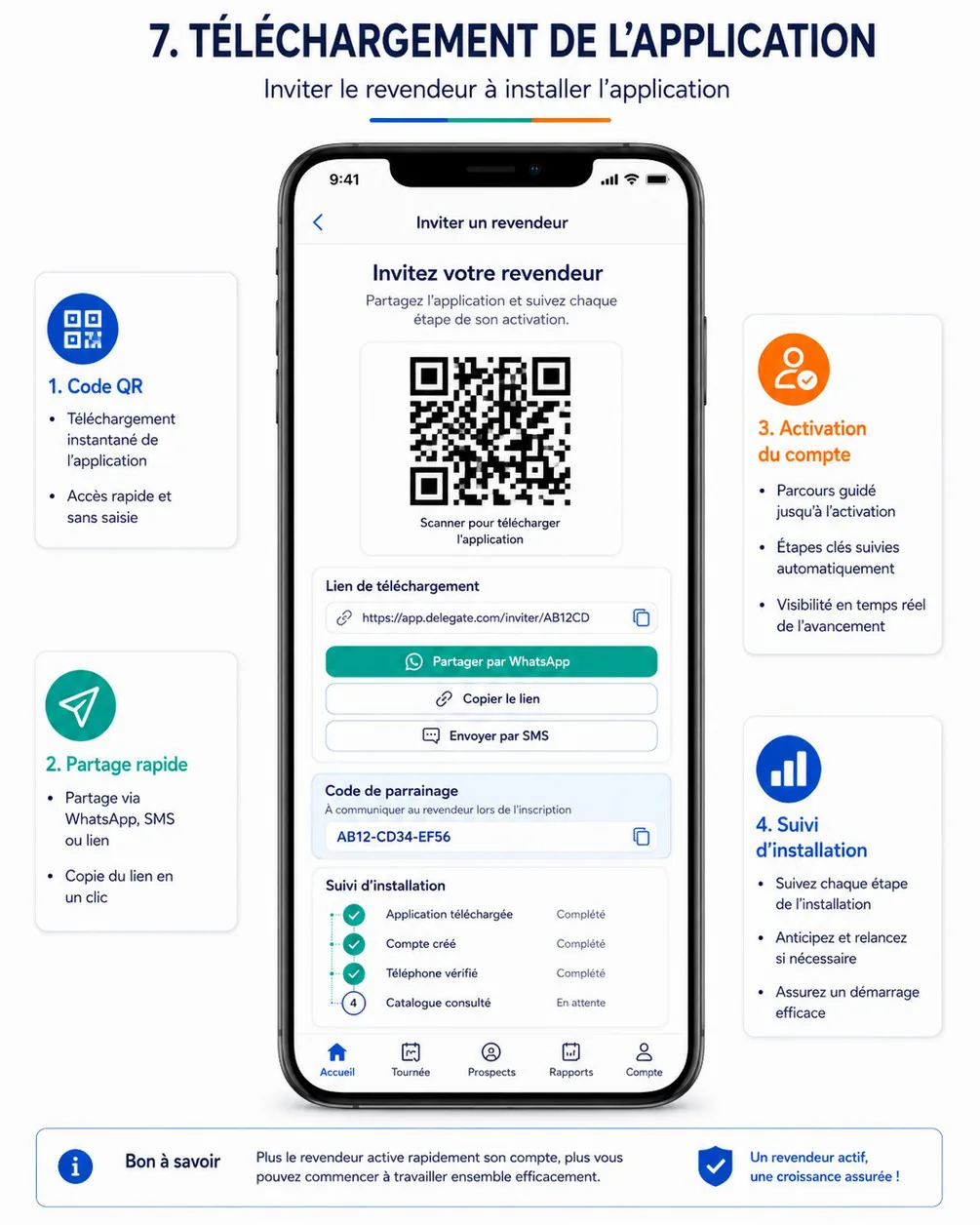
Intent. Invite the reseller to install the app, share it quickly and follow the activation (callouts Code QR, Partage rapide, Activation du compte, Suivi d'installation).
Keep.
- The QR code card with its caption; the link field with a copy button.
- WhatsApp as the primary share (teal), then Copier le lien and Envoyer par SMS.
- The referral-code card with copy; the vertical installation tracker with check marks.
Change.
- The link
app.delegate.com/inviter/AB12CDbecomeshttps://app.hoco.dz/i/AB12CD34. - The code « AB12-CD34-EF56 » (12 characters) becomes 8 characters, displayed
AB12-CD34. - Whom is the invitation for? The reseller's name and number are missing; an invitation is tied to a reseller and a delegate (IVT-01).
- The funnel misses Invitation envoyée and Première commande (IVT-03). Each step shows its date and time instead of « Complété ».
- The Accueil tab is highlighted on a screen opened from a prospect. Keep Prospects active.
- Add the offline state: creating an invitation needs the network.
Maps to. DA-16. Field-kit print version: DQA-07.
delegate-08-first-order — Aide à la 1ère commande
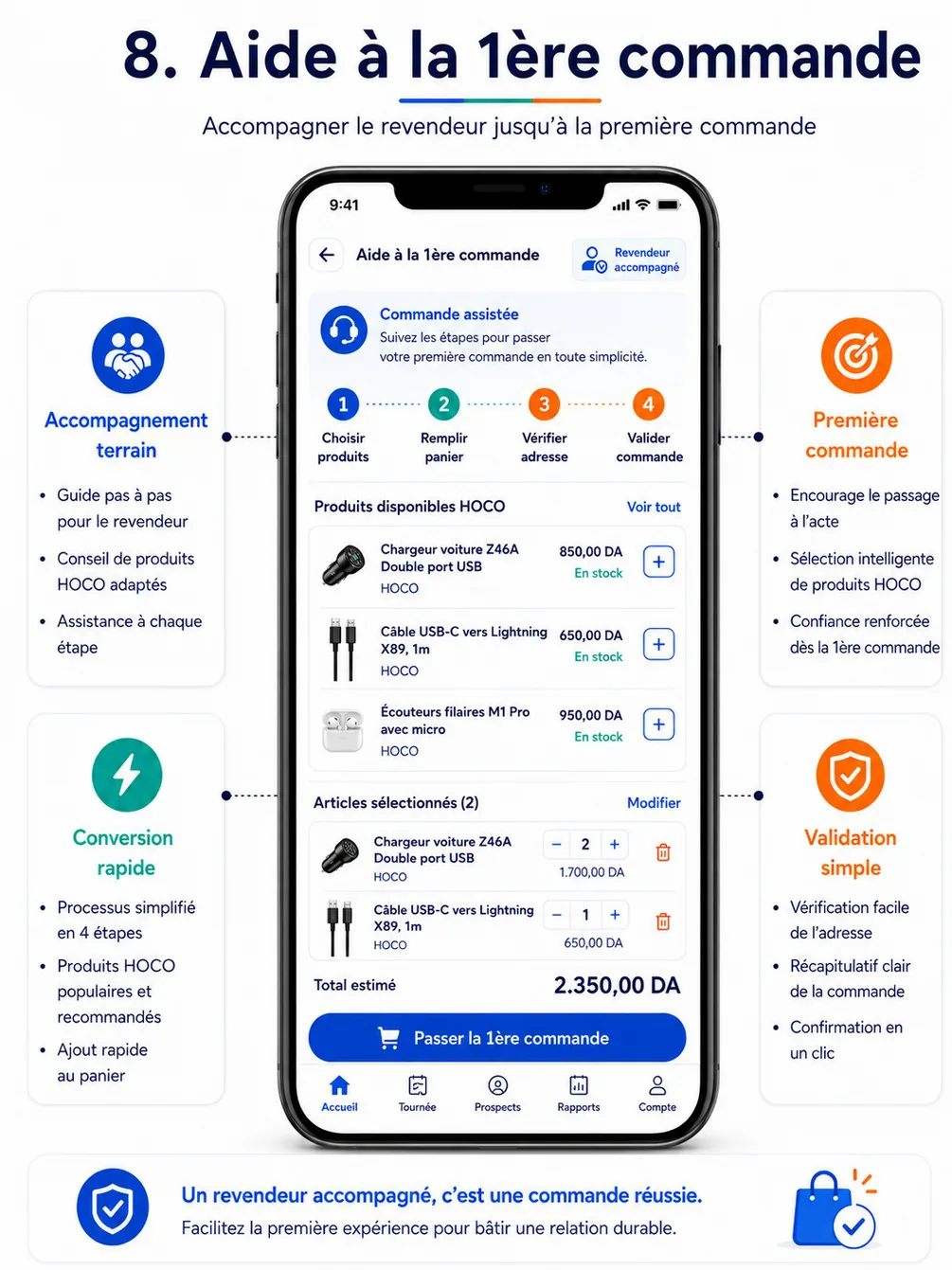
Intent. Guide the reseller to a first order on the spot (callouts Accompagnement terrain, Première commande, Conversion rapide, Validation simple).
Keep.
- The Commande assistée banner; a step indicator; the product list with add buttons and availability text.
- The selected items with steppers; the estimated total; one CTA.
Change.
- The CTA « Passer la 1ère commande » misstates the rule. The delegate prepares the order and the reseller confirms it, or the back-office validates it (ORD-08, cahier §6.7). The CTA becomes « Envoyer au revendeur pour confirmation ». The screen then explains the 72-hour expiry, and that HOCO confirms the order before preparation (ORD-14).
- The reseller's identity is missing (« Revendeur accompagné » has no name). Show the name and
REV-…in the header. - Prices are the reseller's, by their customer type, since the delegate sells at the reseller's price. Availability only.
- Money appears as « 850,00 DA », « 1.700,00 DA » and « 2.350,00 DA » (dot thousands separator). Use
1 700,00 DAeverywhere. - Steps Choisir produits and Remplir panier overlap, and the step colours (blue, teal, orange) are arbitrary. Use 3 steps in one progress style: Produits → Adresse → Envoi.
- « 1ère » becomes « 1re » (French typographic rule).
- Red trash icons: removing a line is not destructive. Use a neutral icon with undo.
- Missing: catalog search and filters (CAT-07), the cart rules (ORD-02) and the address step.
Maps to. DA-17, DA-18; reseller side RA-23; back-office side BO-41.
delegate-09-visit-report — Rapport de visite
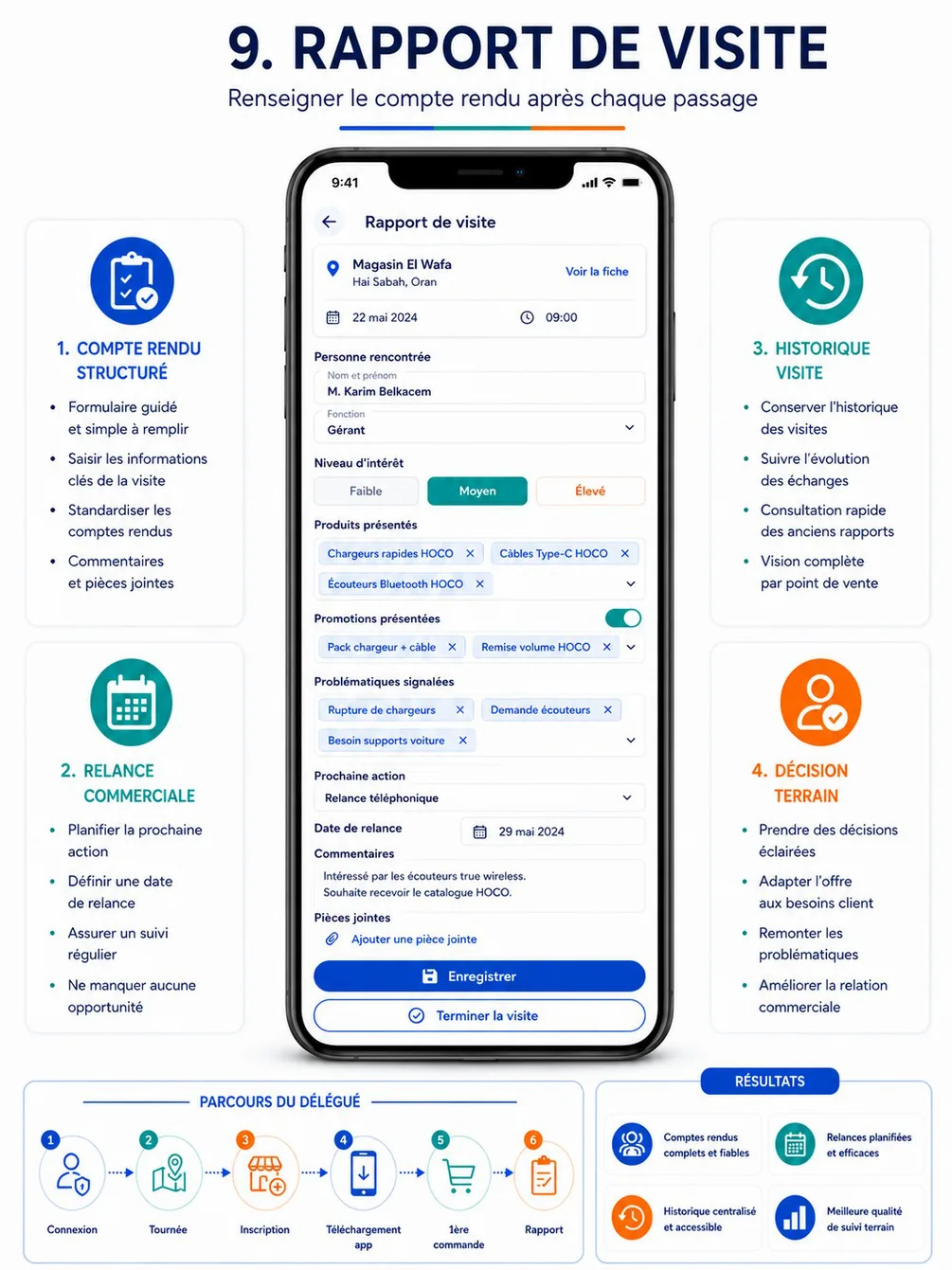
Intent. A standard visit report that plans the follow-up (callouts Compte rendu structuré, Relance commerciale, Historique visite, Décision terrain).
Keep.
- The context card with « Voir la fiche »; the person met; the three-level interest control.
- Multi-select chips for products, promotions and issues; next action plus follow-up date; comments; attachments.
Change.
- Floating-label inputs differ from the other forms. Use labels above.
- « Enregistrer » (filled) and « Terminer la visite » (outlined) compete. Keep one primary: « Enregistrer le rapport » (the draft autosaves), or « Enregistrer et terminer la visite » when the report is mandatory before ending (cahier §6.8).
- Interest-level colours (selected Moyen in teal, Élevé in orange) become the tones from
enums.json: Faiblemuted, Moyeninfo, Élevésuccess. - The promotions toggle duplicates the chips; keep the chips field only.
- Chip text is about 10 px. Use 13 sp minimum, with chips wrapping.
- The follow-up date is required when the next action is not Aucune. The confirmation states the follow-up created (« Relance planifiée le 29 mai »).
delegate-10-tour-closing — Clôture de tournée & résultats
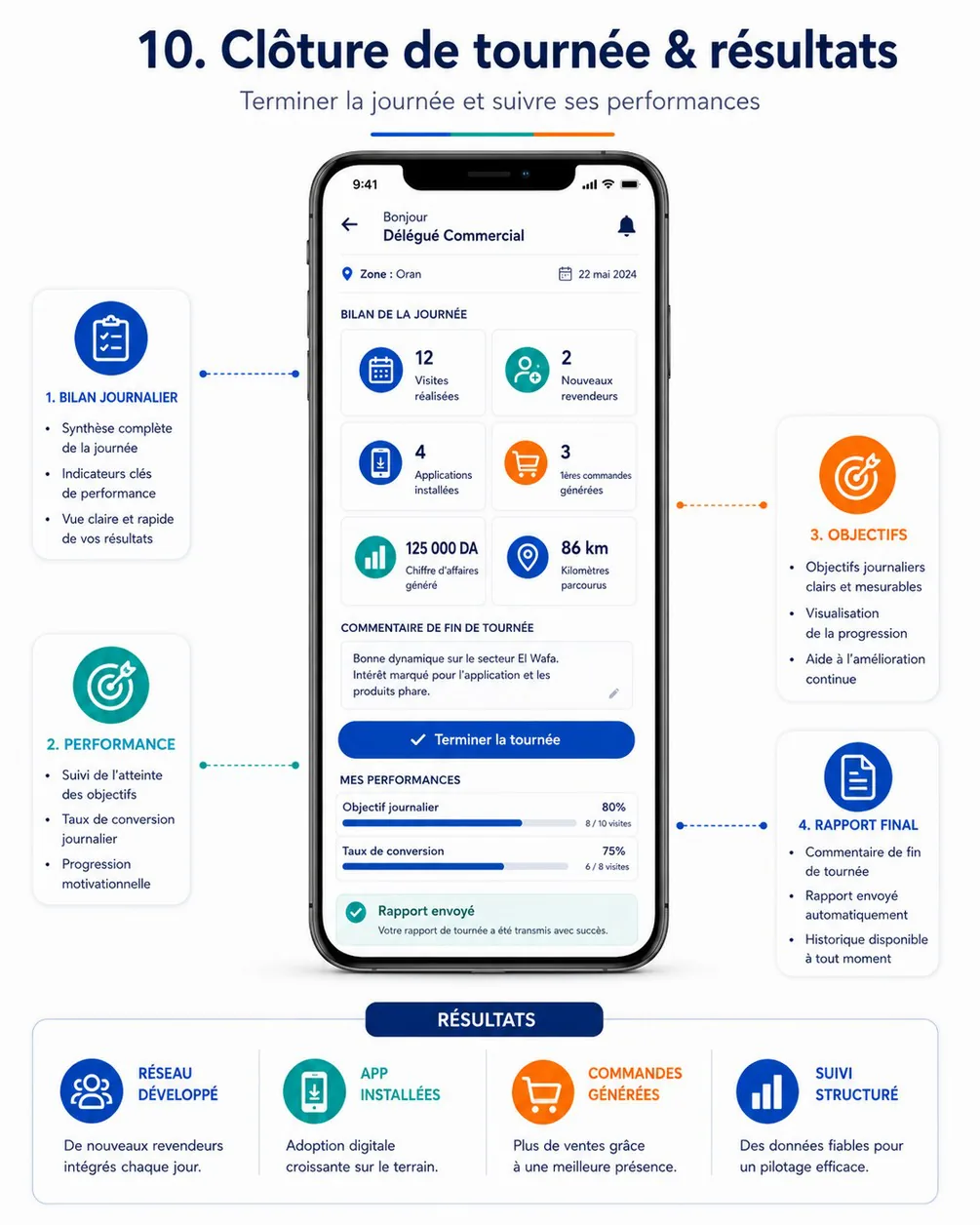
Intent. End the day, send the report and see the results (callouts Bilan journalier, Performance, Objectifs, Rapport final).
Keep.
- The zone and date row; the six summary tiles (visits, new resellers, installs, first orders, revenue, km).
- The end-of-tour comment; one « Terminer la tournée » CTA; the objective and conversion bars; the success confirmation.
Change.
- Pre-close and post-close are mixed: the CTA and « Rapport envoyé » appear together. Use two states:
- The numbers contradict each other: « 12 visites réalisées » against « 8 / 10 visites ». Each KPI gets a defined formula and source (
delegate.tours.closingPreview). - The greeting header on a pushed screen: use the title « Clôture de tournée ».
- Kilometres come from location samples taken only while the tour is in progress. Label them « km parcourus (estimés) ».
Issues across the whole set
| Issue | Where | Resolution |
|---|---|---|
| Two delegate navigation models | Posters 2, 4, 7, 8 against poster 3 | Accueil · Tournée · Prospects · Rapports · Compte |
| Four back affordances: ←, ‹ Retour, ‹, boxed ← | Posters 3, 5, 6, 7, 8, 9 | One: ← icon at the start of the app bar, title start-aligned (Android first, NFR-04) |
| Greeting header on pushed screens | Posters 3, 10 (delegate), 3, 6 and 7 (reseller tabs) | The greeting only on the two home screens; other screens show a title |
| Three input styles: label above, label left, floating label | Posters 2, 6, 9 | Label above, outlined 48 dp field |
Three money formats: 1 250 DA, 850,00 DA, 1.700,00 DA | Posters 1–5, 8 | 1 250,00 DA; compact 1 250 DA only on cards and tiles (numbers) |
Non-canonical identifiers: #CMD-2024-0158, a 12-character code, a foreign domain | Posters 6 (reseller), 7 (delegate) | CMD-2026-000158, AB12-CD34, https://app.hoco.dz/i/AB12CD34 |
| Non-canonical status words: En attente for a visit, Complété, Secteur | Posters 1, 7 (delegate) | Labels from enums.json, Zone |
| V2 surfaces in V1 screens: points, levels, rewards, packs, itinéraire optimisé | Posters 1, 7 (reseller), 4 (delegate) | Removed from V1 frames; designed in DES-30 |
| Stock quantities shown | Poster 4 (reseller) | Availability only (STK-07) |
| Text of 9–11 px | Specifications, tracker labels, checklists, chips, category labels | 12 sp minimum, 14 sp for delegate content |
| Colour meaning invented per screen: red Terminer, orange Voir, a purple status | Posters 5, 3 (delegate), 6 (reseller) | Primary for actions, tones for statuses, red only for destructive actions |
| Incompatible states shown together | Posters 1, 5, 10 (delegate) | One frame per state; one primary action per state |
| Mock numbers that do not add up | Posters 5 (reseller), 1, 10 (delegate) | Consistent mock data set (one store, one tour, one order) reused in every frame |
| Missing states: errors, empty, offline, loading, permissions, GPS | Every poster | Every inventory screen lists its states (inventory) |
| Not shown at all: guest mode, customer type, advanced filters, WhatsApp button, after-sales, returns, live status | — | Added by the 17 October decisions |
Decisions for the design system
- Reseller app navigation: five tabs, Accueil · Catalogue · Panier · Commandes · Compte (posters 1–5).
- Promotions are reached from the home tiles, the banners and the catalog tab.
- The cart is a tab; checkout and product detail are pushed screens without the tab bar.
- For guests, Panier, Commandes and Compte open the sign-up prompt.
- Delegate app navigation: Accueil · Tournée · Prospects · Rapports · Compte. The map is a view of the tour; visits open from stops; messages are reached from the home tile and the bell.
- App bars: ← plus a start-aligned title on pushed screens. The greeting header appears on the two home screens only.
- Colour roles:
- blue = actions, navigation, links, selection;
- teal = WhatsApp share, objectives and conversion progress, secondary accents;
- orange = offers, promo badges, count badges, countdowns, never a warning;
- red = destructive and errors only;
- statuses = tones from
enums.json.
- Cards: white, radius 16,
border.subtlepluselevation.1on the light blue-grey background. Tinted backgrounds only for finance tiles, feature tiles and banners. - Product imagery: 1:1 on white. Brand shown as a capitals line, logos only in filters and banners.
- Status pills: soft background, dark text, optional dot, as in poster 6 (reseller), with colours from tones.
- Inputs: label above, 48 dp,
neutral.400border, which is stronger than the posters' light grey so fields stay visible outdoors. - Typography: geometric display face for titles (Plus Jakarta Sans), Inter for the interface. 12 sp minimum, 14 sp in the delegate app.
- Money, dates, phones and identifiers: the canonical formats of the design system, never the posters' variants.
- One primary action per screen state, sticky at the bottom for checkout, visit, report and closing.
- Quick-access tiles: four per row at 360 dp, as tinted squares with a 600-step icon.
- Maps: one pin language (fill plus glyph plus colour) shared by DA and BO. The GPS banner gates check-in.
- Availability, not stock: En stock or En rupture, everywhere a reseller, a guest or a delegate looks.
- The tri-colour band (blue, teal, orange) from the delegate posters is kept as a brand motif for the splash, onboarding, empty states and documents.
- Poster furniture is not UI: callout cards, Bon à savoir, Bénéfices, Résultats and journey strips stay out of the product. The journey strips set the prototype order (Day 21).
- V2 stays out of V1 frames: no greyed-out points, levels, packs or rewards placeholders.
Design system
Principles, brand rules, tokens, components and patterns shared by the reseller app, the delegate app, the back-office and the reseller web — the contract between Claude Design, hoco_ui (Flutter) and @hoco/ui (Next.js).
Screen inventory
Every screen of the four interfaces with its release, design day and build task — the list Akram, Imad and Anis validate on Day 5, the back-office template strategy, the navigation map of each app and the coverage check.