Cart & orders
The server-side cart and its rules, checkout, the eleven-status order lifecycle with back-office confirmation of every order, processing, history, live tracking, assisted orders, first orders, cancellation, phone orders, documents and returns.
This area covers an order from the reseller's cart to its delivery, cancellation or return (cahier §4.4, §5.3, §5.4, §6.7, §8, §12, §14.2, §15.2 and the decisions of 17 Oct 2026). Orders come from the reseller app (RA) and web (RW), from a délégué's assisted order (DA) and from the back-office (BO, phone orders); every one of them waits for an explicit back-office confirmation before preparation, and every status change reaches the reseller live and as a notification. The server's cart module owns Cart and CartItem; the orders module owns Order, OrderItem, OrderStatusChange, OrderChange, ReturnRequest and ReturnItem and the state machine; stock, billing and fulfilment react to its events. Contracts: Cart & checkout, Orders, Delegate assisted orders, Back-office orders & delivery; the authoritative transition table is Lifecycles › Order.
| ID | Requirement | Release | Priority | Source | Apps |
|---|---|---|---|---|---|
ORD-01 | Server-side cart shared across the reseller's devices (mobile and web) | V1 | MUST | §5.3 | API · RA · RW |
ORD-02 | Cart rules: minimum amount, minimum quantities and steps, maximum per order, stock and credit checks | V1 | MUST | §5.3, §8 | API · RA · RW · DA |
ORD-03 | Checkout: address, note, payment method; a unique order number; immediately visible in the back-office | V1 | MUST | §5.3, §12 | API · RA · RW · BO |
ORD-04 | Order lifecycle (11 statuses) with an explicit transition table and actors; no order is ever confirmed automatically | V1 | MUST | §4.4, §15.2 | API |
ORD-05 | Back-office processing: automatic controls, validation, controlled modification, refusal with reason | V1 | MUST | §4.4 | API · BO |
ORD-06 | Every modification and status change is historised, dated and notified | V1 | MUST | §4.4, §5.4 | API · BO · RA · RW |
ORD-07 | Reseller order tracking: counters by status, filters, progress, details, invoice download, support, reorder | V1 | MUST | §5.4 | RA · RW · API |
ORD-08 | Assisted orders prepared by a delegate, confirmed by the reseller or validated by the administration | V1 | MUST | §4.4, §6.7 | API · DA · RA · RW · BO |
ORD-09 | First order flagged and attributed to the reseller and the source delegate in reports | V1 | MUST | §6.7, §12 | API · BO |
ORD-10 | Cancellation rules by actor and status, with stock release | V1 | MUST | §4.4 | API · RA · RW · BO |
ORD-11 | Back-office order entry on behalf of a reseller (phone orders) | V1 | SHOULD | §4.4 | BO · API |
ORD-12 | Order documents: invoice and delivery note PDFs | V1 | MUST | §4.4 | API · BO · RA · RW |
ORD-14 | Every order — app, web, assisted or phone — waits for an explicit confirmation by the back-office before preparation | V1 | MUST | Team decision (17 Oct 2026), §4.4 | API · BO |
ORD-15 | Order status changes reach the reseller in real time (live update in the app and web) and as a notification | V1 | MUST | Team decision (17 Oct 2026), §5.4 | API · RA · RW |
ORD-13 | Returns: request on a delivered order, back-office approval, reception; returned quantities re-enter stock automatically | V1 | MUST | Team decision (17 Oct 2026), §4.4 | API · BO · RA · RW |
Settings used in this area
| Setting | Default | Meaning |
|---|---|---|
orders.minAmount | 1000000 (10 000,00 DA) | Minimum merchandise total TTC after promotions, delivery fee excluded (D-19). |
orders.cancelAllowedStatuses | SUBMITTED, PENDING | Statuses in which a reseller may cancel; only these two are accepted. |
orders.assistedConfirmationHours | 72 | Delay for the reseller to confirm an assisted order (D-23). |
orders.confirmationSlaHours | 24 | An order waiting longer for confirmation is flagged late in BO-41. |
returns.windowDays | 7 | Days after delivery during which a return can be requested (D-35). |
stock.reserveOn · stock.deductOn | VALIDATED · SHIPPED | Stock effects of the lifecycle (STK-03). |
billing.invoiceOn | SHIPPED | Status at which the invoice is issued (FIN-01). |
| Per variant | minQty 1 · qtyStep 1 · maxQtyPerOrder none | Quantity rules (CAT-03). |
| Cart size (constant) | 100 lines | 422 CART_LINE_LIMIT_REACHED beyond. |
Requirements
ORD-01 — Server-side cart shared across devices
Statement — The system shall keep one cart per reseller on the server, so that the reseller app and the reseller web always show the same lines.
Rules
- One
Cartper reseller, created on first use; aCartItemper variant (adding a variant already present adds to its line). Guests and delegates have no cart (401/403); a pending reseller may fill theirs (AUTH-08). - Operations:
cart.get,cart.items.add(idempotent withIdempotency-Key),cart.items.update,cart.items.remove,cart.clear; every one returns the whole re-validated cart (PRC-05), so a client never computes amounts itself. - The server is authoritative; the apps refresh the cart when the cart screen opens, when the app comes to the foreground and after every mutation. The last write wins on a line; there is no device-local cart.
- A cart line keeps the unit price it was added at (to raise
PRICE_CHANGED) and the time it was added; the cart has no expiry — lines that became invalid show blocking issues (ORD-02). - Successful checkout empties the cart in the same transaction (ORD-03); an assisted order never touches the reseller's cart.
- At most 100 lines (
422 CART_LINE_LIMIT_REACHED).
Acceptance criteria
- A line added on the phone appears in the web cart at its next load, with the same quantity and price.
- Removing a line on the web removes it from the phone's cart at its next refresh.
- Adding the same variant twice yields one line with the summed quantity.
- A 101st line returns
422 CART_LINE_LIMIT_REACHED.
Data — Cart, CartItem.
Interfaces
- Screens: RA-17 Cart · RW-06 Cart
- API:
cart.getGET /cart·cart.items.addPOST /cart/items·cart.items.updatePATCH /cart/items/{itemId}·cart.items.removeDELETE /cart/items/{itemId}·cart.clearDELETE /cart
ORD-02 — Cart rules
| Release | Priority | Source | Apps | Owner tasks |
|---|---|---|---|---|
| V1 | MUST | cahier §5.3, §8 | API · RA · RW · DA | SRV-15 · WEB-03 · MRA-03 · MRA-04 · MDA-09 · DES-08 |
Statement — The system shall enforce, on the cart and again at checkout, the minimum order amount, per-variant minimum quantity, step and maximum per order, availability and — for credit orders — the credit limit, and report every problem as a clear issue.
Rules
- Quantity rules per variant: a quantity is valid when it is at least
minQty, equalsminQty + k × qtyStep, and does not exceedmaxQtyPerOrder(applied to the cart total of the variant). ExampleminQty 10,qtyStep 5,maxQtyPerOrder 100: 10, 15, 100 are valid; 12 and 105 are not. - At mutation (
cart.items.add,cart.items.update), a request that cannot be satisfied in full is refused and the cart is unchanged — no silent clamping:422 QUANTITY_NOT_ALLOWED(details.rule:MIN_QTY,QTY_STEP,MAX_PER_ORDER, withsuggestedQty),422 STOCK_INSUFFICIENT(no quantity revealed — STK-07),422 PRODUCT_UNAVAILABLE,404 NOT_FOUNDfor a product not visible to the reseller. - At every read, the cart re-checks each line and returns issues:
PRODUCT_UNAVAILABLE,STOCK_INSUFFICIENT,QUANTITY_NOT_ALLOWED(limits changed since),ORDER_MIN_AMOUNT_NOT_MET(cart level, with the missing amount: « Plus que 3 750,00 DA pour commander »),ACCOUNT_PENDING_VALIDATION,RESELLER_SUSPENDED— all blocking;PRICE_CHANGED,PROMOTION_ENDED— warnings.canCheckoutis true when there is at least one line and no blocking issue. - Minimum amount:
orders.minAmountcompared with the merchandise total TTC after promotions, delivery fee excluded;0disables it. - Order of checks at checkout: caller (account
ACTIVE—403 ACCOUNT_PENDING_VALIDATION; store not suspended —403 RESELLER_SUSPENDED) → cart not empty (422 CART_EMPTY) → each line: visibility, quantity rules, availability → prices and promotions → minimum amount → address (422 ADDRESS_NOT_DELIVERABLE, field codeUNKNOWN_ADDRESS) → payment method (422 PAYMENT_METHOD_NOT_ALLOWED) → credit forCREDIT(422 CREDIT_LIMIT_EXCEEDEDunder policyBLOCK— FIN-05) → total equal to the total seen (409 CART_CHANGED). A cart with blocking issues answers with the code of the first issue in this order and every issue indetails.issueswith the fresh cart. - The same rules apply to assisted orders (
delegate.assisted.updatereturns the issues while the delegate builds the order) and, at confirmation, to the reseller's confirmation (ORD-08); back-office orders apply them at creation, the minimum amount being a warning on later modifications (ORD-05).
Acceptance criteria
- With
minQty 10andqtyStep 5, adding 12 returns422 QUANTITY_NOT_ALLOWEDwithrule: "QTY_STEP"andsuggestedQty: 15; the cart is unchanged. - With 3 units available, adding 5 returns
422 STOCK_INSUFFICIENTwhose body contains no available quantity. - A cart of 6 250,00 DA TTC shows
ORDER_MIN_AMOUNT_NOT_METwithmissingAmount375 000 andcanCheckout: false. - A product hidden after being added shows
PRODUCT_UNAVAILABLEon its line and blocks checkout. - Checkout of a cart holding both an unavailable line and a too-low total returns
422 PRODUCT_UNAVAILABLEwith both issues indetails.issues.
Data — Cart, CartItem, ProductVariant (limits), StockLevel (read), CreditAccount (read), Setting.
Interfaces
- Screens: RA-14 Product detail · RA-17 Cart · DA-17 First-order assistance · RW-06 Cart
- API:
cart.getGET /cart·cart.items.addPOST /cart/items·cart.items.updatePATCH /cart/items/{itemId}·cart.checkoutPOST /cart/checkout·delegate.assisted.updatePATCH /delegate/assisted-orders/{orderId}
Notes / open points — One minimum for all or one per customer type, and a lower first-order minimum, are D-19.
ORD-03 — Checkout: address, note, payment method, unique number, immediately visible
| Release | Priority | Source | Apps | Owner tasks |
|---|---|---|---|---|
| V1 | MUST | cahier §5.3, §12 | API · RA · RW · BO | SRV-15 · WEB-03 · MRA-04 · DES-08 |
Statement — The system shall turn the reseller's cart into an order with a delivery address, an optional note and a payment method, give it a unique number, and make it appear in the back-office immediately.
Rules
cart.checkoutOptionsgives the reseller's delivery addresses, the payment methods allowed for them with the reason when one is not (FIN-02), the delivery fee for the chosen address (DLV-06) and the available credit (FIN-05).cart.checkoutrequires anIdempotency-Keyand carriesaddressId(one of the reseller's addresses, managed in RA-19),paymentMethod,note(at most 500 characters, « Note pour la commande ») andexpectedTotalTtc.- In one transaction: re-validation (ORD-02 R5); number
CMD-YYYY-NNNNNNfromNumberSequence(year inAfrica/Algiers, no gaps);Orderwith channelRESELLER_APPorRESELLER_WEB, statusSUBMITTED(orPENDINGat once when a control needs a decision — ORD-04), snapshots of every line (product, SKU, variant label, image, unit price HT/TTC, VAT rate, promotion, totals), of the address, the payment method and the note; promotion caps consumed; first-order flag (ORD-09); cart emptied;OrderStatusChange— → SUBMITTEDwith the reseller as actor. - Nothing is reserved at checkout with the default
stock.reserveOn = VALIDATED. - A replay with the same key and body returns the original
201withIdempotent-Replayed: true— a lost response never creates a second order; the same key with another body returns409 IDEMPOTENCY_KEY_REUSED. - Immediately visible: after commit the order enters the confirmation queue (BO-41) and the orders list (BO-38) through the back-office live stream within 2 seconds; validators get an in-app alert; the reseller gets a push and an inbox notification « Commande envoyée — elle sera confirmée par l'équipe HOCO avant sa préparation »; the assigned delegate gets an in-app notice.
- RA-20 / RW-07 show the number, the total and the next step (confirmation by HOCO).
Acceptance criteria
- A valid checkout returns
201withnumberCMD-2026-000158, statusSUBMITTEDand an empty cart; BO-41 shows the order within 2 seconds without reload. - Repeating the request with the same
Idempotency-Keyreturns the same order withIdempotent-Replayed: true; there is still one order. - Checkout without
Idempotency-Keyreturns400 IDEMPOTENCY_KEY_REQUIRED. - A note of 501 characters returns
400 VALIDATION_FAILED(TOO_LONG). - An
addressIdof another reseller returns400 VALIDATION_FAILED(UNKNOWN_ADDRESS). - Two checkouts at the same second get consecutive numbers with no gap.
Data — Order, OrderItem, OrderStatusChange, NumberSequence, ResellerAddress, Cart, CartItem, IdempotencyRecord, OutboxEvent.
Interfaces
- Screens: RA-18 Checkout · RA-19 Address book & address form · RA-20 Order confirmation · RW-07 Checkout & confirmation
- API:
cart.checkoutPOST /cart/checkout·addresses.listGET /reseller/addresses·addresses.createPOST /reseller/addresses·addresses.updatePATCH /reseller/addresses/{addressId}·addresses.removeDELETE /reseller/addresses/{addressId}·addresses.setDefaultPOST /reseller/addresses/{addressId}/default
ORD-04 — Order lifecycle with an explicit transition table
Statement — The system shall move every order through the eleven statuses of cahier §15.2 only along an explicit transition table that names, for each move, the actor, the guard and the side effects — and shall never confirm an order automatically.
Rules
-
Statuses (
OrderStatus):DRAFT,SUBMITTED,PENDING,VALIDATED,REFUSED,PREPARING,READY,SHIPPED,DELIVERED,CANCELLED,RETURNED;REFUSED,CANCELLEDandRETURNEDare terminal,DELIVEREDis terminal except for returns. -
Transition table (summary — guards and side effects in full on Lifecycles › Order):
From → To Actor Operation Key guard or effect — → SUBMITTEDReseller · back-office ( orders.create) · system (after-sales replacement)cart.checkout·admin.orders.create·admin.tickets.resolveCart rules (ORD-02); number allocated — → DRAFTDelegate · back-office delegate.assisted.create·admin.orders.create(submit: false)No number, no stock effect, invisible to the reseller DRAFT→ deletedCreating delegate · back-office delegate.assisted.discard·admin.orders.cancelHard delete, audit kept DRAFT→PENDINGDelegate delegate.assisted.submitAwaiting the reseller's confirmation (72 h) DRAFT→SUBMITTEDBack-office admin.orders.transitionIts own draft PENDING→SUBMITTEDReseller · back-office ( orders.validate)orders.confirmAssisted·admin.orders.confirmAssistedAssisted order confirmed; re-priced and re-controlled SUBMITTED→PENDINGSystem · back-office ( orders.update)controls · admin.orders.transitionPending reason CREDIT_OVER_LIMIT,RESELLER_NOT_VALIDATEDorON_HOLD(reason)PENDING→SUBMITTEDBack-office admin.orders.transitionHold lifted (only ON_HOLD)SUBMITTED,PENDING→VALIDATEDBack-office orders.validateonlyadmin.orders.validateControls pass or are overridden; stock reserved; delivery record created (ORD-14) SUBMITTED,PENDING→REFUSEDBack-office orders.validateadmin.orders.refuseReason from ORDER_REFUSAL_REASONSUBMITTED,PENDING→CANCELLEDReseller (own order) · system (assisted expiry) · reseller rejection orders.cancel· job ·orders.rejectAssistedORD-10 SUBMITTED…READY→CANCELLEDBack-office orders.updateadmin.orders.cancelReason; stock put back automatically VALIDATED→PREPARING→READY→SHIPPEDorders.updateordelivery.updateadmin.orders.transitionPicking, delivery note at READY, deduction and invoice atSHIPPED(DLV-01, DLV-02)SHIPPED→DELIVERED·READY→DELIVERED(pickup)delivery.updateadmin.deliveries.proofProof recorded (DLV-03) SHIPPED→RETURNEDdelivery.updateororders.updateadmin.orders.transitionRefused at the door; return in transit created DELIVERED→RETURNEDSystem admin.returns.receiveEvery delivered unit returned and accepted (ORD-13) -
Any other move answers
409 ORDER_TRANSITION_NOT_ALLOWEDwithdetails: { from, to, allowed, useOperation? }. There are no backward moves afterVALIDATED; a mistake is corrected by cancelling (untilREADY) or by a return. -
No automatic confirmation: there is no setting, job or control that moves an order to
VALIDATED; onlyadmin.orders.validateby a person holdingorders.validatedoes (ORD-14). -
Every transition writes an
OrderStatusChange(from, to, time, actor or system, client, reason) and an outbox eventorder.status_changed, delivered to the back-office stream, to the reseller live and as a push and inbox notification (ORD-15). -
Transitions run in one database transaction with their stock movements (STK-03), documents (ORD-12) and history; the order carries a
versionand a staleversionanswers409 VERSION_CONFLICT. -
allowedTransitionsandallowedActionson order details are computed by the same state machine for the caller (ACL-05).
| Value | UI label (fr) | Meaning |
|---|---|---|
DRAFT | Brouillon | Assisted order being prepared by a delegate, or a back-office draft. |
SUBMITTED | Envoyée | Placed by the reseller (or an assisted order confirmed by the reseller); waits for the back-office. Orders are never confirmed automatically. |
PENDING | En attente | On hold: needs information, a stock/credit decision, or the reseller's confirmation of an assisted order. |
VALIDATED | Validée | Confirmed by a back-office user (orders.validate); stock reserved (default setting). |
REFUSED | Refusée | Refused with a reason; terminal. |
PREPARING | En préparation | Picking in progress. |
READY | Prête | Packed, waiting for the carrier. |
SHIPPED | Expédiée | Handed to the carrier; stock deducted (default setting). |
DELIVERED | Livrée | Proof of delivery recorded. |
CANCELLED | Annulée | Cancelled by the reseller (before confirmation) or the back-office (with reason); reserved quantities return to stock automatically. |
RETURNED | Retournée | Returned after delivery (accepted return or refused at the door); quantities re-enter stock automatically on reception. |
Acceptance criteria
admin.orders.transitionwithto: VALIDATEDreturns409 ORDER_TRANSITION_NOT_ALLOWEDwithuseOperation: "admin.orders.validate".PREPARING → VALIDATEDandSHIPPED → CANCELLEDreturn409 ORDER_TRANSITION_NOT_ALLOWED.- No order reaches
VALIDATEDin a test run where nobody callsadmin.orders.validate, whatever its controls. - Each step of an order's life adds one
OrderStatusChangerow with its actor; system moves show Système. - Two users moving the same order with the same
versionat once: one succeeds, the other gets409 VERSION_CONFLICT.
Data — Order (status, version, pending reasons), OrderStatusChange, StockMovement, Delivery, Invoice, OutboxEvent, AuditLog.
Interfaces
- Screens: BO-38 Orders list
- API:
admin.orders.listGET /admin/orders·admin.orders.transitionPOST /admin/orders/{orderId}/transitions
ORD-05 — Back-office processing: controls, confirmation, controlled modification, refusal
Statement — The system shall run automatic controls on every order waiting in the back-office, and let authorised users confirm it, modify it under control or refuse it with a reason.
Rules
- Controls (cahier §4.4 « Contrôle du stock, des prix, remises, crédit et adresse »), recomputed on every read of an order not yet
VALIDATEDand frozen at confirmation: stock (OKorINSUFFICIENT, with the short lines); price (OKorCHANGED— information only, the order keeps its snapshot prices); credit forCREDITorders (OK,EXCEEDED,BLOCKED, elseNOT_APPLICABLE; amounts shown to holders oforders.validateorfinance.view); address (OKorMISSINGrecipient, phone, commune or line). - Confirmation (
admin.orders.validate,orders.validate): allowed fromSUBMITTED, orPENDINGonce its reasons are resolved; refused for an assisted order still awaiting the reseller (409 ORDER_TRANSITION_NOT_ALLOWED), a reseller not yet approved (422 RESELLER_NOT_VALIDATED, never overridable — approve the account first, CRM-09), a missing address (422 ADDRESS_MISSING), a suspended store (403 RESELLER_SUSPENDED). A failing stock control needsoverride.stockby astock.validateholder (STK-08); a failing credit control needsoverride.creditby afinance.validateholder (FIN-05); each override needs a reason (422 REASON_REQUIRED) and is journaled asOVERRIDE. - Controlled modification (
admin.orders.modify,orders.update, reason required and shown to the reseller): inSUBMITTED,PENDING,VALIDATEDany change of quantity, removal, addition or another address of the reseller; inPREPARINGdecreases and removals only (picking shortage); never after an invoice is issued (409 ORDER_INVOICED) nor on an assisted order awaiting the reseller (409 ORDER_NOT_MODIFIABLE). Unchanged lines keep their snapshot price; new lines take today's price for the reseller's type; the back-office cannot type a price. Controls re-run; reservations and promotion caps are adjusted by the difference; a total under the minimum is a warning, not a refusal. A change leaving no line is refused — cancel instead. - Refusal (
admin.orders.refuse,orders.validate): fromSUBMITTEDorPENDING, with a reason code fromORDER_REFUSAL_REASONand a comment shown to the reseller; releases any reservation, promotion cap and credit exposure; reverts the first-order flag. - Hold (
SUBMITTED → PENDING, reason required) for missing information; lifted back toSUBMITTED. - BO-39 shows the controls, the lines, the history and change log, the overrides and the actions allowed for the user; BO-41 lets a validator confirm or refuse from the queue (ORD-14).
- Every action writes
AuditLog(VALIDATE,REJECT,UPDATE,OVERRIDE) and notifies the reseller (ORD-06).
Acceptance criteria
- An order with a line short by 4 units shows
stock: INSUFFICIENTin BO-39; confirming it without override returns422 STOCK_INSUFFICIENT; withoverride.stockand a reason by a stock manager it becomesVALIDATED. - Confirming an order of a reseller still
PENDINGvalidation returns422 RESELLER_NOT_VALIDATEDeven with overrides. - Reducing a line from 10 to 6 with the reason « Rupture partielle » recomputes the totals, adds an
OrderChangerow and notifies the reseller with the new total. - Increasing a line of a
PREPARINGorder returns409 ORDER_NOT_MODIFIABLE. - Refusing without a reason code returns
400 VALIDATION_FAILED; refusing aVALIDATEDorder returns409 ORDER_TRANSITION_NOT_ALLOWED(it must be cancelled).
Data — Order (controls, overrides, pending reasons), OrderItem, OrderChange, OrderStatusChange, StockMovement, Promotion (caps), AuditLog.
Interfaces
- Screens: BO-38 Orders list · BO-39 Order detail (controls, actions, history) · BO-41 Orders to confirm (new, on hold, assisted)
- API:
admin.orders.listGET /admin/orders·admin.orders.getGET /admin/orders/{orderId}·admin.orders.toConfirmGET /admin/orders/to-confirm·admin.orders.validatePOST /admin/orders/{orderId}/validate·admin.orders.refusePOST /admin/orders/{orderId}/refuse·admin.orders.modifyPATCH /admin/orders/{orderId}/lines
ORD-06 — Every modification and status change historised, dated and notified
| Release | Priority | Source | Apps | Owner tasks |
|---|---|---|---|---|
| V1 | MUST | cahier §4.4, §5.4 | API · BO · RA · RW | SRV-16 · DSH-06 · WEB-04 · MRA-05 |
Statement — The system shall keep a dated history of every status change and every modification of an order, show it to the back-office and the reseller, and notify the reseller of each one.
Rules
- Status changes:
OrderStatusChange(from, to, time, actor or system, client, reason). Modifications:OrderChange(each changed line or field with before and after, the reason, the actor, the totals before and after). Both are written in the transaction of the change and never edited (AUD-02). - The back-office sees both in BO-39 (
admin.orders.history) with staff names; the reseller sees the status timeline and a summary of each modification in RA-22 / RW-09 (orders.get) with « HOCO » as actor and only the reasons meant for them (refusal, cancellation and modification reasons; never internal notes or override reasons). - Times are shown in
Africa/Algiers(« 14 mai 2026 à 10:32 »). - Every status change and every modification sends the reseller an inbox notification and a push and updates their open screens live (ORD-15); assisted orders also inform the source delegate; delivered and returned orders inform the assigned delegate. Notifications for the same order within 60 seconds are merged into one (notifications matrix).
- The status shown to the reseller is always the order's current status — the same as the back-office's (cahier §5.4 acceptance).
Acceptance criteria
- After
SUBMITTED → VALIDATED → PREPARING, RA-22 lists the three steps with their times, and BO-39 lists the same steps with staff names. - A modification shows on RA-22 as « Commande modifiée par HOCO » with the reason and the new total; the internal note added at confirmation does not appear.
- The reseller receives one push per change, and a modification followed by a confirmation within 60 seconds arrives as one notification.
Data — OrderStatusChange, OrderChange, Notification, NotificationDelivery, OutboxEvent.
Interfaces
- Screens: RA-22 Order detail & tracking · BO-39 Order detail (controls, actions, history) · RW-09 Order detail, tracking & assisted-order confirmation
- API:
orders.getGET /orders/{orderId}·admin.orders.getGET /admin/orders/{orderId}·admin.orders.modifyPATCH /admin/orders/{orderId}/lines·admin.orders.historyGET /admin/orders/{orderId}/history
ORD-07 — Reseller order tracking
Statement — The system shall let a reseller follow their orders with counters by status, filters, a progress tracker, order details, invoice download, support contact and reorder.
Rules
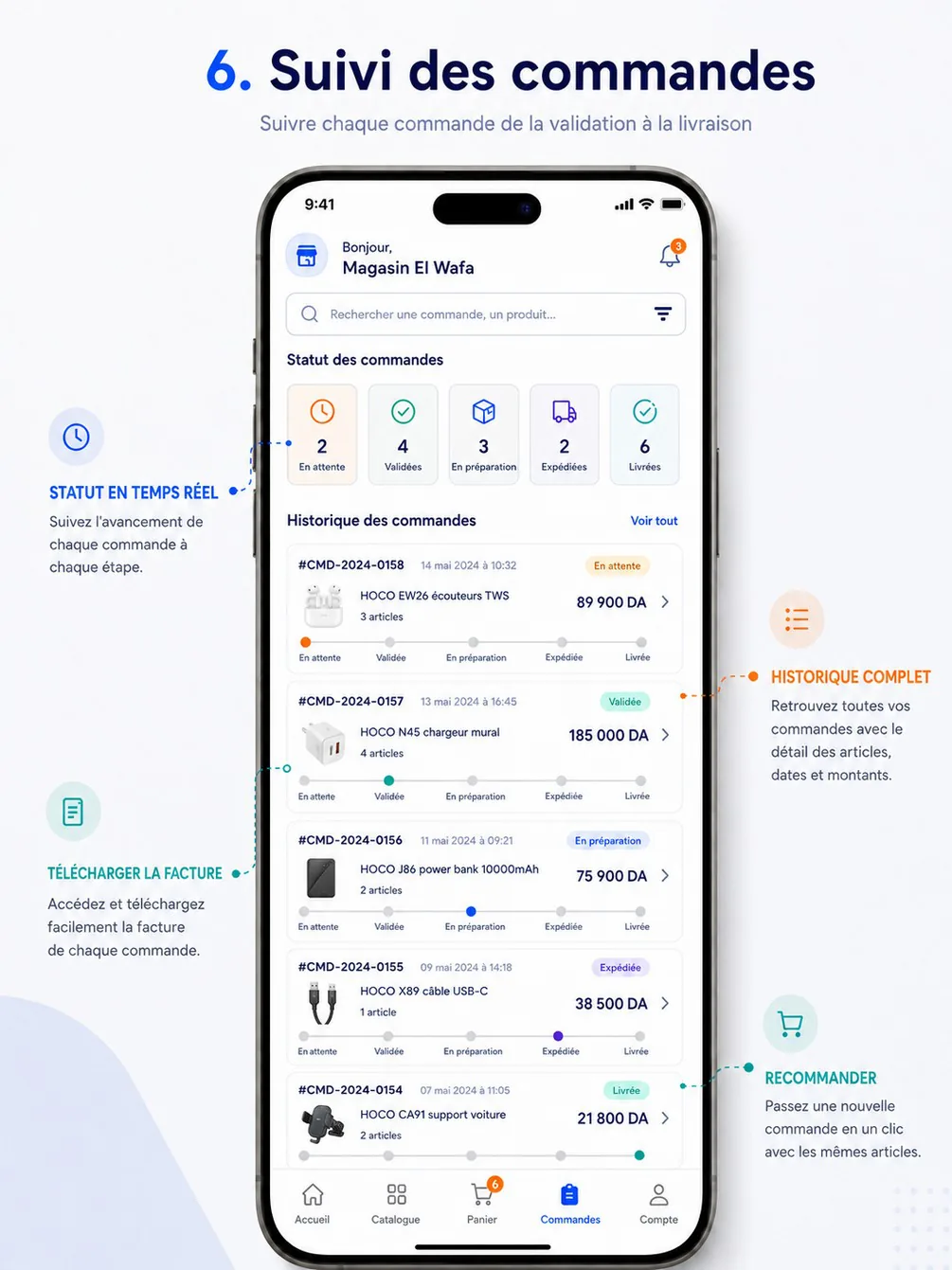
- Counters and tracker (reference screen 6,
orders.summary): En attente =SUBMITTED+PENDING; Validées =VALIDATED; En préparation =PREPARING+READY; Expédiées =SHIPPED; Livrées =DELIVERED.REFUSED,CANCELLEDandRETURNEDare off the tracker, shown with their reason.DRAFTorders are never shown; assisted orders awaiting confirmation are pinned at the top with « À confirmer » (ORD-08). - List (
orders.list, cursor pagination): number, date, first product and line count, total TTC, status pill with the French label, progress tracker; filter by status bucket, search by order number or product name, date range. - Detail (
orders.get): lines and totals, address, payment method, delivery (carrier, tracking link, driver for own fleet), status timeline and modifications (ORD-06), documents (ORD-12), returns (ORD-13) andallowedActions(CANCEL,CONFIRM,REJECT,REORDER,REQUEST_RETURN,OPEN_CLAIM,DOWNLOAD_INVOICE,DOWNLOAD_DELIVERY_NOTE). - Support: « Contacter le support » opens a ticket linked to the order (SUP-01) or the regional WhatsApp (SUP-05).
- Reorder (
orders.reorder, fromDELIVERED,CANCELLED,REFUSED,RETURNED): adds the order's lines to the cart at today's prices and promotions; lines no longer orderable are skipped and reported, quantities that no longer fit the rules are moved to the nearest allowed value and reported; a line not fully available is added with its blocking issue. Nothing addable →422 NOTHING_TO_REORDER. - A reseller sees only their own orders (ACL-03); the history stays consultable for every past order.
Acceptance criteria
- With 2 orders
SUBMITTED, 1PENDINGand 3PREPARING, the counters show En attente 3 and En préparation 3. - A refused order shows Refusée with its reason and no tracker.
- Reordering a delivered order whose product is now archived adds the other lines and reports the archived one.
- Searching
CMD-2026-000158finds that order; another reseller's order number returns nothing.
Data — Order, OrderItem, OrderStatusChange, Delivery, Invoice, ReturnRequest, Cart.
Interfaces
- Screens: RA-21 Orders · RA-22 Order detail & tracking · RW-08 Orders list · RW-09 Order detail, tracking & assisted-order confirmation
- API:
orders.listGET /orders·orders.summaryGET /orders/summary·orders.getGET /orders/{orderId}·orders.reorderPOST /orders/{orderId}/reorder
ORD-08 — Assisted orders
| Release | Priority | Source | Apps | Owner tasks |
|---|---|---|---|---|
| V1 | MUST | cahier §4.4, §6.7 | API · DA · RA · RW · BO | SRV-16 · DSH-06 · WEB-04 · MRA-05 · MDA-09 · DES-09 · DES-14 |
Statement — The system shall let a delegate prepare an order for a reseller in their scope, have it confirmed by the reseller in the app or web or by the administration, and then process it like any other order.
Rules
- Preparation (DA-17, four steps: products, quantities, address check, send):
delegate.assisted.createopens aDRAFTwith channelDELEGATE_ASSISTEDand the delegate as source, priced for the reseller's customer type and filtered by the reseller's visibility; the reseller must be in scope (403 OUT_OF_SCOPE) and not suspended.delegate.assisted.updateedits lines, address and note and returns totals and issues (ORD-02);delegate.assisted.discarddeletes a draft. Drafts are invisible to the reseller and reserve nothing; assisted orders need connectivity (not queued offline). - Sending (
delegate.assisted.submit): same controls as a checkout, a reseller pending validation being allowed; at most one assisted order awaiting confirmation per reseller (409 ASSISTED_ORDER_ALREADY_PENDING). The order gets itsCMD-number, statusPENDING, confirmationAWAITING_RESELLERand an expirynow + orders.assistedConfirmationHours. - Reseller confirmation (RA-23, RW-09,
orders.confirmAssisted): the order is re-priced and re-controlled like a checkout;expectedTotalTtcmust match (409 CART_CHANGEDotherwise — the re-priced order is shown again); the reseller may choose the address and payment method among theirs. Result:CONFIRMED_BY_RESELLER, statusSUBMITTED(orPENDINGwith a pending reason), promotion caps consumed, first-order flag. A pending account cannot confirm (403 ACCOUNT_PENDING_VALIDATION) — the administration can. - Administration confirmation (BO-41,
admin.orders.confirmAssisted,orders.validate): for a reseller without the app or who agreed by phone; channel (PHONE,IN_PERSON,WHATSAPP,OTHER) and a note of 10–500 characters saying who confirmed and how. Result:CONFIRMED_BY_ADMIN, then as R3. - Rejection (
orders.rejectAssisted, reason 3–300 characters) →CANCELLED,REJECTED_BY_RESELLER. Expiry: whenassistedExpiresAtpasses, a job cancels the order (EXPIRED, system reason « Délai de confirmation expiré »); confirmations after the deadline answer409 ASSISTED_ORDER_EXPIRED. A reminder push goes to the reseller 24 hours before expiry. - Confirming the assisted order and confirming the order for preparation are two distinct acts: after
SUBMITTEDthe order waits foradmin.orders.validatelike any order (ORD-14). - Notifications: sending → push, live event and SMS to the reseller with a link to RA-23 (in-app and push only when the reseller has the app); confirmation, rejection and expiry → push to the delegate. The delegate follows their assisted orders and the orders of their resellers read-only in DA-18 (
delegate.orders.list, no purchase price).
| Value | UI label (fr) | Meaning |
|---|---|---|
AWAITING_RESELLER | En attente du revendeur | |
CONFIRMED_BY_RESELLER | Confirmée par le revendeur | |
CONFIRMED_BY_ADMIN | Validée par l'administration | |
REJECTED_BY_RESELLER | Refusée par le revendeur | |
EXPIRED | Expirée | Not confirmed within the configured delay (default 72 h). |
Acceptance criteria
- Delegate Yacine prepares 2 lines for Hassi Phone and sends it: the order is
PENDING/AWAITING_RESELLERwith aCMD-number and appears in BO-41 under Commandes assistées; the reseller receives the push and the SMS. - Sending a second assisted order for the same reseller while the first awaits returns
409 ASSISTED_ORDER_ALREADY_PENDING. - The reseller confirms with the total shown: the order becomes
SUBMITTED/CONFIRMED_BY_RESELLERand waits in BO-41 for confirmation; Yacine receives a push. - A price change between sending and confirmation makes
orders.confirmAssistedreturn409 CART_CHANGEDwith the new total. - An assisted order not confirmed after 72 hours is
CANCELLED/EXPIRED; a confirmation attempt afterwards returns409 ASSISTED_ORDER_EXPIRED. - An administrator confirming with a 5-character note gets
400 VALIDATION_FAILED.
Data — Order (channel, source delegate, confirmation, expiry), OrderItem, OrderStatusChange, Notification, OutboxEvent.
Interfaces
- Screens: RA-23 Assisted order confirmation · DA-17 First-order assistance · DA-18 Assisted orders & orders of my resellers · BO-41 Orders to confirm (new, on hold, assisted) · RW-09 Order detail, tracking & assisted-order confirmation
- API:
orders.confirmAssistedPOST /orders/{orderId}/confirm·orders.rejectAssistedPOST /orders/{orderId}/reject·delegate.assisted.createPOST /delegate/assisted-orders·delegate.assisted.updatePATCH /delegate/assisted-orders/{orderId}·delegate.assisted.submitPOST /delegate/assisted-orders/{orderId}/submit·delegate.assisted.discardDELETE /delegate/assisted-orders/{orderId}·delegate.orders.listGET /delegate/orders·delegate.orders.getGET /delegate/orders/{orderId}·admin.orders.confirmAssistedPOST /admin/orders/{orderId}/confirm-assisted
Notes / open points — The 72-hour delay and what follows expiry are D-23.
ORD-09 — First order flagged and attributed
Statement — The system shall flag each reseller's first order and attribute it to the reseller and to the source delegate, so that reports count first orders and conversions correctly.
Rules
- An order is the first order when it is the reseller's first non-draft order that is not
REFUSEDorCANCELLED, set when it reachesSUBMITTED(checkout, assisted-order confirmation or back-office order):Order.isFirstOrder = true, ResellerStatusFIRST_ORDER(CRM-04), invitation stepFIRST_ORDER(IVT-03). - If that order ends
REFUSEDorCANCELLEDand no other order is open, the flag moves to the reseller's next submitted order and the reseller returns to its previous status; funnel steps already reached stay reached. A returned order keeps the flag (the conversion happened). - Attribution, frozen at submission: the order's delegate is the source delegate of an assisted order, otherwise the reseller's assigned delegate at submission; the invitation funnel credits the invitation's delegate with the first order. The creating delegate (
createdByDelegateId) stays visible on the reseller. - Reports and objectives use these fields: first orders and conversion per delegate (ANA-03), objective metric
FIRST_ORDERS(FLD-02), counted on the submission date inAfrica/Algiersand recomputed if the flag moves. - BO-38 and BO-41 show a 1ère commande badge; the attributed delegate gets a push when the first order is submitted.
Acceptance criteria
- An assisted order prepared by Yacine and confirmed by a new reseller is flagged first order with Yacine as delegate, and counts in Yacine's Premières commandes for that day.
- If that first order is refused and the reseller orders again the next day, the new order carries the flag and the report moves the count to the new date.
- A reseller's second order is not flagged.
Data — Order (isFirstOrder, delegate), Reseller, Invitation, InvitationEvent, Objective.
Interfaces
- Screens: DA-17 First-order assistance
- API:
delegate.assisted.submitPOST /delegate/assisted-orders/{orderId}/submit
ORD-10 — Cancellation by actor and status, with automatic restock
Statement — The system shall let the reseller cancel their own order until the back-office confirms it, let the back-office cancel an order until it ships, and put any reserved or deducted quantities back automatically.
Rules
- Reseller (
orders.cancel, RA-22): only while the status is inorders.cancelAllowedStatuses(SUBMITTED,PENDING— before confirmation), with a reason from the reseller subset ofORDER_CANCEL_REASON(comment required forOTHER); otherwise409 ORDER_TRANSITION_NOT_ALLOWEDand the app says « Commande déjà confirmée : contactez le support ». An assisted order awaiting confirmation is rejected, not cancelled (ORD-08). - Delegate: may only discard their own drafts.
- Back-office (
admin.orders.cancel,orders.update): fromSUBMITTED,PENDING,VALIDATED,PREPARINGorREADY, with a reason code and a comment shown to the reseller; never fromSHIPPEDon (the path isRETURNED) —409 ORDER_TRANSITION_NOT_ALLOWED; refused while an issued invoice has confirmed payments (409 INVOICE_HAS_PAYMENTS). A back-office draft is deleted instead. - System: an assisted order whose confirmation expires.
- Effects, automatic, in the same transaction:
RESERVATION_RELEASEfor every reserved line andRETURNfor any quantity already deducted (STK-03); delivery record closed; an issued invoice without payments cancelled with a full credit note (FIN-08); promotion caps and credit exposure released; first-order flag moved (ORD-09). - Notifications: the reseller (live and push, with the reason, except for their own cancellation), the source or assigned delegate, and the validators (the order leaves the queue).
Acceptance criteria
- A reseller cancels a
SUBMITTEDorder: it becomesCANCELLEDand leaves BO-41 at once. - The same reseller cancelling a
VALIDATEDorder gets409 ORDER_TRANSITION_NOT_ALLOWED. - The back-office cancelling a
READYorder releases its reservations: BO-34 showsRESERVATION_RELEASEmovements referencing the order, with no manual step. - Cancelling a
SHIPPEDorder returns409 ORDER_TRANSITION_NOT_ALLOWED. - A cancellation with reason
OTHERand no comment returns422 REASON_REQUIRED.
Data — Order, OrderStatusChange, StockMovement, Delivery, Invoice, CreditNote, Promotion (caps), ReferenceItem (ORDER_CANCEL_REASON).
Interfaces
- Screens: RA-22 Order detail & tracking
- API:
orders.cancelPOST /orders/{orderId}/cancel·admin.orders.cancelPOST /admin/orders/{orderId}/cancel
ORD-11 — Back-office order on behalf of a reseller
Statement — The system should let the back-office enter an order on behalf of a reseller — typically taken by phone or WhatsApp — with the same pricing and rules as a reseller's own order.
Rules
- BO-40 (
admin.orders.create,orders.create): reseller (any record, prospects included), lines chosen in the catalog with that reseller's prices and visibility, one of the reseller's addresses, payment method allowed for them, note shown to the reseller, internal note, source (PHONE,WHATSAPP,VISIT,OTHER), andsubmit(falsekeeps aDRAFT). - Prices are resolved exactly as at checkout (PRC-02); the back-office cannot type a price. Quantity rules, availability, minimum amount and credit apply as in ORD-02 (no override at creation).
- A submitted order has channel
BACK_OFFICE, the creating user asplacedBy, statusSUBMITTED— orPENDINGat once withRESELLER_NOT_VALIDATEDwhen the point of sale is not approved, orCREDIT_OVER_LIMITunder the approval policy — and waits for confirmation like any order (ORD-14). - The reseller is notified « Une commande a été créée pour vous » (push and inbox) and sees it in their orders.
- A free replacement order created by an after-sales resolution (SUP-04) uses the same path with lines at price 0.
Acceptance criteria
- An order created for Phone Store El Bahia (Demi-gros) is priced with Demi-gros prices and appears in BO-41 and in the reseller's app.
- An order for a prospect not yet approved is
PENDINGwithRESELLER_NOT_VALIDATEDand cannot be confirmed before approval. - A request containing a unit price is refused (
400 VALIDATION_FAILED).
Data — Order (channel, placedBy, source), OrderItem, OrderStatusChange, Notification.
Interfaces
- Screens: BO-40 New order on behalf of a reseller
- API:
admin.orders.createPOST /admin/orders
ORD-12 — Invoice and delivery-note PDFs
| Release | Priority | Source | Apps | Owner tasks |
|---|---|---|---|---|
| V1 | MUST | cahier §4.4 | API · BO · RA · RW | SRV-16 · DSH-06 · MRA-05 · DQA-09 |
Statement — The system shall generate the delivery note and the invoice of each order as PDF documents at the configured statuses and make them available to the back-office and to the reseller.
Rules
- The delivery note (
BL-YYYY-NNNNNN) is generated when the order reachesREADY(crossing rule); it lists lines and quantities without prices, the order number, the reseller, the address and the parcel count. - The invoice (
FAC-YYYY-NNNNNN) is generated when the order reachesbilling.invoiceOn(defaultSHIPPED), with the legal mentions of FIN-01. - Documents are produced by the worker as A4 PDFs (French, Arabic-ready, HOCO branding — DQA-09), stored as private
GENERATED_DOCUMENTfiles and served through signed URLs valid 5 minutes. - The reseller downloads them from RA-22 / RW-09 (
orders.document, own orders only); before generation, or for a cancelled invoice, the answer isDOCUMENT_NOT_AVAILABLEwith the status from which it exists. - The back-office can regenerate a document (
admin.orders.documents,orders.update) — same number and same amounts, new PDF version, the previous version kept; a document's amounts never change after issue (corrections go through a credit note).
Acceptance criteria
- Moving an order to
READYproducesBL-2026-000123; RA-22 shows « Télécharger le bon de livraison ». - Before shipping,
orders.documentfor the invoice returnsDOCUMENT_NOT_AVAILABLEwithavailableFrom: "SHIPPED". - Regenerating the invoice keeps its number and amounts and adds a version.
- A signed URL used after 5 minutes is refused.
Data — Order, Invoice, File (GENERATED_DOCUMENT), NumberSequence, Delivery (delivery-note number).
Interfaces
- Screens: RA-22 Order detail & tracking · BO-39 Order detail (controls, actions, history)
- API:
orders.documentGET /orders/{orderId}/documents/{type}·admin.orders.documentsPOST /admin/orders/{orderId}/documents
ORD-14 — Back-office confirmation of every order
Statement — The system shall make every order — from the reseller app, the web, an assisted order or the back-office — wait for an explicit confirmation by a back-office user holding orders.validate before any preparation.
Rules
- Every new order lands
SUBMITTED(orPENDINGwhen on hold or awaiting the reseller) and enters the queue « Commandes à confirmer » (BO-41,admin.orders.toConfirm): exactly the orders inSUBMITTEDorPENDING, oldest first, with their live controls, in three tabs — Nouvelles (SUBMITTED), En attente (PENDINGexcept assisted), Commandes assistées (awaiting the reseller). - Only
admin.orders.validate, called by a person, moves an order toVALIDATED(ORD-05 R2); no setting, job or control does — there is no auto-validation setting. - The queue updates live: an order entering it appears without reload (
order.to_confirm), an order leaving it (confirmed, refused, cancelled, expired) disappears; counts per tab and an overdue count are shown. - An order waiting longer than
orders.confirmationSlaHours(24 h) is flagged En retard in the queue and raises one reminder to the validators; the general dashboard shows the queue size and the oldest waiting time (ANA-01). - The apps tell the reseller that confirmation is pending (« Elle sera confirmée par l'équipe HOCO avant sa préparation ») and the tracker shows En attente until confirmation.
- Confirmation reserves stock with the default settings, creates the delivery record (
TO_PREPARE) and notifies the reseller (« Commande confirmée ») and, for an assisted order, the delegate.
Acceptance criteria
- A checkout, an assisted order confirmed by the reseller and a phone order each appear in BO-41 and stay
SUBMITTEDuntil a validator confirms them. - Confirming from BO-41 removes the row live for every validator looking at the queue and moves the reseller's tracker to Validée.
- An order waiting 25 hours shows En retard and the validators receive one reminder.
- A user without
orders.validategets403 PERMISSION_DENIEDonadmin.orders.toConfirmandadmin.orders.validate.
Data — Order, OrderStatusChange, Delivery, StockMovement, Notification, OutboxEvent.
Interfaces
- Screens: BO-41 Orders to confirm (new, on hold, assisted)
- API:
admin.orders.toConfirmGET /admin/orders/to-confirm·admin.orders.validatePOST /admin/orders/{orderId}/validate
Notes / open points — The pilot measures the median queue time; if it exceeds about four working hours, reserving at SUBMITTED is reconsidered (D-22).
ORD-15 — Real-time order status for the reseller
| Release | Priority | Source | Apps | Owner tasks |
|---|---|---|---|---|
| V1 | MUST | Team decision (17 Oct 2026), §5.4 | API · RA · RW | SRV-16 · SRV-26 · WEB-04 · MRA-05 · MRA-10 |
Statement — The system shall deliver every status change and modification of a reseller's order to that reseller in real time while their app or web page is open, and as a push and inbox notification.
Rules
- Live channel: while the reseller app is in the foreground or the reseller web is open, the client keeps a Server-Sent Events connection to
events.stream(GET /v1/events, the reseller's own events only). Events:order.status_changed(order id, number, from, to, time, reason),order.modified,assisted_order.awaiting_confirmation,return.status_changed,ticket.replied,ticket.resolved,notification.created. - On an event, the open screens update without reload: the counters and list (RA-21, RW-08), the order detail and tracker (RA-22, RW-09), the badge of the inbox.
- Notification channel: every status change and every modification also creates an inbox notification and a push (transactional category, cannot be disabled — NOT-05), so a reseller with the app closed is informed; the push opens the order detail.
- Delivery guarantees: events are kept 24 hours per user and replayed after
Last-Event-IDon reconnection; beyond 24 hours the server sendsresyncand the client refetches; a: pingheartbeat every 25 seconds, reconnection with back-off (1 s to 30 s). The mobile app closes the stream in the background (push takes over) and reopens it in the foreground. - Latency: a status change committed in the back-office reaches an open reseller screen within 2 seconds and the push within 1 minute.
- Sign-out, revocation, suspension or password change close the stream from the server; at most 3 streams per user.
Acceptance criteria
- With RA-22 open on
CMD-2026-000158, confirming the order in the back-office moves the tracker to Validée within 2 seconds without any user action. - With the app closed, the same change produces a push « Commande confirmée » that opens RA-22.
- After 2 minutes offline, reconnecting with
Last-Event-IDdelivers the missedorder.status_changedevents in order. - A staff session calling
events.streamgets403 PERMISSION_DENIED.
Data — OutboxEvent, Notification, NotificationDelivery; per-user event stream in Redis.
Interfaces
- Screens: RA-21 Orders · RA-22 Order detail & tracking · RW-09 Order detail, tracking & assisted-order confirmation
- API:
events.streamGET /events
ORD-13 — Returns with automatic restock
| Release | Priority | Source | Apps | Owner tasks |
|---|---|---|---|---|
| V1 | MUST | Team decision (17 Oct 2026), §4.4 | API · BO · RA · RW | SRV-20 · DSH-13 · WEB-04 · MRA-10 · SRV-29 |
Statement — The system shall let a reseller request the return of delivered items, let the back-office approve or reject it and record the reception, and automatically re-enter accepted quantities into stock and issue the credit note.
Rules
- Request (RA-40, RW-14,
returns.create): on aDELIVEREDorder withinreturns.windowDays(7 days) of delivery (422 RETURN_WINDOW_EXPIREDafter — the app then offers an after-sales claim, SUP-04); per line a quantity up to the returnable quantity (delivered − already returned − already claimed,422 QUANTITY_NOT_ALLOWED), a reason (at least 10 characters) and photos (at least one per request, at most 4 per item). CreatesReturnRequestRET-YYYY-NNNNNNinREQUESTED, originRESELLER; refused for a suspended store (403 RESELLER_SUSPENDED) or an order not delivered (409 ORDER_NOT_DELIVERED). Returns also come from an after-sales resolutionRETURN(bornAPPROVED) and from a door refusal (SHIPPED → RETURNED, bornIN_TRANSIT). - Decision (BO-69,
admin.returns.decide,orders.validate): approve — possibly fewer units — or reject with a reason (10–500 characters, shown to the reseller); an approval may arrange the transport at once (RESELLER_DROP_OFF,CARRIER,DELEGATE_PICKUP) and moves the return toIN_TRANSIT. Nothing moves in stock or money at this stage. - Reception (
admin.returns.receive,stock.update): per item, received, accepted (credited) and restocked (sellable) quantities withrestockQty ≤ acceptedQty ≤ receivedQty ≤ approved, and the condition (SELLABLE,DEFECTIVE,DAMAGED,MISSING). In one transaction:RETURNstock movements for the restocked quantities — automatic, no separate stock entry (STK-03); a credit noteAV-YYYY-NNNNNNfor Σ accepted × the line's net unit price TTC, allocated to the order's invoice balance or kept as the reseller's credit (FIN-08); statusRECEIVEDthenREFUNDED, orREJECTEDwhen nothing is accepted. - The order becomes
RETURNEDonly when every delivered unit has been returned and accepted; otherwise it staysDELIVEREDwith a Retour partiel badge. - Lifecycle (
ReturnStatus):REQUESTED → APPROVED → IN_TRANSIT → RECEIVED → REFUNDED, orREJECTEDat decision or inspection; any other move answers409 RETURN_TRANSITION_NOT_ALLOWED(Lifecycles › Return). - Every step reaches the reseller live and by push (
return.status_changed), with the credit note downloadable; requests alert the validators (BO-69 queue); aDELEGATE_PICKUPassignment notifies the reseller's delegate.
| Value | UI label (fr) | Meaning |
|---|---|---|
REQUESTED | Demandé | |
APPROVED | Accepté | |
IN_TRANSIT | En retour | Approved; goods on their way back. |
RECEIVED | Reçu | |
REFUNDED | Remboursé / avoir émis | |
REJECTED | Refusé |
Acceptance criteria
- On an order delivered 3 days ago, the reseller returns 3 cables with a photo and a reason:
RET-2026-000012isREQUESTEDand appears in BO-69. - A request 8 days after delivery returns
422 RETURN_WINDOW_EXPIRED; a request without any photo returns field codePHOTO_REQUIRED. - Approving with
DELEGATE_PICKUPmoves it toIN_TRANSITand notifies the delegate. - Receiving 3 units, accepting 3 and restocking 3 posts one
RETURNmovement of +3, issuesAV-2026-000004for 3 × 41 650 = 124 950 and moves the return toREFUNDED, in one operation. - A unit received
DAMAGEDis credited if accepted but not restocked. - When every delivered unit of an order has come back accepted, the order becomes
RETURNED.
Data — ReturnRequest, ReturnItem, StockMovement, CreditNote, Invoice, Order, File, Notification.
Interfaces
- Screens: RA-22 Order detail & tracking · RA-40 Return request · BO-69 Returns & after-sales claims · RW-09 Order detail, tracking & assisted-order confirmation · RW-14 Support: tickets, after-sales claims, returns & WhatsApp
- API:
returns.createPOST /orders/{orderId}/returns·returns.listGET /returns·returns.getGET /returns/{returnId}·admin.returns.listGET /admin/returns·admin.returns.getGET /admin/returns/{returnId}·admin.returns.decidePOST /admin/returns/{returnId}/decision·admin.returns.receivePOST /admin/returns/{returnId}/reception·admin.tickets.resolvePOST /admin/tickets/{ticketId}/resolution
Notes / open points — Return window, accepted reasons and who carries goods back are D-35. The window setting is named returns.windowDays on some API pages and returns.windowDays on others; one name must be kept.
Error codes
| Code | HTTP | Raised when |
|---|---|---|
ACCOUNT_PENDING_VALIDATION · RESELLER_SUSPENDED | 403 | Checkout, confirmation or return by a pending account or a suspended store |
OUT_OF_SCOPE | 403 | Assisted order for a reseller outside the delegate's scope |
NOT_FOUND · DOCUMENT_NOT_AVAILABLE | 404 | Another reseller's order; document not generated yet or cancelled |
ORDER_TRANSITION_NOT_ALLOWED | 409 | Move outside the transition table, reseller cancellation after confirmation |
CART_CHANGED | 409 | Re-validated total differs from the total the reseller saw (checkout, assisted confirmation) |
ASSISTED_ORDER_ALREADY_PENDING · ASSISTED_ORDER_EXPIRED · ASSISTED_CONFIRMATION_NOT_PENDING | 409 | Assisted-order guards |
ORDER_NOT_MODIFIABLE · ORDER_INVOICED · INVOICE_HAS_PAYMENTS | 409 | Modification or cancellation guards |
ORDER_NOT_DELIVERED · RETURN_TRANSITION_NOT_ALLOWED | 409 | Return on an undelivered order; return move outside its lifecycle |
IDEMPOTENCY_KEY_REUSED · VERSION_CONFLICT | 409 | Same key with another body; stale version |
CART_EMPTY · CART_LINE_LIMIT_REACHED · NOTHING_TO_REORDER | 422 | Cart guards |
PRODUCT_UNAVAILABLE · QUANTITY_NOT_ALLOWED · STOCK_INSUFFICIENT · ORDER_MIN_AMOUNT_NOT_MET | 422 | Cart rules |
ADDRESS_NOT_DELIVERABLE · ADDRESS_MISSING · PAYMENT_METHOD_NOT_ALLOWED · CREDIT_LIMIT_EXCEEDED | 422 | Checkout and confirmation guards |
RESELLER_NOT_VALIDATED · REASON_REQUIRED | 422 | Confirmation of an unapproved reseller; missing reason |
RETURN_WINDOW_EXPIRED | 422 | Return requested after the window |
IDEMPOTENCY_KEY_REQUIRED | 400 | Checkout or another required-key operation without the header |
Stock
Global or per-warehouse stock, physical, reserved and available quantities, reservation and deduction by order status with automatic restock on cancellation and return, the movement ledger, alerts, inventories, availability-only display and overrides.
Preparation & delivery
Preparation with picking list up to ready, shipping with own fleet or carrier and tracking number, proof of delivery, carriers, the V2 carrier API and the delivery-fee policy.