System, returns, guest mode & V2
Screen specifications RA-36 to RA-41 of the reseller app — system states, the V1 return request with its tracking and credit note, guest mode with the price lock, and the V2 packs, loyalty and rewards screens.
This page gathers the cross-cutting system states (RA-36), two V1 screens decided on 17 October 2026 — the return request (RA-40, ORD-13) and guest mode (RA-41, AUTH-10) — and the three V2 screens (packs, loyalty, rewards), which get a short specification here and their full design in DES-30.
| ID | Screen | UI title | Section | Release | Design | Build |
|---|---|---|---|---|---|---|
RA-36 | System states (offline, maintenance, forced update, errors, empty) | États système | System | V1 | Day 10 | MOB-05 |
RA-41 | Guest mode — price lock and sign-up prompts | Mode invité | System | V1 | Day 6 | MOB-06 |
| ID | Screen | UI title | Section | Release | Design | Build |
|---|---|---|---|---|---|---|
RA-37 | Packs list & detail | Packs rentables | V2 | V2 | DES-30 | MRA-20 |
RA-38 | Loyalty: points, level, history | Fidélité | V2 | V2 | DES-30 | MRA-20 |
RA-39 | Rewards & redemption | Récompenses | V2 | V2 | DES-30 | MRA-20 |
RA-36 — System states (offline, maintenance, forced update, errors, empty)
| Field | Value |
|---|---|
| Screen | System states (offline, maintenance, forced update, errors, empty) · System |
| French title | États système |
| Release | V1 |
| Design day | Day 10 — DES-10 |
| Build task | MOB-05 |
| Requirements | ADM-07 · NFR-07 |
| Reference screen | None — follow the design system |
Purpose — One consistent catalogue of the states every screen can fall into, so that Imad builds them once (MOB-05) and Akram designs them once (ADM-07, NFR-07).
Entry points & exits — Any screen. The blocking states (forced update, maintenance, suspended) replace the whole app; the others live inside a screen.
Layout — the states
| State | Trigger | Layout and copy | Actions |
|---|---|---|---|
| Offline banner | No connectivity for 3 s | Banner under the header, neutral tone: « Hors connexion — données du 14 nov. à 10:32 » | Disappears with the snackbar « Connexion rétablie » |
| Offline, nothing cached | No connectivity and no cache for the screen | Full EmptyState: illustration, « Pas de connexion internet », « Vérifiez votre connexion puis réessayez. » | « Réessayer » |
| Forced update | appConfig.get → forceUpdate, or any 426 UPGRADE_REQUIRED | Full screen, no back: illustration, « Mise à jour requise », « Une nouvelle version de l'application HOCO est nécessaire pour continuer. » | « Mettre à jour » → storeUrl |
| Update available | updateAvailable | Dialog once per version: « Nouvelle version disponible » and releaseNotes | « Mettre à jour », « Plus tard » |
| Maintenance | maintenance.enabled, or any 503 MAINTENANCE | Full screen: « Maintenance en cours », maintenance.message, « Retour prévu vers 14:30 » (from until) | « Réessayer » → appConfig.get |
| Account suspended | 403 ACCOUNT_SUSPENDED | Full screen after local sign-out: « Votre compte est suspendu », « Contactez HOCO pour le réactiver. » (or « Ce compte a été désactivé. ») | « Écrire sur WhatsApp » (default number), « Appeler HOCO » (settings.support.phone), « Continuer sans compte » |
| Session expired | 401 UNAUTHENTICATED | Banner on the guest home: « Votre session a expiré. Reconnectez-vous. » | « Se connecter » |
| Generic error | 5xx, unexpected codes | ErrorState: « Une erreur est survenue », the server message when safe, « Code : req_01J9Z4K7M2 » in caption | « Réessayer » |
| Not found | 404 NOT_FOUND | « Ce contenu n'est plus disponible » | « Retour » to the parent list |
| Too many attempts | 429 | Inline: « Trop de tentatives. Réessayez dans 45 s. » with a countdown | Button re-enabled at zero |
| Permission denied | Camera, location (guest WhatsApp), notifications | Explanation card with the reason in one sentence | « Ouvrir les paramètres »; an alternative when one exists (manual code, wilaya list) |
| Empty list | No data | EmptyState: illustration, title, one helpful sentence, one action — wording per screen | Screen-specific |
| Loading | Any first load | Skeleton shaped like the content, shown after 300 ms (no flash on fast responses); never a blank screen; a load above 10 s turns into the generic error | — |
| Feedback | After an action | Snackbar 4 s (success, info, error), with « Annuler » when undo exists; destructive actions confirm in a Dialog | — |
Data — appConfig.get → forceUpdate, updateAvailable, storeUrl, releaseNotes, maintenance.enabled, maintenance.message, maintenance.until, settings.support; the error envelope error.code, error.message, error.details, error.requestId.
Actions — As in the table; « Réessayer » repeats the failed request (with the same Idempotency-Key for a write).
Rules
- Accessibility (NFR-07): every state has a text title (never colour or illustration alone), touch targets of 48 dp, contrast AA, screen-reader labels on illustrations marked decorative.
- The live connection (
events.stream) never shows a state of its own: its loss is silent, data refreshes on focus and push. - Blocking states keep the pending deep link and resume it once cleared.
States — This screen is the states.
Copy — Every string of the table above.
Analytics — system_state_shown with state, code, screenId; forced_update_clicked.
Acceptance criteria
- Setting the minimum version above the installed one in BO-66 blocks the app on the next launch or the next call.
- Maintenance shows the message and end time typed in BO-66.
- With airplane mode on, every previously viewed screen opens with the offline banner and no write action is possible.
- An error state always shows the request id.
RA-37 — Packs list & detail
| Field | Value |
|---|---|
| Screen | Packs list & detail · V2 |
| French title | Packs rentables |
| Release | V2 |
| Design day | DES-30 — V2 designs (no fixed day) |
| Build task | MRA-20 |
| Requirements | PRM-06 |
| Reference screen | reseller-06-promotions-loyalty |
V2 — designed in DES-30, built in MRA-20.
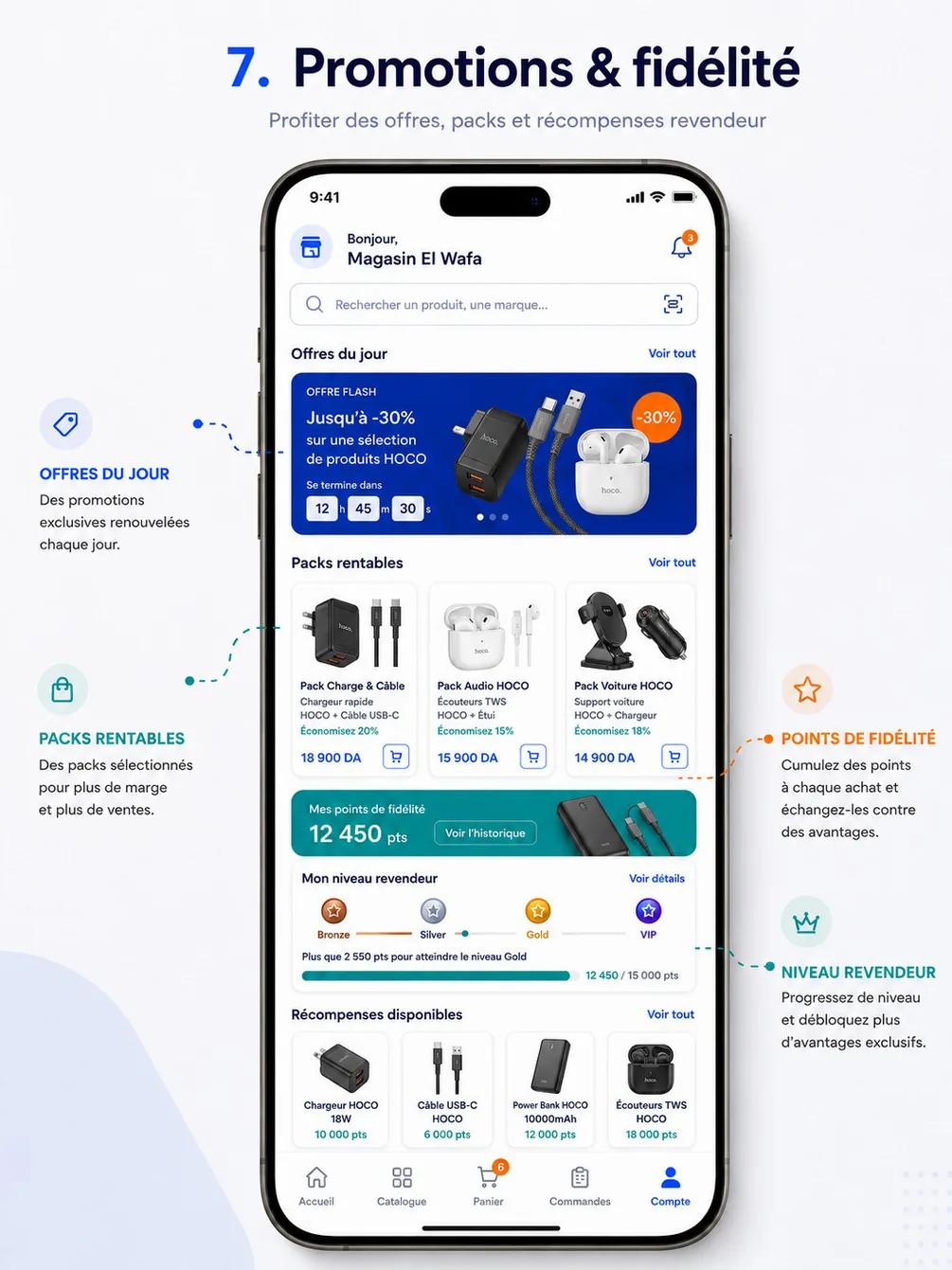
Purpose — Offer profitable bundles of references at a pack price and add them to the cart as one unit (PRM-06, cahier §5.5 « Ajouter un pack au panier »).
Layout — « Packs rentables » section on RA-24 and a full list: pack cards as on the reference (photo, name, contents « Chargeur HOCO + Câble USB-C », « Économisez 20 % », pack price, cart icon). Detail: contents with quantities, the individual total struck through, the pack price and the saving, availability (a pack is available only when every item is), QuantityStepper (number of packs), « Ajouter le pack au panier ».
Data and actions — packs.list, packs.get; cart.packs.add { packId, qty } with an Idempotency-Key. In the cart a pack is one line (kind: "PACK") edited as a whole.
Rules — Prices per customer type; guests see packs with the price lock; a pack cannot be split in the cart.
Acceptance criteria — Adding a pack adds one cart line at the pack price; the saving shown equals the difference with the items bought separately.
RA-38 — Loyalty: points, level, history
| Field | Value |
|---|---|
| Screen | Loyalty: points, level, history · V2 |
| French title | Fidélité |
| Release | V2 |
| Design day | DES-30 — V2 designs (no fixed day) |
| Build task | MRA-20 |
| Requirements | LOY-01 · LOY-03 · LOY-05 |
| Reference screen | reseller-06-promotions-loyalty |
V2 — designed in DES-30, built in MRA-20.
Purpose — Show the points balance, the level (Bronze, Silver, Gold, VIP) with the progress to the next one, and a traceable points history (LOY-01, LOY-03, LOY-05).
Layout — As on the reference: « Mes points de fidélité 12 450 pts » card with « Voir l'historique »; « Mon niveau revendeur » with the four levels and « Plus que 2 550 pts pour atteindre le niveau Gold »; the period and benefits of each level; history rows (Gain, Bonus, Échange, Expiration, Ajustement, Annulation) with order reference, date and ± points; expiring points notice. V2 also turns on the home Points tile.
Data — loyalty.summary, loyalty.transactions.
Rules — Points credited after delivery or payment per setting, reversed on cancellation or return (cahier §4.6); levels computed over a period with thresholds validated by HOCO.
Acceptance criteria — Every points movement in the history matches a back-office ledger entry (cahier §12 Fidélité).
RA-39 — Rewards & redemption
| Field | Value |
|---|---|
| Screen | Rewards & redemption · V2 |
| French title | Récompenses |
| Release | V2 |
| Design day | DES-30 — V2 designs (no fixed day) |
| Build task | MRA-20 |
| Requirements | LOY-04 |
| Reference screen | reseller-06-promotions-loyalty |
V2 — designed in DES-30, built in MRA-20.
Purpose — Exchange points for rewards — voucher, free delivery, discount, gift, early access to new products (LOY-04).
Layout — « Récompenses disponibles » grid as on the reference (image, name, cost in points); unavailable rewards greyed with the reason (« Points insuffisants », « Épuisé »); confirmation sheet « Échanger 10 000 pts contre … ? Solde après : 2 450 pts »; « Mes récompenses » with voucher codes, status and expiry.
Data and actions — loyalty.rewards, loyalty.redeem with an Idempotency-Key, loyalty.redemptions.
Rules — Unavailable rewards cannot be claimed (cahier §5.5); the redemption debits the points once.
Acceptance criteria — A redemption appears once in the points history and in « Mes récompenses ».
RA-40 — Return request
| Field | Value |
|---|---|
| Screen | Return request · Orders |
| French title | Demande de retour |
| Release | V1 |
| Design day | Day 9 — DES-09 |
| Build task | MRA-10 |
| Requirements | ORD-13 · SUP-04 |
| Reference screen | None — follow the design system |
Purpose — Let the reseller send back intact items of a delivered order — an ordering mistake, an item not ordered — follow the return until HOCO receives it, and get the credit note (ORD-13, FIN-08). Faulty, damaged, wrong or missing products go through an after-sales claim instead (RA-33), which may itself create a return.
Entry points & exits — « Demander un retour » on RA-22 (Livrée orders within the return window); « Mes retours » on RA-27; the resolution card Retour of RA-34; pushes return.requested, return.approved, return.rejected, return.received; /orders/{orderId}/return, /returns, /returns/{returnId}. Exits to RA-22, RA-30 (credit note), RA-33 (« Produit défectueux ? »).
Layout — form (full screen, bottom navigation hidden):
AppBar« Demande de retour ».- Order card: « CMD-2026-000158 — livrée le 14 nov. », « Retour possible jusqu'au 21 nov. ».
- Banner: « Produit défectueux, endommagé ou erroné ? Faites plutôt une réclamation SAV. » with « Signaler un problème » → RA-33.
- « Articles à retourner »: the order's lines with a checkbox and, once checked, a
QuantityStepperfrom 1 to the delivered quantity minus the quantities already returned (« 10 livrés · 2 déjà retournés »). - « Motif »:
RadioCardlist — « Erreur de commande », « Article non commandé ou en trop », « Colis abîmé à la livraison », « Autre ». TextField« Commentaire » (required for Autre, 500 characters).- « Photos » — up to 6; required for « Colis abîmé à la livraison ».
- Information: « Après acceptation par HOCO, vous recevrez les instructions de retour. Un avoir sera émis à la réception des articles. »
StickyFooter: « Envoyer la demande ».
Layout — return detail
AppBar« RET-2026-000012 » and theStatusBadge.ProgressTracker: Demandé → Accepté → En retour → Reçu → Remboursé / avoir émis, with dates; Refusé replaces it with the reason.- After approval: « Instructions de retour » card (how and where to send or hand over the goods, written by HOCO).
- Lines: requested quantity and, after reception, the accepted quantity (« 2 demandés · 2 acceptés »).
- When refunded: « Avoir AV-2026-000031 — 4 980,00 DA » with « Voir l'avoir (PDF) » and « Déduit de votre solde ».
- Related order link and history
Timeline.
Layout — list (« Mes retours »): rows with number, order number, date, line count, StatusBadge; empty state « Aucun retour. Un retour se demande depuis une commande livrée. »
Data
| Shown or used | Source |
|---|---|
| Window | settings.returns.windowDays (7) and orders.get → delivery.deliveredAt |
| Lines and returnable quantities | orders.get → items[].id, name, sku, imageUrl, quantity, returnedQuantity (Assumption — to expose so the stepper stops at what remains returnable) |
| Upload | files.createUpload (TICKET_ATTACHMENT, 10 MB) → PUT → files.completeUpload — Assumption, a dedicated RETURN_PHOTO purpose may be added |
| Create | returns.create { items: [{ orderItemId, qty }], reasonCode, comment?, photoFileIds[] } → id, number, status |
| List | returns.list ?status=&cursor= → items[] (id, number, order.number, createdAt, lineCount, status) |
| Detail | returns.get → status, statusHistory[], items[] (name, requestedQty, acceptedQty), instructions, rejectionReason, creditNote (number, amountTtc, pdf) |
| Live | events.stream → return.status_changed (returnId, from, to, reason) |
Actions
- « Envoyer la demande » →
returns.createwith anIdempotency-Keykept until success → the return detail with the snackbar « Demande de retour envoyée — RET-2026-000012 ». - Live
return.status_changed→ the tracker animates; the order's « Retours et SAV » block on RA-22 updates too. - « Voir l'avoir (PDF) » → signed URL (5 minutes) in the PDF viewer.
Rules
- Only Livrée orders of the reseller, within
settings.returns.windowDays(7) of delivery; quantities not above the delivered quantity minus what is already returned (ORD-13). - HOCO approves or rejects (with a reason) in BO-69; approval may move the return to En retour when the goods are on their way.
- At reception HOCO records the accepted quantities: they re-enter stock automatically and a credit note is issued for them (STK-03, FIN-08); the credit note lowers the balance on RA-29. There is no cash refund in the app.
- Reason codes are an Assumption (
RETURN_REASONlist to add to the reference lists).
States
| Situation | Message or behaviour |
|---|---|
| Window over | Button hidden on RA-22; a deep link shows « Le délai de retour (7 jours après la livraison) est dépassé. » |
422 RETURN_WINDOW_EXPIRED | Same message |
400 VALIDATION_FAILED | Under the fields (no line selected, quantity too high, missing photo or comment) |
| Upload pending | « Envoi des photos… » on the button |
| Offline | Form kept as a draft, send disabled; detail and list cached |
Copy — « Demande de retour » · « Retour possible jusqu'au {date} » · « Produit défectueux, endommagé ou erroné ? Faites plutôt une réclamation SAV. » · « Articles à retourner » · « {delivered} livrés · {returned} déjà retournés » · « Motif » · « Erreur de commande » · « Article non commandé ou en trop » · « Colis abîmé à la livraison » · « Autre » · « Commentaire » · « Photos » · « Après acceptation par HOCO, vous recevrez les instructions de retour. Un avoir sera émis à la réception des articles. » · « Envoyer la demande » · « Instructions de retour » · « {requested} demandés · {accepted} acceptés » · « Avoir {number} — {amount} » · « Voir l'avoir (PDF) » · « Déduit de votre solde » · « Mes retours ».
Analytics — return_started with orderId; return_requested with reasonCode, lineCount, units; return_status_viewed with status.
Acceptance criteria
- A return of 2 units of one line, requested 3 days after delivery, appears in the back-office returns queue (BO-69).
- After reception in the back-office, the reseller sees Remboursé / avoir émis, the credit note PDF, and a lower balance on RA-29; the 2 units are back in stock.
- A return cannot be requested 8 days after delivery.
- Each status change arrives live on an open detail and as a notification.
RA-41 — Guest mode — price lock and sign-up prompts
| Field | Value |
|---|---|
| Screen | Guest mode — price lock and sign-up prompts · System |
| French title | Mode invité |
| Release | V1 |
| Design day | Day 6 — DES-06 |
| Build task | MOB-06 |
| Requirements | AUTH-10 · PRC-02 |
| Reference screen | None — follow the design system |
Purpose — Let a shop owner discover the catalog, product pages and promotions without an account and contact HOCO on WhatsApp, while prices stay hidden and nothing can be ordered — then turn that interest into an account (AUTH-10, PRC-02).
Entry points & exits — « Découvrir le catalogue sans compte » on RA-02; next launches without session; sign-out; a shared product or promotion link opened without session. Exits to RA-03 (« Créer mon compte ») and RA-07 (« J'ai déjà un compte »), then back to where the guest was.
Layout — the guest pieces (applied on the screens of the shopping and promotions pages):
- Guest header on tab roots: HOCO logo, « Bienvenue sur HOCO », « Se connecter » (text button) instead of the bell.
PriceLockinline (cards, lists, suggestions, scanner sheet): lock icon and « Prix réservé aux revendeurs » in place of the price; promotion badges (« −30 % ») stay.PriceLockcard (product detail, promotion detail): « Créez un compte pour voir les prix », « Gratuit · 3 minutes », « Créer mon compte », « J'ai déjà un compte »; the recommended retail price stays visible.- Sign-up prompt sheet (
BottomSheet), opened by any locked action: title « Créez votre compte revendeur », three benefits with icons — « Vos prix selon votre type de client (Super-gros, Demi-gros, Détail) », « Commande en quelques secondes, suivi en direct », « Offres réservées aux revendeurs » — « Créer mon compte », « J'ai déjà un compte », « Plus tard ». - Locked tabs Panier, Commandes, Compte: full-screen version of the prompt with an illustration (no sheet).
- Home guest card in the attention slot of RA-09.
WhatsAppButtonon every guest screen.
What triggers the prompt — tap on a PriceLock; the Panier, Commandes or Compte tab; the Commandes quick tile; a deep link that needs a session (/cart, /orders/…, /favorites, /finance/…, /support/…); the « Prix » section of RA-13. Nothing interrupts browsing on its own: no timed pop-up.
Data — Guests call, without Authorization, the operations marked optional: catalog.home, catalog.categories, catalog.brands, catalog.products.list, catalog.products.suggest, catalog.facets, catalog.products.get, catalog.products.similar, catalog.products.byBarcode, promotions.list, promotions.get, banners.list, support.whatsapp, plus appConfig.get and the public reference data. Responses carry price: null, priceLocked: true, isFavorite: false, priceRange: null.
Actions
- « Créer mon compte » → RA-03 (stored invitation code prefilled); « J'ai déjà un compte » → RA-07. After success, the app returns to the screen the guest was on — now with the prices of the declared type — or opens the deep link that was blocked.
- « Plus tard » closes the sheet.
- WhatsApp: guest resolution of the overview (position or chosen wilaya → region number).
Rules
- Guests never receive a price, a discount amount, a margin or a price bound from the API; the app has no price to hide — it renders
PriceLockwheneverpriceLockedis true (PRC-02). - No cart, no favorites, no orders, no notifications, no push for guests; the API answers
401on those operations. - After sign-up the reseller sees the prices of the declared customer type right away (
catalog.pricesVisibleBeforeValidation, defaulttrue, decision to confirm); ordering waits for the validation (RA-06). - Guests are counted in analytics with
userKind: "guest"; no personal data is collected before sign-up. Catalog views by guests do not record the invitation step Catalogue consulté (only signed-in resellers do).
States — Offline: cached public catalog with locks. Expired session: the app falls back to guest mode with the expiry banner. Pending reseller with pricesVisibleBeforeValidation = false: the same PriceLock with « Prix visibles après validation de votre compte » and no sign-up prompt.
Copy — « Bienvenue sur HOCO » · « Se connecter » · « Prix réservé aux revendeurs » · « Créez un compte pour voir les prix » · « Gratuit · 3 minutes » · « Créer mon compte » · « J'ai déjà un compte » · « Créez votre compte revendeur » · « Vos prix selon votre type de client (Super-gros, Demi-gros, Détail) » · « Commande en quelques secondes, suivi en direct » · « Offres réservées aux revendeurs » · « Plus tard » · « Prix visibles après validation de votre compte ».
Analytics — guest_mode_started; guest_lock_tapped with source (card, product, tab, filter, deeplink); guest_signup_prompt_shown; guest_converted with minutesAsGuest, screensViewed.
Acceptance criteria
- Browsing as a guest through home, catalog with filters, product detail, promotions and search, no price, discount amount, margin or price bound appears anywhere (QA checks the API responses too).
- Every locked action opens the prompt; nothing can be added to a cart or to favorites.
- Signing up from a product's lock returns to that product with the reseller's price.
- The WhatsApp button opens a regional number for a guest who allowed the location, and asks for the wilaya otherwise.
Account & support
Screen specifications RA-26 to RA-28 and RA-32 to RA-35 of the reseller app — notifications and announcements, account hub, store profile and documents, support with regional WhatsApp, tickets and after-sales claims, conversation, and settings.
Delegate app
The délégué's day, the navigation model, offline-first, location and outdoor-readability rules, and the index of the 28 delegate-app screens.