Shopping
Screen specifications RA-09 to RA-16 of the reseller app — home, search, barcode scanner, catalog, advanced filters and sort, product detail, full specifications and favorites, for guests and resellers.
Finding a product fast is the core of the app: cahier §5.1 demands correct search and filter results in under 3 seconds, and the product decisions of 17 October 2026 add combinable advanced filters with counts (CAT-12) and guest browsing without prices (AUTH-10). Home, search, scanner, catalog and filters are designed on day 7; product detail, specifications and favorites on day 8. Shared rules — money formatting, the price lock, availability-only stock, the quantity stepper, the WhatsApp button, gating, errors — are on the reseller app overview.
| ID | Screen | UI title | Section | Release | Design | Build |
|---|---|---|---|---|---|---|
RA-09 | Home | Accueil | Shopping | V1 | Day 7 | MRA-01 |
RA-10 | Search | Recherche | Shopping | V1 | Day 7 | MRA-02 |
RA-11 | Barcode scanner | Scanner | Shopping | V1 | Day 7 | MRA-02 |
RA-12 | Catalog | Catalogue | Shopping | V1 | Day 7 | MRA-02 |
RA-13 | Advanced filters & sort (price range, category/sub-category, brand, attributes…) | Filtres avancés et tri | Shopping | V1 | Day 7 | MRA-02 |
RA-14 | Product detail | Détail produit | Shopping | V1 | Day 8 | MRA-03 |
RA-15 | Full specifications | Caractéristiques | Shopping | V1 | Day 8 | MRA-03 |
RA-16 | Favorites | Favoris | Shopping | V1 | Day 8 | MRA-03 |
Quick add. A cart icon on a product card adds the variant the card shows without opening the product: cart.items.add with { variantId: defaultVariantId } and a fresh Idempotency-Key — without qty, the server adds the variant's minQty. The card shows the first variant matching the active filters, so a reseller filtering on « Blanc » adds the white one; another variant is chosen on RA-14. Success: the snackbar « Ajouté au panier » with « Voir le panier » and the badge from the returned cart. Refusals are never silently adjusted: 422 QUANTITY_NOT_ALLOWED or STOCK_INSUFFICIENT show their message in the snackbar. Guests see no cart icon: the card shows the PriceLock and tapping it opens the sign-up prompt of RA-41. The same behaviour applies on home, catalog, search, promotion detail and favorites.
RA-09 — Home
| Field | Value |
|---|---|
| Screen | Home · Shopping |
| French title | Accueil |
| Release | V1 |
| Design day | Day 7 — DES-07 |
| Build task | MRA-01 |
| Requirements | CAT-11 · PRM-05 · FIN-10 · NOT-01 · AUTH-10 · SUP-05 · NOT-09 · NOT-10 · PRM-07 |
| Reference screen | reseller-01-home |
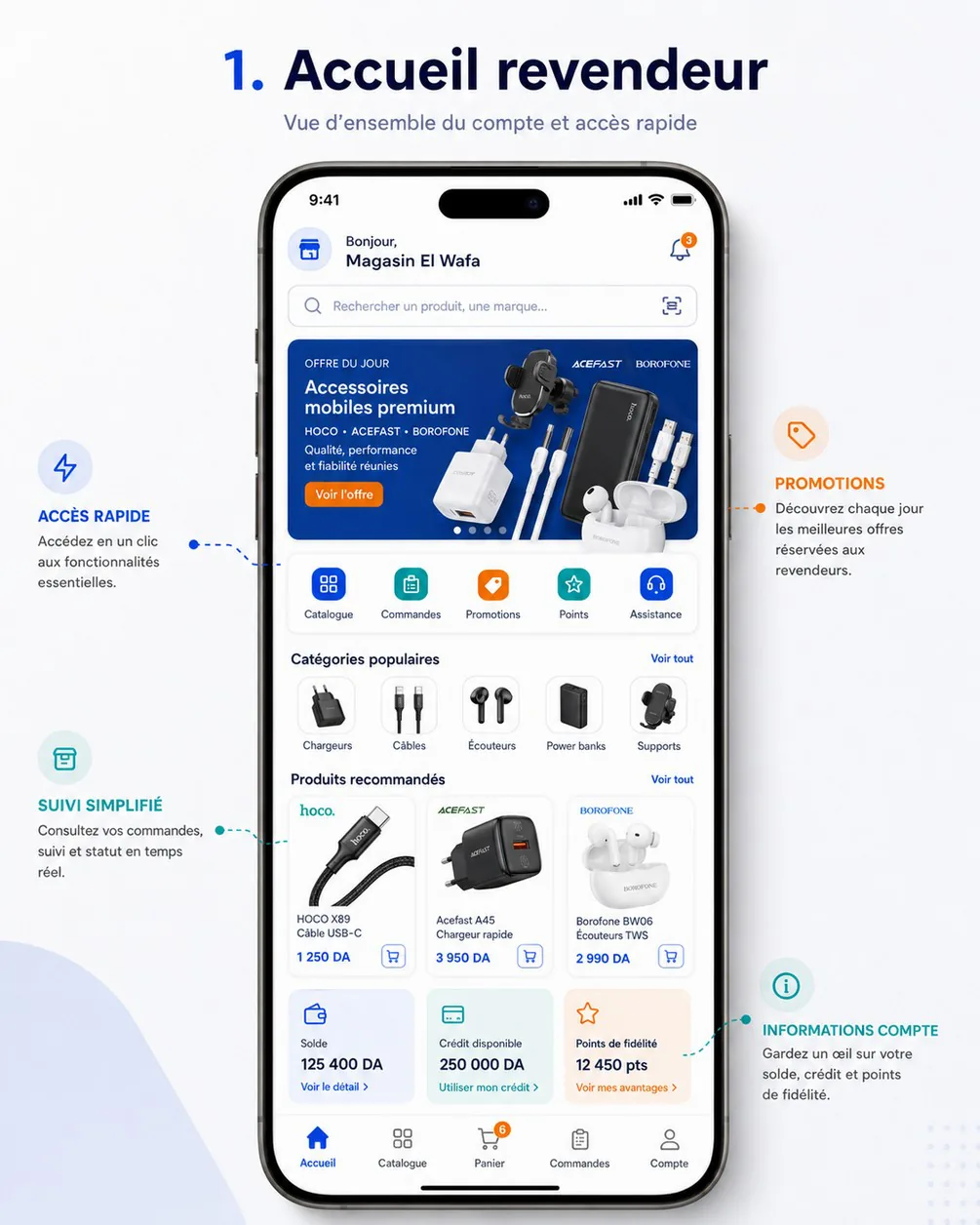
Purpose — Show the key account information and give one-tap access to buying (cahier §5): today's offer, quick access to every module, popular categories, recommended products, balance and available credit, anything waiting for the reseller — and, for a guest, the invitation to create an account.
Entry points & exits — Accueil tab; after sign-in or validation; guest entry from RA-02; the route /. Exits to RA-26 (bell), RA-10 (search field), RA-11 (scanner icon), RA-25 or RA-24 (banners, daily offer), RA-12 (categories, quick tile, « Voir tout »), RA-14 (product), RA-21, RA-32 (quick tiles), RA-29 (account tiles), RA-23 (assisted-order banner), RA-41 or RA-03 (guest prompts), WhatsApp.
Layout
TabRootHeader: store photo or initials, « Bonjour, » and the store name, bell with the unread badge. Guest: HOCO logo, « Bienvenue sur HOCO », « Se connecter ».- Attention slot, at most one
Banner, by priority: ordering blocked (error, whenstore.canOrderis false for a validated account) → assisted order to confirm (warning: « Votre délégué Yacine a préparé une commande de 45 600,00 DA — à confirmer avant le 17 nov. à 14:30 », « Confirmer » → RA-21, whose pinned card opens RA-23) → orders waiting for HOCO's confirmation (info: « 2 commandes en attente de confirmation par HOCO », → RA-21) → pending validation (info: « Compte en attente de validation : vous pourrez commander dès sa validation. ») → guest card (brand tone: « Créez votre compte revendeur pour voir vos prix et commander », « Créer mon compte »). SearchField« Rechercher un produit, une marque… » with the scanner icon at its end.Carousel, aspect ratio 2:1, at most 5 slides, auto-advance 5 s, paused while touched, dots. The daily offer comes first: label « OFFRE DU JOUR », title, subtitle, « Voir l'offre », and aCountdownwhen it ends within 24 h. Titles and buttons are drawn by the app over the image — images carry no text, so they work in Arabic later.- Quick access: the tiles of
quickTilesin their order (icon + label + optional count badge) — Catalogue, Commandes (badge: assisted orders to confirm), Promotions (badge: active offers), Assistance (badge: tickets waiting for the reseller's reply). The reference's Points tile (LOYALTY) is V2 loyalty (RA-38): disabled tiles are hidden, so V1 shows four tiles spread over the width. For guests Commandes comesenabled: falseand opens the sign-up prompt. Favorites are reached from RA-27. - Latest unread announcement, when there is one: card « Message de HOCO », title, two-line excerpt → RA-26.
SectionHeader« Catégories populaires » with « Voir tout »; horizontal list of up to 8 category tiles (photo + name).SectionHeader« Produits recommandés » with « Voir tout »; horizontal list of compactProductCard(image, brand, name on two lines, price orPriceLock,StockBadge, cart icon).- Account tiles (
KpiTile), signed-in and validated only: « Solde » with « Voir le détail » and « Crédit disponible » with « Voir mon crédit », both → RA-29. Without a credit account the balance tile takes the full width. V2 adds « Points de fidélité » → RA-38. WhatsAppButton(floating) andBottomNav.
Data
| Shown | Source |
|---|---|
| Store name, type, ordering state | catalog.home → store.storeName, store.customerType, store.accountStatus, store.canOrder (store is null for guests) |
| Badges | catalog.home → badges.unreadNotifications, badges.cartItems (null for guests); afterwards kept current by notifications.unreadCount, cart.get and live events |
| Daily offer | catalog.home → dailyOffer (PromotionSummary: id, title, image, badge, endsAt); countdowns use serverTime |
| Banners | catalog.home → banners[] (placement HOME_CAROUSEL: image, title, subtitle, call to action, route) |
| Quick tiles | catalog.home → quickTiles[].key (CATALOG, ORDERS, PROMOTIONS, LOYALTY, SUPPORT), enabled, badge — server-driven, icons mapped from key |
| Categories | catalog.home → popularCategories[].id, name, imageUrl, productCount |
| Recommended | catalog.home → recommended[] (3 to 10 ProductCard: price, priceLocked, promotion, availability) |
| Balance, credit | catalog.home → account.balanceDue, account.creditAvailable (account null for guests; creditAvailable null without a credit line; loyaltyPoints null until V2) |
| Assisted order, orders waiting for HOCO | orders.summary → awaitingConfirmation, counts.SUBMITTED + counts.PENDING; live assisted_order.awaiting_confirmation (delegateName, totalTtc, expiresAt) for the banner text |
| Announcement | announcements.list ?unread=true&limit=1 → items[0].id, title, body (excerpt) |
Actions
- Pull-to-refresh →
catalog.homeand, signed in,orders.summaryin parallel. Guests callcatalog.homewithout theAuthorizationheader. Each home block is computed independently server-side: a failing block comes back empty and its section is hidden. - Banner or daily offer → its
routefrom the deep-link table; routes outside the app's table are ignored (no external URLs in V1). - Quick add on a recommended product (see above). Heart icons are not shown on home cards.
- Category tile → RA-12 filtered on that category. « Voir tout » of categories → RA-12; of recommended products → RA-12 on the Populaires tab.
- Live events
order.status_changedandassisted_order.awaiting_confirmationrefresh the attention slot.
Rules
- What is shown depends on the reseller's profile, zone and active promotions (cahier §5); banners and offers are targeted server-side (PRM-02, PRM-05). Guests get the untargeted, public selection.
- Prices follow the customer type; guests never get a price (PRC-02, AUTH-10); only active, authorised products are shown (CAT-05).
- Recommended products are rules-based (CAT-11) — for example products the reseller ordered before that are back in stock, best sellers in their wilaya, new arrivals; the rules live in the catalog module (SRV-11).
- Balance and credit are the reseller's own figures (FIN-10) and equal those on RA-29.
- Each module opens from home without error (cahier §5 acceptance criterion).
States
| State | Behaviour |
|---|---|
| Loading | Skeleton with the real store name from cache; grey carousel, tiles and cards |
| Empty sections | A section without data is hidden — never an empty header |
| Error, no cache | ErrorState « Impossible de charger l'accueil » with « Réessayer » |
| Error with cache | Cached home and snackbar « Impossible d'actualiser l'accueil » |
| Offline | Cached home, offline banner, cart icons disabled |
| Guest | No bell, no account tiles, PriceLock on cards, guest card in the attention slot |
| PENDING_VALIDATION | Prices of the declared type (or the lock if the setting is false); no account tiles |
| Ordering blocked | Error banner « Les commandes sont suspendues sur votre compte. Contactez HOCO. » |
Copy — « Bonjour, » · « Bienvenue sur HOCO » · « Rechercher un produit, une marque… » · « OFFRE DU JOUR » · « Voir l'offre » · « Catégories populaires » · « Produits recommandés » · « Voir tout » · « Solde » · « Crédit disponible » · « Voir le détail » · « Voir mon crédit » · « Créez votre compte revendeur pour voir vos prix et commander » · « {count} commandes en attente de confirmation par HOCO ».
Analytics — home_viewed with bannerCount, hasAssisted, userKind; home_banner_clicked with bannerId, position, kind; home_quick_tile_clicked with key; home_category_clicked; home_product_clicked with productId, position; quick_add_to_cart with productId, source: "home"; guest_signup_prompt_clicked with source: "home".
Notification Centre (change request 03) — NOT-09, NOT-10, designed in DES-23, built in MRA-11. A « Centre de notifications » card sits between the attention slot and the search field, for signed-in resellers only. It replaces the single announcement card of item 6.
- One chip per group with content, in the order Urgent (danger tone), Promotions, Nouveautés, Suggestions (V2 adds Points et niveaux; Academy comes later). Each chip shows its unread count from
notifications.unreadCount→byGroup. A chip opens RA-26 on that group. - The 3 latest unread items (
notifications.list?unread=true&limit=3): icon, title, one line of body, relative time, and the action button (action.label, e.g. « Commander maintenant »). The button marks the item read and opensaction.deepLink. With nothing unread: « Vous êtes à jour » and the 3 latest items. - Live
notification.created(withgroup) updates the chips and the list without a modal: smart notifications never open a pop-up. - When a flash sale is active, the carousel shows it right after the daily offer, with the label « VENTE FLASH » and the countdown « Plus que 05:12:45 » (
catalog.home→flashSales[], PRM-07).
Acceptance criteria
- With network, home is complete in under 3 s after the app opens (NFR-01), for a guest and for a reseller.
- Every banner, tile, category and product opens its target without error.
- A guest sees no price anywhere on home; a reseller sees the prices of their customer type.
- The bell badge equals the number of unread notifications; reading one decrements it.
- Balance and credit equal the values on RA-29 and in the back-office credit account (BO-46).
RA-10 — Search
| Field | Value |
|---|---|
| Screen | Search · Shopping |
| French title | Recherche |
| Release | V1 |
| Design day | Day 7 — DES-07 |
| Build task | MRA-02 |
| Requirements | CAT-07 |
| Reference screen | None — follow the design system |
Purpose — Find a product by name, reference or brand in a few keystrokes (CAT-07).
Entry points & exits — The search field of RA-09 and RA-12, the route /search?q=. Exits to RA-14 (product suggestion), RA-12 in results mode (submit, brand or category suggestion), RA-11 (scanner icon), back.
Layout
AppBarholding theSearchField(autofocus, keyboard open, clear button), the scanner icon, and « Annuler ».- Before typing: « Recherches récentes » (up to 10 rows, each with ×, and « Effacer »); « Marques » (HOCO, ACEFAST, BOROFONE logo chips); « Catégories » (six rows).
- From the second character, grouped suggestions: « Produits » (up to 5 rows: thumbnail, name, reference, price or lock icon,
StockBadge), « Marques », « Catégories », and a last row « Voir tous les résultats pour “chargeur 20w” ». - The keyboard's search key submits.
Data
| Shown | Source |
|---|---|
| Product suggestions | catalog.products.suggest → products[] (id, name, reference, image, price or lock, availability) |
| Brand and category suggestions | catalog.products.suggest → brands[], categories[] |
| Brands and categories before typing | catalog.brands, catalog.categories (cached) |
| Recent searches | Device storage |
Actions — Typing calls catalog.products.suggest?q= 250 ms after the last keystroke; a newer request cancels the older one. Submit or « Voir tous les résultats » → RA-12 with q, and the query is saved to recents. Tapping a recent search re-runs it.
Rules
- Search matches name, reference (SKU) and brand, ignoring case and accents; an exact reference match comes first (« N32 » → HOCO N32) (CAT-07). Guests search the same catalog without prices.
- Nothing is requested below 2 characters. Queries are trimmed.
- Recent searches stay on the device (10 at most, cleared at sign-out); they are never sent to the server.
States — No suggestion: « Aucun résultat pour “{query}” » with « Vérifiez l'orthographe ou cherchez par référence (ex. N32). » and « Scanner un code-barres ». Suggestion error: silent — submit still runs a full search. Offline: recent searches and cached categories, with « Recherche indisponible hors connexion ».
Copy — « Rechercher un produit, une marque… » · « Annuler » · « Recherches récentes » · « Effacer » · « Marques » · « Catégories » · « Produits » · « Voir tous les résultats pour “{query}” ».
Analytics — search_suggest_shown with queryLength, resultCount; search_submitted with query (truncated to 50 characters); search_suggestion_clicked with type, position.
Acceptance criteria
- Suggestions appear within one second of the second character on a 4G connection.
- Submitting shows results in under 3 s (cahier §5.1).
- Typing an exact reference puts that product first.
- Recent searches persist across launches and can be cleared.
RA-11 — Barcode scanner
| Field | Value |
|---|---|
| Screen | Barcode scanner · Shopping |
| French title | Scanner |
| Release | V1 |
| Design day | Day 7 — DES-07 |
| Build task | MRA-02 |
| Requirements | CAT-10 |
| Reference screen | None — follow the design system |
Purpose — Identify a product by scanning its barcode — typically an empty box on the shelf — and reorder it in seconds (CAT-10, priority COULD: it may ship after the pilot without blocking V1).
Entry points & exits — The scanner icon in the search fields of RA-09, RA-10, RA-12. Exits to RA-14 (« Voir la fiche »), back to where it was opened.
Layout
- Full-screen camera preview with a dark overlay and a framed window (70 % of the width); hint « Placez le code-barres dans le cadre ».
- Top bar: close (×) and the torch toggle.
- Bottom: « Saisir le code manuellement ».
- On detection: haptic feedback, the frame turns green, and a
BottomSheetopens: thumbnail, name, reference, price (orPriceLock),StockBadge,QuantityStepperatminQty, primary « Ajouter au panier », secondary « Voir la fiche », text button « Scanner un autre produit ». - After an add, the sheet closes, scanning resumes and a chip counts « 3 produits ajoutés ».
Data — catalog.products.byBarcode → productId, variantId, sku, barcode, name, variantLabel, brandName, imageUrl, price, priceLocked, promotion, availability, limits (minQty, qtyStep, maxQtyPerOrder).
Actions
- Detection →
catalog.products.byBarcode/{barcode}; the same code is ignored for 3 seconds to avoid double reads. - « Ajouter au panier » →
cart.items.add{ variantId, qty }with anIdempotency-Key; snackbar « Ajouté au panier ». - Manual entry: numeric field (8 to 14 digits) → same lookup.
Rules
- Formats: EAN-13, EAN-8, UPC-A, UPC-E, Code 128. A barcode identifies a variant (CAT-03).
- The camera permission is asked on first use with the rationale « La caméra sert uniquement à lire les codes-barres. » Nothing is recorded or uploaded.
- Lookup needs the network. Guests see the product with the lock and « Créer mon compte » instead of the add button.
States
| Situation | Message or behaviour |
|---|---|
404 NOT_FOUND | Sheet « Aucun produit HOCO ne correspond à ce code ({barcode}). » with « Réessayer » and « Rechercher par nom » |
| Variant out of stock | Add disabled, « En rupture » |
422 STOCK_INSUFFICIENT on add | « Stock insuffisant pour cette quantité. » |
| Permission denied | Full-screen explanation with « Ouvrir les paramètres »; manual entry still available |
| No camera | Manual entry only |
| Offline | « Connexion requise pour identifier le produit. » |
Copy — « Placez le code-barres dans le cadre » · « Saisir le code manuellement » · « Ajouter au panier » · « Voir la fiche » · « Scanner un autre produit » · « {count} produits ajoutés ».
Analytics — barcode_scanned with found, format, lookupMs; barcode_manual_entry; barcode_add_to_cart with variantId, quantity.
Acceptance criteria
- Scanning a known barcode shows the right variant in under 2 s on 4G.
- Adding from the sheet creates a cart line with that variant and quantity.
- An unknown code shows the not-found message and scanning can resume.
- With the permission denied, the reseller can still type the code.
RA-12 — Catalog
| Field | Value |
|---|---|
| Screen | Catalog · Shopping |
| French title | Catalogue |
| Release | V1 |
| Design day | Day 7 — DES-07 |
| Build task | MRA-02 |
| Requirements | CAT-07 · STK-07 · PRC-05 · CAT-12 · AUTH-10 |
| Reference screen | reseller-02-catalog |
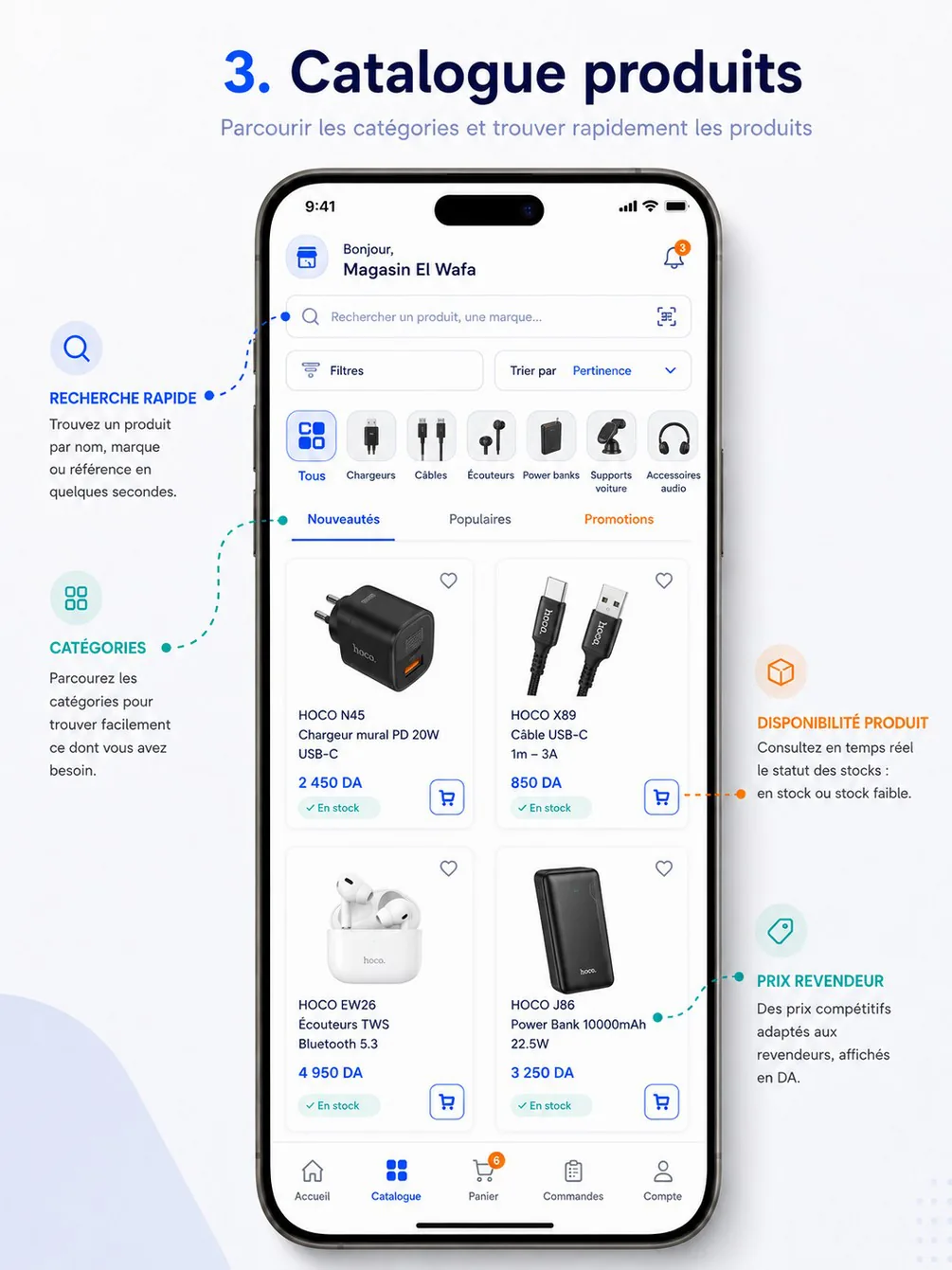
Purpose — Browse and narrow down the HOCO, ACEFAST and BOROFONE catalog with combinable filters (CAT-07, CAT-12), at the reseller's own prices — or without prices for a guest (AUTH-10).
Entry points & exits — Catalogue tab; quick tile and categories on RA-09; submit on RA-10; brand or category suggestions; the route /catalog?… (parameters of RA-13). Exits to RA-14, RA-13 (filters and sort), RA-10, RA-11, RA-26.
Layout
TabRootHeader. In results mode (a search query is set) anAppBarwith back replaces it and theSearchFieldshows the query with a clear button.SearchField(opens RA-10) with the scanner icon.- Toolbar:
Button« Filtres » with the number of active filters as a badge; sort control « Trier par : Pertinence » (both open RA-13); result count « 128 produits » on the right. - Category chips, horizontal scroll, icon + label: « Tous », then the top-level categories in back-office order (Chargeurs, Câbles, Écouteurs, Power banks, Supports voiture, Accessoires audio, Montres, Accessoires). Selecting one sets the category filter of RA-13; categories without a visible product are hidden.
Tabsas on the reference: « Nouveautés » · « Populaires » · « Promotions ». Populaires is selected by default: it is the whole catalog sorted by popularity (sort=popular), so nothing is hidden at first sight. Nouveautés setsnew=true&sort=newest; Promotions setspromotion=true. They are shortcuts for the Nouveautés and En promotion switches of RA-13 — one state, so the tab and the switch always agree.- Active filter chips, only when filters apply, one per value: « Chargeurs », « USB-C », « 20 à 65 W », « 1 000 à 5 000 DA », « HOCO », « En stock », « En promotion », each with ×, then « Tout effacer ».
- Grid of
ProductCard, 2 columns (3 from 600 dp): square image on white, heart (top right, signed-in only), « Nouveau » badge (top left) when new, « −30 % » badge on promotion, brand and name on two lines, price (promotional price with the base price struck through) orPriceLock,StockBadge, cart icon button (signed-in only). - Infinite scroll: the next page loads six cards before the end; spinner footer; « Vous avez tout vu » at the end. A back-to-top button appears after three screens of scroll.
WhatsAppButton(floating).
Data
| Shown | Source |
|---|---|
| Products | catalog.products.list with the filter state of RA-13 and cursor, limit=20 → items[] (ProductCard), nextCursor |
| Card fields | imageUrl, brand.name, name, price.ttc (or ht per settings.pricing.priceDisplay), priceLocked, promotion.price, promotion.label, availability, isNew, isFavorite, defaultVariantId (the first variant matching the filters) |
| Result count, category chips | catalog.facets → total; catalog.categories → top-level items[] (id, name, imageUrl, productCount) |
Actions
- Card → RA-14. Heart →
favorites.addorfavorites.remove, optimistic; on error the heart reverts with « Impossible de modifier vos favoris ». - Cart icon → quick add (see top of page).
- Chip, tab, sort or filter change → reload from the first page, scrolled to the top, and refresh
catalog.facets(count and chips). - Chip × → removes that value only. « Tout effacer » → clears every filter, keeps the search query and the sort.
- Pull-to-refresh → first page again.
Rules
- Only active, authorised products are visible (CAT-05), at the price of the reseller's customer type (PRC-02); availability only, never a quantity (STK-07).
- Out-of-stock products stay visible with « En rupture » and a disabled cart icon; for Pertinence and Popularité they come after available ones (server ranking).
- Nouveautés: products published within
catalog.newProductDays(30 days). Popularity: units ordered over the last 30 days by all resellers, refreshed daily. With a search query the default sort is relevance (exact reference, SKU or barcode first). - Results under 3 seconds (CAT-07, NFR-01).
- The filter state is the one of RA-13: kept while the app runs, set by deep links.
States
| State | Behaviour |
|---|---|
| Loading | Grid of 6 skeleton cards |
| No result | EmptyState « Aucun produit ne correspond à vos critères » with « Tout effacer »; for a search, the tips of RA-10 |
| Error | ErrorState with « Réessayer »; a failing next page shows a retry row at the bottom, the loaded cards stay |
| Offline | Last cached pages with the offline banner; changing filters shows « Connexion requise pour filtrer » |
| Guest | PriceLock on every card, no heart, no cart icon, no price filter or price sort |
Copy — « Filtres » · « Trier par : {sort} » · « {count} produits » · « Nouveautés » · « Populaires » · « Promotions » · « Nouveau » · « Tout effacer » · « Vous avez tout vu » · « Aucun produit ne correspond à vos critères ».
Analytics — catalog_viewed with tab, categoryId, sort, filterCount, userKind; catalog_page_loaded with page, ms; product_card_clicked with productId, position, list: "catalog"; favorite_toggled with productId, on; filter_chip_removed with facet.
Acceptance criteria
- Any combination of category, sub-category, brand, attributes, price, availability, promotion and new arrivals returns correct results in under 3 s (cahier §5.1, CAT-12).
- The count « N produits » equals the number of cards reachable by scrolling.
- A reseller only sees products and prices allowed for them (cahier §12 Catalogue scenario); a guest sees no price.
- Removing one active chip keeps all other filters.
RA-13 — Advanced filters & sort
| Field | Value |
|---|---|
| Screen | Advanced filters & sort (price range, category/sub-category, brand, attributes…) · Shopping |
| French title | Filtres avancés et tri |
| Release | V1 |
| Design day | Day 7 — DES-07 |
| Build task | MRA-02 |
| Requirements | CAT-12 · CAT-13 |
| Reference screen | None — follow the design system |
Purpose — Let resellers and guests combine every useful criterion — category and sub-category, brand, price range, the technical attributes of the category (power, connector, cable length, colour, battery capacity, Bluetooth version…), availability, promotion, new arrivals — with live result counts, and choose the sort order (CAT-12, CAT-13).
Entry points & exits — « Filtres » and « Trier par » on RA-12; the category chips and tabs of RA-12 write the same state; deep links /catalog?…. Both sheets close back to RA-12.
Layout — filters (BottomSheet, full height, drag handle):
- Header: « Filtres », « Réinitialiser » (text button, right), close (×).
- Sections, in this order; each is collapsible and, when collapsed, shows its selection in grey (« USB-C, Lightning »):
| Section | Widget | Values and counts |
|---|---|---|
| « Catégorie » | Two-level single choice: the top-level categories with their counts; the chosen one unfolds its sub-categories as chips (« Toutes » first). Choosing a sub-category replaces the category filter by that sub-category | « Chargeurs (36) » · « Chargeurs muraux (24) », « Chargeurs voiture (12) » |
| « Prix » | RangeSlider between the facet bounds with the small histogram of the result (from buckets when given), plus two numeric inputs « Min » and « Max » in DA, step 100 DA, TTC | Signed-in with prices only; guests and locked prices see PriceLock « Créez un compte pour filtrer par prix » |
| « Marque » | Multi-choice chips with logos | « HOCO (36) », « ACEFAST (12) », « BOROFONE (10) » |
| One section per attribute of the selected category (up to 12) | Widget from the attribute definition (below) | Each value with its count |
| « Disponibilité » | Switch « En stock uniquement » | Count of in-stock products |
| « Offres » | Switches « En promotion » and « Nouveautés » | Counts |
StickyFooter: primary « Afficher 36 produits » — the count updates live; at 0 it reads « Aucun produit » and is disabled, with the hint « Retirez un filtre pour élargir la recherche ».
Attribute widgets. Attributes are defined per category in the back-office (BO-71, AttributeDefinition) and valued on each variant (VariantAttributeValue). The app renders whatever the facets return, by widget:
widget | Type | Rendering | Example in V1 |
|---|---|---|---|
CHIPS | ENUM | Multi-choice chips | « Connecteur » USB-C · Lightning · Micro-USB; « Ports » USB-C · USB-A; « Version Bluetooth » 5.0 · 5.3 · 5.4 |
CHECKBOXES | ENUM | Vertical multi-choice list — for long lists and colours (a colour dot before the label when the value is a known colour code) | « Couleur » Noir · Blanc · Gris · Bleu |
RANGE | NUMBER | RangeSlider with histogram and two inputs, unit shown | « Puissance (W) » 10 to 65; « Capacité (mAh) » 5 000 to 30 000; « Longueur (m) » 0,25 to 3 |
TOGGLE | BOOLEAN | Switch | « Charge rapide », « Réduction de bruit active (ANC) » |
A list longer than 8 values shows the first 6 and « Voir les 12 valeurs ». Without a selected category the facets carry no attribute: the sheet shows the hint « Choisissez une catégorie pour filtrer par puissance, connecteur, capacité… ».
Layout — sort (BottomSheet, content height): radio list Popularité (default without search), Pertinence (default with a search query, shown only then), Nouveautés, Prix croissant, Prix décroissant. The two price sorts are hidden for guests.
Data
| Shown | Source |
|---|---|
| Categories and sub-categories with counts | catalog.facets → categories[] (id, name, parentId, count, selected, children[]) |
| Brands with counts | catalog.facets → brands[] (id, name, count, selected); logos from catalog.brands → logoUrl |
| Price bounds | catalog.facets → priceRange.min, priceRange.max (TTC unit prices the caller would pay; null for guests) |
| Attributes | catalog.facets → attributes[] (key, label, type, unit, widget, values[] with value, label, count, selected; range with min, max, selectedMin, selectedMax, buckets[]) |
| Availability, promotion, new | catalog.facets → availability[] (value, count), promotion.count, new.count |
| Result count | catalog.facets → total |
Filter state and parameters. One state object drives RA-12, the facets call, the product list and the deep links; the reseller web uses the same parameters in its URL, with category and brand slugs instead of ids (category=chargeurs-muraux, brand=hoco), which app links also accept (RW-03). Parameters are those of catalog search and filters:
| Filter | Query parameter | Example |
|---|---|---|
| Search | q (2–80 characters) | q=chargeur |
| Category or sub-category | categoryId (one; a category includes its sub-categories) | categoryId=… |
| Brands | brandId (repeatable) | brandId=…&brandId=… |
| Price | priceMin, priceMax (centimes, TTC; signed-in only) | priceMin=100000&priceMax=500000 |
| Attribute, list | attr.<key> (repeatable) | attr.connector=USB_C&attr.connector=LIGHTNING |
| Attribute, range | attr.<key>=<min>..<max>, open ends allowed | attr.power=20..65, attr.capacity=10000.. |
| Attribute, yes/no | attr.<key>=true | attr.fast_charge=true |
| Availability | availability=IN_STOCK | — |
| Promotion · new arrivals | promotion=true · new=true | — |
| Sort | sort | popular, relevance, newest, price_asc, price_desc |
Actions
- Every change in the filters sheet calls
catalog.facetswith the pending state (debounced 300 ms; a newer call cancels the older one) and updates counts and the footer. Nothing is applied to RA-12 until « Afficher … produits », which reloads the list with the same parameters. - Changing the category clears the attribute filters (they belong to the previous category), with the snackbar « Filtres de la catégorie précédente retirés ».
- Typing in « Min » or « Max » applies on blur or OK; a minimum above the maximum swaps them.
- « Réinitialiser » clears every filter in the sheet (search query and sort are kept).
- Closing the sheet with × or back discards pending changes.
- A sort option applies immediately and closes its sheet.
Rules
- Filters combine: values inside one parameter are OR, different parameters are AND (CAT-12).
- Counts are disjunctive: each facet is counted with every filter applied except its own, so adding a second brand shows how many products it brings;
totalapplies them all and equals what the list returns. Values with no result are not returned. - Price filtering applies to the price the reseller would pay (customer type, promotion included); guests never send price filters (the API would answer
400 VALIDATION_FAILED,SIGN_IN_REQUIRED). - Attribute filters apply to variants: a product matches when one of its visible variants matches every selected attribute, and its card then shows that variant.
- The state is kept while the app runs (returning to Catalogue restores it) and reset at sign-out; deep links set it completely.
- Facets answer in under 1 second; results keep the 3-second target (NFR-01).
States
| State | Behaviour |
|---|---|
| Facets loading | Counts replaced by small skeletons; the footer button shows a spinner |
| Facets error | Counts hidden, sections still usable, footer « Afficher les produits » (without count) |
400 VALIDATION_FAILED UNKNOWN_ATTRIBUTE (stale deep link) | The unknown attribute is dropped with the snackbar « Un filtre n'est plus disponible » |
| Offline | Cached facets of the current category; the footer reads « Connexion requise pour filtrer » and is disabled |
| Guest | No « Prix » slider (lock instead), no price sorts |
Copy — « Filtres » · « Réinitialiser » · « Catégorie » · « Toutes » · « Prix » · « Min » · « Max » · « Marque » · « Disponibilité » · « En stock uniquement » · « Offres » · « En promotion » · « Nouveautés » · « Afficher {count} produits » · « Aucun produit » · « Retirez un filtre pour élargir la recherche » · « Voir les {count} valeurs » · « Choisissez une catégorie pour filtrer par puissance, connecteur, capacité… » · « Créez un compte pour filtrer par prix » · « Filtres de la catégorie précédente retirés » · « Trier par » · « Popularité » · « Pertinence » · « Prix croissant » · « Prix décroissant ».
Analytics — catalog_filter_applied with categoryId, brandCount, attributeKeys, hasPrice, inStock, promotion, new, resultCount; catalog_filter_reset; catalog_sort_changed with sort.
Acceptance criteria
- Selecting Câbles, then « Connecteur : USB-C » and « Longueur : 1 à 2 m » shows only cables with a USB-C connector between 1 and 2 m, and the footer count equals the result count.
- Each displayed count equals the number of products the user would get by adding that value.
- A guest never sees a price slider, a price bound or a price sort.
- The same filters typed on the web (RW-03) and opened as an app link reproduce the same result.
- « Réinitialiser » then « Afficher … produits » shows the unfiltered catalog for the current search.
RA-14 — Product detail
| Field | Value |
|---|---|
| Screen | Product detail · Shopping |
| French title | Détail produit |
| Release | V1 |
| Design day | Day 8 — DES-08 |
| Build task | MRA-03 |
| Requirements | CAT-08 · STK-07 · ORD-02 · AUTH-10 |
| Reference screen | reseller-03-product-detail |
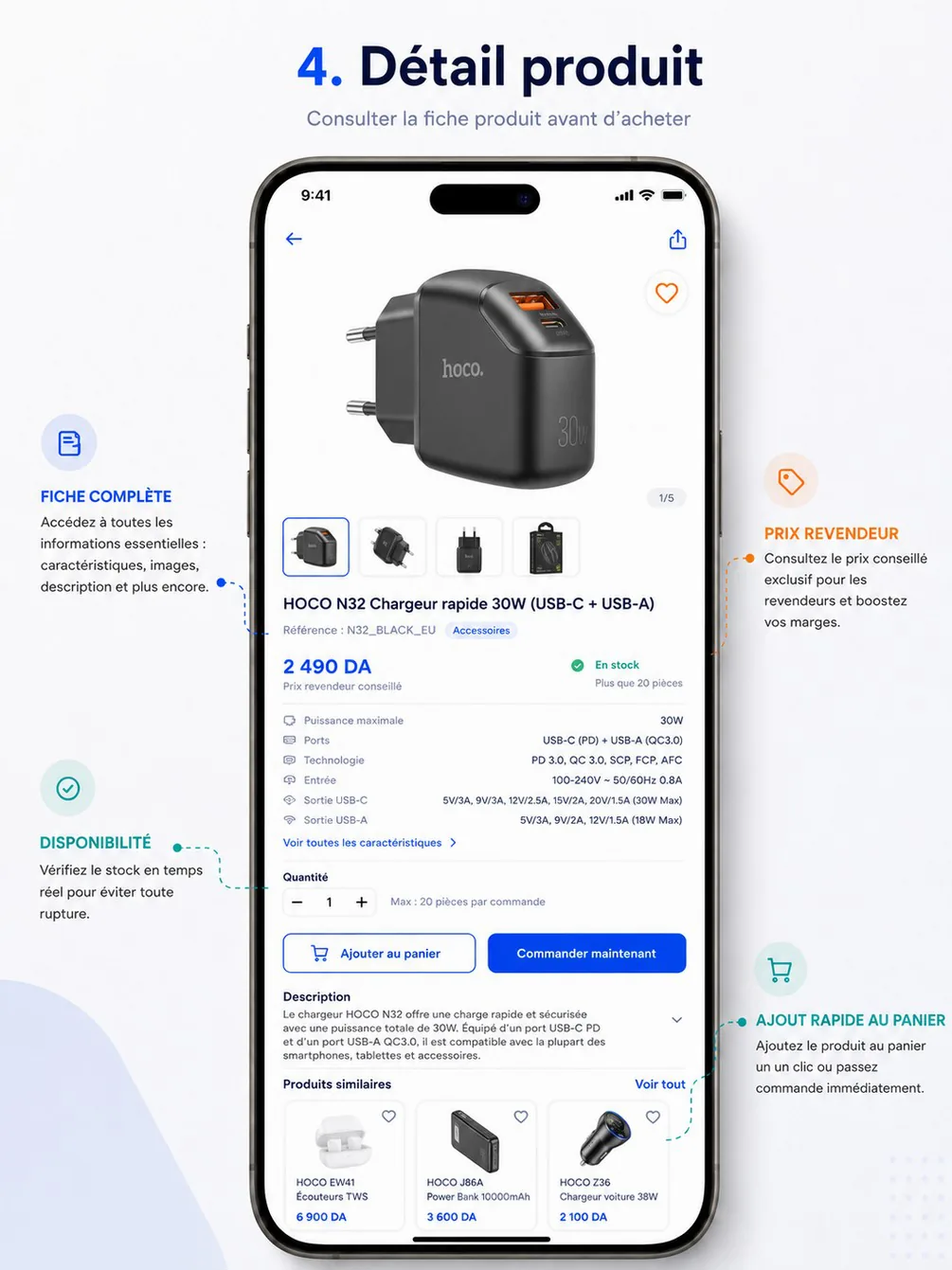
Purpose — Give everything needed before adding to the cart (cahier §5.2): gallery, specifications, description, the reseller's price and the recommended retail price, availability and quantity limits, similar and complementary products. Guests see the same page without prices.
Entry points & exits — Product cards everywhere, RA-10 suggestions, RA-11, cart lines on RA-17, shared links /products/{productId}. Exits to RA-15, RA-17 (« Commander maintenant », « Voir le panier »), RA-25 (promotion), another RA-14 (similar product), the share sheet, WhatsApp, RA-41 (guest).
Layout
- Transparent
AppBarover the gallery: back, WhatsApp icon (« Une question sur ce produit ? »), share. ImageGallery: square images, swipe, counter « 1/5 », floating heart (signed-in); tap opens a full-screen viewer with pinch-zoom. Thumbnail row below, the current one outlined.- Product name (up to 3 lines); « Référence : N32_BLACK_EU » (long-press copies) and a category
Chip. - Variant chips, only with several variants (« Noir », « Blanc », « 1 m », « 2 m »); an out-of-stock variant stays selectable but looks muted.
- Price block (
PriceTag): the reseller's price, large — « 2 490 DA » — with « Votre prix Demi-gros TTC ». With a promotion: promotional price large, base price struck through, badge « −20 % », « Offre valable jusqu'au 30 nov. » (or aCountdownunder 24 h) and « Voir l'offre ». Then « Prix de vente conseillé : 3 200 DA » and « Marge estimée : 710 DA (22 %) » when a recommended price exists. The reference labels the price « Prix revendeur conseillé », mixing two prices; they are separated here. Guest:PriceLockcard « Créez un compte pour voir les prix » with « Créer mon compte » and « J'ai déjà un compte »; the recommended retail price stays visible, the margin does not. - Availability:
StockBadgeEn stock or En rupture — never a quantity (the reference's « Plus que 20 pièces » is not shown). - Key specifications: the first six (icon, label, value) as on the reference, then « Voir toutes les caractéristiques » → RA-15.
- « Quantité » (signed-in):
QuantityStepperwith its helper (« Max : 20 pièces par commande », « Minimum 5 pièces », « Par multiples de 5 »), then « Déjà 10 dans votre panier » when the variant is in the cart. - Button row (signed-in): secondary « Ajouter au panier » (cart icon) and primary « Commander maintenant ». Once the row scrolls out of view, a compact
StickyFootershows the price and « Ajouter au panier ». Guests: no stepper, no buttons — the lock card replaces them. - « Description », collapsed after 4 lines with a chevron.
- « Garantie : 12 mois ».
- « Produits similaires » and « Produits complémentaires »: horizontal
ProductCardlists with « Voir tout ».
Data
| Shown | Source |
|---|---|
| Name, model reference, category, description, warranty | catalog.products.get → name, reference, category.name (category.path for the chip), description, warrantyMonths, isNew |
| Images | gallery[] (FileRef, public CDN, display order); variants[i].imageIds are shown first when the variant is selected |
| Variants | variants[].id, label, sku (the « Référence » line), attributes[].display |
| Price | variants[i].price (Price of the caller's customer type) or null with priceLocked: true; the label uses Me.reseller.customerType |
| Recommended price, margin | variants[i].recommendedPrice (TTC, shown to guests too); margin = recommended price − price.ttc, as a percentage of the recommended price — computed in the app, hidden when the price is locked |
| Promotion | variants[i].promotion (id, label, type, price, endsAt) |
| Availability | variants[i].availability (IN_STOCK, OUT_OF_STOCK) |
| Limits, already in cart | variants[i].limits.minQty, limits.qtyStep, limits.maxQtyPerOrder (null = no maximum); variants[i].inCartQty |
| Key specifications | specs[] where highlighted (at most six) — label, value; all specs on RA-15 |
| Favorite, share | isFavorite; share.url, share.text |
| Similar and complementary | catalog.products.similar → similar[], complementary[] (ProductCard) |
Actions
- Variant chip → price, availability, limits and images switch locally; no call (all variants come in the response).
- Heart →
favorites.addorfavorites.remove, optimistic, reverted on error. - « Ajouter au panier » →
cart.items.add{ variantId, qty }with a freshIdempotency-Key; spinner in the button; success: snackbar « Ajouté au panier · 5 × HOCO N32 » with « Voir le panier », cart badge and « Déjà N dans votre panier » updated from the response. - « Commander maintenant » → the same add, then the Panier tab (RA-17) with the line highlighted. The cart is shared, so the reseller reviews everything in it before checkout.
- WhatsApp icon → regional number with « … Ma question concerne HOCO N32 Chargeur rapide 30W (réf. N32_BLACK_EU). »
- Share → system share sheet with
share.text(« HOCO N32 Chargeur rapide 30W — Réf. N32_BLACK_EU ») andshare.url(https://app.hoco.dz/products/{productId}). No price in the shared text: prices depend on the customer type; the link opens for guests too. - Pull-to-refresh reloads the product.
Rules
- The price is the one of the reseller's customer type, promotions applied on top (PRC-01, PRC-02); quantity tiers do not exist in V1.
- The quantity can exceed neither the maximum per order nor the available stock (cahier §5.2, ORD-02); the app knows the maximum, the server checks the stock.
- Adding merges with an existing line of the same variant. If the sum would break a limit, the server refuses the whole request — it never adjusts silently — with
422 QUANTITY_NOT_ALLOWEDanddetails(rule,currentQty,suggestedQty); the app shows « Vous avez déjà 15 pièces dans le panier : 20 pièces maximum par commande. » and offers « Ajouter 5 » (the suggested quantity). - The added line keeps the right price, quantity and reference (cahier §5.2 acceptance criterion); a later price change shows as a warning in the cart (PRC-05).
- Similar products come from the same category; complementary products from catalog rules (charger ↔ cable) (CAT-08).
States
| Situation | Message or behaviour |
|---|---|
| Loading | Skeleton: gallery block, title lines, price block |
| Variant out of stock | Danger badge, stepper and buttons disabled, « Ce produit est en rupture de stock. » |
404 NOT_FOUND (hidden, archived or not visible) | « Ce produit n'est plus disponible. » with « Voir des produits similaires » → RA-12 on its category |
422 QUANTITY_NOT_ALLOWED (details.rule: MIN_QTY, QTY_STEP, MAX_PER_ORDER) | « Minimum {minQty} pièces. » · « Par multiples de {qtyStep} pièces. » · « Maximum {maxQtyPerOrder} pièces par commande. » |
422 STOCK_INSUFFICIENT | « Quantité non disponible pour HOCO N32. Réduisez la quantité. » — no quantity revealed |
422 PRODUCT_UNAVAILABLE · 422 CART_LINE_LIMIT_REACHED | « Ce produit n'est plus disponible à la commande. » · « Votre panier a atteint 100 lignes. » |
| Offline | Cached product if viewed in the last 24 h, with the offline banner; buttons disabled |
| Guest | PriceLock card, no stepper, no heart, no buttons |
| PENDING_VALIDATION | Prices and buttons as active (the cart is allowed); setting false → lock « Prix visibles après validation de votre compte » and no buttons |
| Ordering blocked | Adding stays possible; a warning line « Les commandes sont suspendues sur votre compte » above the buttons |
Copy — « Référence : {sku} » · « Votre prix {customerType} TTC » · « Prix de vente conseillé : {price} » · « Marge estimée : {margin} ({percent} %) » · « Offre valable jusqu'au {date} » · « Voir l'offre » · « Créez un compte pour voir les prix » · « Voir toutes les caractéristiques » · « Quantité » · « Déjà {qty} dans votre panier » · « Ajouter au panier » · « Commander maintenant » · « Description » · « Garantie : {months} mois » · « Produits similaires » · « Produits complémentaires ».
Analytics — product_viewed with productId, variantId, source, availability, hasPromotion, userKind; variant_selected; add_to_cart with variantId, quantity, unitPriceTtc, source: "product_detail"; order_now_clicked; product_shared; product_whatsapp_clicked.
Acceptance criteria
- The price shown equals the variant's price for the reseller's customer type (with the active promotion), as set in the product editor (BO-28); a guest sees no price.
- No quantity of stock appears anywhere on the screen.
- The stepper never exceeds the maximum per order; typing 23 with a step of 5 gives 20 with an explanation.
- Adding the same variant twice gives one cart line with the summed quantity, within the maximum.
- The cart line has the same reference, quantity and unit price as shown here at the time of adding (cahier §5.2).
RA-15 — Full specifications
| Field | Value |
|---|---|
| Screen | Full specifications · Shopping |
| French title | Caractéristiques |
| Release | V1 |
| Design day | Day 8 — DES-08 |
| Build task | MRA-03 |
| Requirements | CAT-08 |
| Reference screen | None — follow the design system |
Purpose — Show every technical characteristic of the product (CAT-08).
Entry points & exits — « Voir toutes les caractéristiques » on RA-14; the route /products/{productId}/specs. Exit: back to RA-14.
Layout
AppBar« Caractéristiques ».- Product reminder: thumbnail, name, « Référence : N32_BLACK_EU » with a copy icon.
- Grouped tables, one
ListRowper characteristic (label left, value right, wrapping to several lines): for example « Général », « Électrique », « Connectique », « Compatibilité », « Contenu de la boîte ». Filterable attributes (power, connector, length…) appear here with their unit, exactly as used by RA-13. - Last group « Garantie » with the warranty duration.
Data — The response already loaded by RA-14: catalog.products.get → specs[].group, label, value, sku, warrantyMonths. No new call; opened from a deep link, it calls catalog.products.get.
Actions — Copy the reference: snackbar « Référence copiée ».
Rules — Groups and order follow the product editor (BO-28); empty values are not shown; guests see this screen too.
States — No specification: « Aucune caractéristique renseignée pour ce produit. » Offline: cached product.
Copy — « Caractéristiques » · « Référence copiée ».
Analytics — product_specs_viewed with productId.
Acceptance criteria
- Every characteristic entered in the back-office is listed, grouped as entered, with its unit.
- Long values wrap without being cut.
RA-16 — Favorites
| Field | Value |
|---|---|
| Screen | Favorites · Shopping |
| French title | Favoris |
| Release | V1 |
| Design day | Day 8 — DES-08 |
| Build task | MRA-03 |
| Requirements | CAT-09 |
| Reference screen | None — follow the design system |
Purpose — Keep the products the reseller orders often one tap away (CAT-09).
Entry points & exits — The Favoris quick tile on RA-09, « Mes favoris » on RA-27, the route /favorites. Exits to RA-14, RA-12 (empty state), RA-17 (snackbar). Guests are sent to the sign-up prompt of RA-41.
Layout
AppBar« Favoris » with the count (« 12 produits »).- Grid of
ProductCard(same card as RA-12) with the heart filled; the cart icon adds as everywhere. - Infinite scroll.
Data — favorites.list ?cursor=&limit=20 → items[] (ProductCard), nextCursor. Products no longer visible to the reseller are not returned.
Actions — Heart → favorites.remove, the card fades out with the snackbar « Retiré des favoris » and « Annuler » (5 s, re-adds with favorites.add). Card → RA-14. Pull-to-refresh.
Rules — Favorites belong to the reseller account and are the same on mobile and web; adding is idempotent (PUT). Guests have no favorites.
States — Loading: skeleton grid. Empty: EmptyState « Aucun favori pour l'instant » — « Touchez le cœur d'un produit pour le retrouver ici. » with « Parcourir le catalogue ». Offline: cached list, hearts and cart icons disabled. Error: ErrorState.
Copy — « Favoris » · « {count} produits » · « Retiré des favoris » · « Annuler » · « Aucun favori pour l'instant » · « Parcourir le catalogue ».
Analytics — favorites_viewed with count; favorite_toggled with on: false, source: "favorites".
Acceptance criteria
- A product added to favorites on the web appears here after a refresh.
- Removing then « Annuler » restores the favorite.
- Out-of-stock favorites show « En rupture » with a disabled cart icon.
Onboarding & account
Screen specifications RA-01 to RA-08 of the reseller app — launch and version check, welcome with guest entry, sign-up with OTP, customer type and account claim, pending validation, sign-in and password reset.
Ordering
Screen specifications RA-17 to RA-20 of the reseller app — server-side cart with live re-validation, checkout with address, payment method and credit check, address book, and the confirmation of an order sent to HOCO for confirmation.