Ordering
Screen specifications RA-17 to RA-20 of the reseller app — server-side cart with live re-validation, checkout with address, payment method and credit check, address book, and the confirmation of an order sent to HOCO for confirmation.
Cahier §5.3: « Préparer, contrôler et envoyer une commande complète » — and after sending, the order gets a unique number and appears immediately in the back-office. Since the product decisions of 17 October 2026, no order is confirmed automatically: checkout ends with an order Envoyée, waiting for HOCO's explicit confirmation in the back-office queue (ORD-14, BO-41). These four screens are designed on day 8 and built in MRA-04; the server rules are in SRV-15 and the order lifecycle. Shared rules — money, price lock, availability, stepper, errors — are on the reseller app overview.
| ID | Screen | UI title | Section | Release | Design | Build |
|---|---|---|---|---|---|---|
RA-17 | Cart | Panier | Ordering | V1 | Day 8 | MRA-04 |
RA-18 | Checkout | Validation de commande | Ordering | V1 | Day 8 | MRA-04 |
RA-19 | Address book & address form | Adresses de livraison | Ordering | V1 | Day 8 | MRA-04 |
RA-20 | Order confirmation | Commande envoyée | Ordering | V1 | Day 8 | MRA-04 |
Who can order. Guests have no cart: the Panier tab shows the sign-up prompt of RA-41. A PENDING_VALIDATION reseller builds a cart normally but cannot submit it (403 ACCOUNT_PENDING_VALIDATION). A reseller whose lifecycle status is Suspendu cannot submit either (403 RESELLER_SUSPENDED).
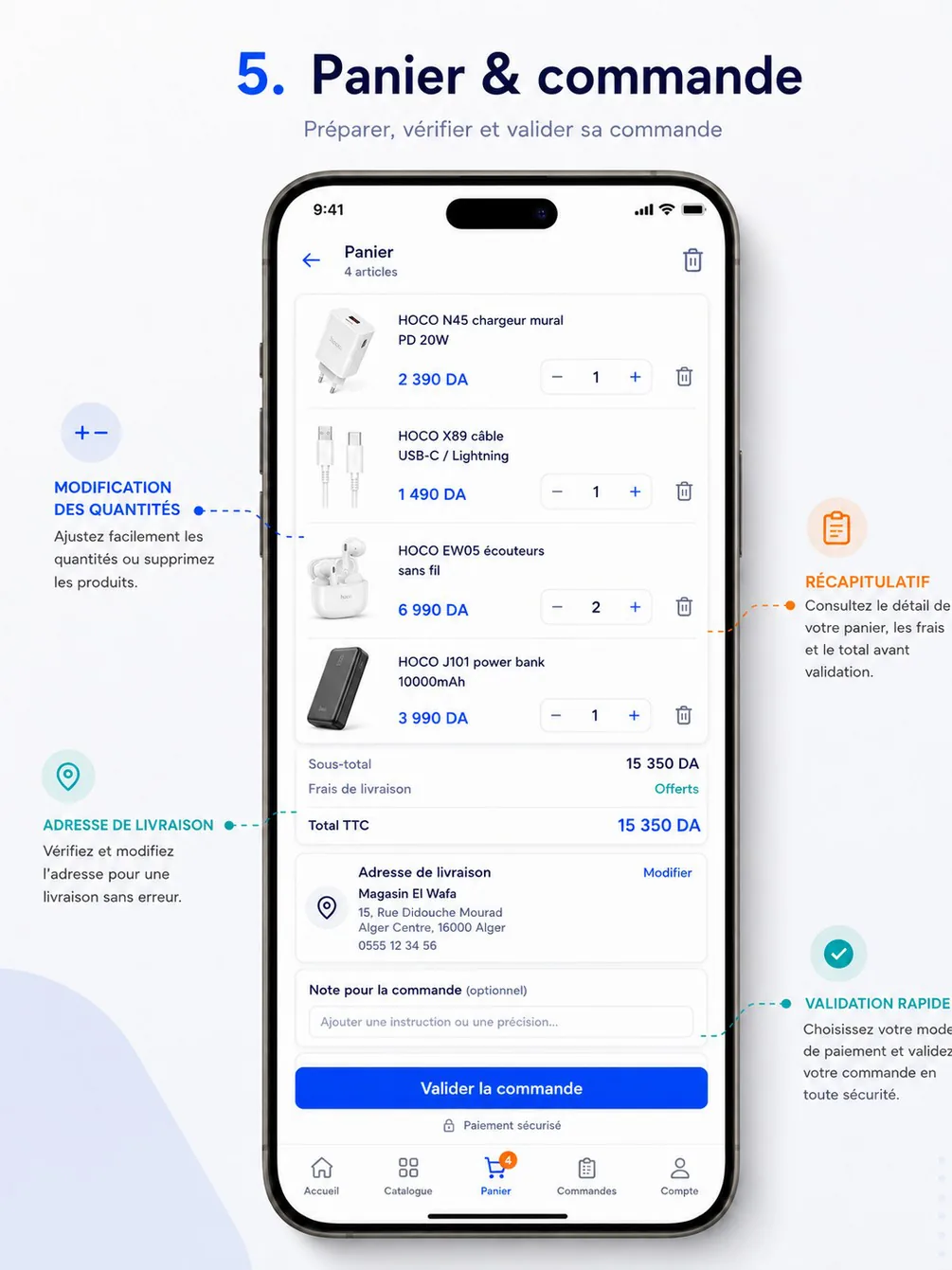
From the reference to the inventory. The reference shows cart and checkout as one scroll. The validated inventory splits them: RA-17 keeps the lines and the summary block of the reference; RA-18 holds the address, the payment method with its credit check, the note and the final total — choices that change the delivery fee and need room for their messages. The reference's « Paiement sécurisé » badge is dropped: there is no online payment in V1; the chosen method's helper text replaces it.
RA-17 — Cart
| Field | Value |
|---|---|
| Screen | Cart · Ordering |
| French title | Panier |
| Release | V1 |
| Design day | Day 8 — DES-08 |
| Build task | MRA-04 |
| Requirements | ORD-01 · ORD-02 · PRC-05 · PRM-04 |
| Reference screen | reseller-04-cart-checkout |
Purpose — Review, adjust and validate the content of the order before checkout: quantities, deletions, applied promotions, subtotal, discounts, delivery fee and total, with every problem (price change, stock, quantity rules, minimum amount) explained on the line it concerns (ORD-01, ORD-02, PRC-05, PRM-04).
Entry points & exits — Panier tab; « Voir le panier » snackbars; « Commander maintenant » on RA-14 (line highlighted); orders.reorder results; /cart. Exits to RA-18 (« Passer la commande »), RA-14 (tap on a line), RA-12 (« Continuer mes achats », empty state), RA-21 (empty state « Recommander une commande »).
Layout
AppBar: title « Panier », subtitle « 4 articles »; trash icon (« Vider le panier »). No back arrow on the tab root.- Cart-level banners, from
issues[]withoutlineId, most severe first:- error
RESELLER_SUSPENDED« Les commandes sont suspendues sur votre compte. Contactez HOCO. » with the WhatsApp button; - warning
ACCOUNT_PENDING_VALIDATION« Votre compte doit être validé par HOCO avant de commander. Vous pouvez préparer votre panier. »; - info
ORDER_MIN_AMOUNT_NOT_MET« Montant minimum de commande : 10 000,00 DA. Il vous manque 1 550,00 DA. » with a progress bar; - info « Les prix de 2 articles ont changé depuis leur ajout. » when lines carry
PRICE_CHANGED.
- error
- Line list (
CartLine), one per variant:- thumbnail (64 dp), name on two lines, variant label and reference in caption;
- unit price in the displayed basis — promotional price with the base price struck through and the promotion label (« Offre flash −30 % ») when a promotion applies;
QuantityStepper(overview rules; − becomes a trash icon atminQty);- line total, right-aligned and bold, with « 5 × 2 490 DA » in caption under it;
- trash icon;
- line issue under the line, coloured by severity, with its fix button (table under Rules).
- Applied promotions block (only when
appliedPromotionsis not empty): one row per promotion — « Offre flash HOCO −30 % » … « −4 500,00 DA ». SummaryCard, in TTC as on the reference: « Sous-total », « Remises » (hidden at 0), « Frais de livraison » (on the default address, or « Offerts »), « Total TTC » (largest), and « dont TVA 2 450,00 DA » in caption. Under it, when the fee policy has a free-delivery threshold not yet reached: « Plus que 2 300,00 DA pour la livraison offerte » with a progress bar.- Text link « Continuer mes achats ».
StickyFooter: « Total TTC 15 350,00 DA » and the primary button « Passer la commande ». When checkout is not possible the button is disabled and the first blocking reason is written above it in one line (« Corrigez 2 articles pour continuer », « Il vous manque 1 550,00 DA », « Compte en attente de validation »).
Data
| Shown | Source |
|---|---|
| Line count (title, tab badge) | cart.get → itemsCount (lines); unitsCount for « 12 pièces » in the summary |
| Lines | lines[].id, product.name, product.brandName, product.imageUrl, variant.sku, variant.label, qty, limits (minQty, qtyStep, maxQtyPerOrder), availability |
| Unit price | lines[].price (current price for the customer type, before promotion); lines[].promotionApplied (label, unitPrice, endsAt) for the promotional price and the strike-through |
| Line total | lines[].lineTotals.totalTtc (and totalHt, discountHt) |
| Line issues | lines[].issues[] (Issue: code, severity, message, details) |
| Promotions | appliedPromotions[] (label, discountTtc, lineIds) |
| Summary | displayTotals.itemsTtc (« Sous-total »), discountTtc (« Remises »), deliveryFeeTtc (« Frais de livraison », 0 = « Offerts »), totalTtc; totals.vatTotal (« dont TVA ») |
| Free-delivery progress | delivery.feePolicy, delivery.isFree, delivery.freeThresholdTtc; the remaining amount is freeThresholdTtc − (itemsTtc − discountTtc) |
| Minimum amount | minimumOrder.amountTtc, minimumOrder.met, minimumOrder.missingTtc |
| Cart-level issues, can submit | issues[]; canCheckout (true when there is at least one line and no BLOCKING issue) |
All totals come from the server (every cart mutation returns the whole CartView); the app never adds prices itself, except the free-delivery remainder above. Field details: cart API page.
Actions
| Interaction | Call | Behaviour |
|---|---|---|
| Open the tab, pull-to-refresh, return to foreground | cart.get | Skeleton only on first load; later refreshes keep the content and show a thin progress bar |
| + / − | cart.items.update { qty } (absolute quantity) | Optimistic quantity in the stepper; line total and summary show a shimmer until the response (promotions and fees can change); requests are debounced 400 ms after the last tap, so ten taps send one call; on error the quantity reverts and the message appears under the line |
| Tap the number | Keypad dialog → cart.items.update | Typed value snapped to a valid quantity before sending, with the explanation |
− at minQty (trash) or trash icon | cart.items.remove | Line removed at once (optimistic) with the snackbar « Article retiré » and « Annuler » for 5 s; « Annuler » re-adds it with cart.items.add { variantId, qty } (new Idempotency-Key) |
| « J'ai vu » on a price change | cart.items.update with the same qty | Acknowledges the new price: the warning disappears |
| « Vider le panier » | Dialog « Vider le panier ? Les 4 articles seront retirés. » [Annuler] [Vider] → cart.clear | Empty state afterwards |
| Fix button of a line issue | cart.items.update or cart.items.remove | See the issue table |
| Tap a line | — | RA-14 on that variant |
| « Passer la commande » | — | RA-18; enabled only when canCheckout |
Rules
- One cart per reseller, on the server, shared with the web (ORD-01): an item added on the reseller web appears here at the next refresh; the app keeps no local cart. Adding a variant already in the cart increases its line.
- Quantity rules per line (ORD-02): valid quantities are
minQty + k × qtyStepup tomaxQtyPerOrder; invalid lines are blocking. - Prices and stock are re-validated at every cart read and again at checkout (PRC-05, cahier §8 « contrôle au panier et à la validation »). Stock is not reserved in the cart: reservation happens when HOCO confirms the order.
- Prices are those of the reseller's customer type; a change of type by HOCO or a price change re-prices the cart and flags the lines.
- Promotions apply automatically, with their dates, stock cap and target (PRM-04); there is no promo code in V1.
- Minimum order amount
settings.orders.minAmount(default 10 000,00 DA) is compared with the merchandise total TTC after promotions, excluding the delivery fee. - Delivery fee follows the setting
delivery.feePolicy:FREE(default — « Offerts » once the minimum is reached) or a fee per wilaya waived above a threshold (DLV-06). - Re-validation never changes the lines behind the reseller's back: a problem line keeps its quantity and gets an issue. A cart holds 100 lines at most (
CART_LINE_LIMIT_REACHED). - Line issues and their fixes — the app never proposes a quantity derived from stock, because stock is never shown as a number (STK-07):
| Code | Severity | Message under the line | Fix |
|---|---|---|---|
PRICE_CHANGED (details.previous, details.current) | Warning | « Prix mis à jour : 2 390 DA → 2 490 DA » | « J'ai vu » (any update of the line acknowledges it) |
PROMOTION_ENDED (details.reason: END_DATE, CAP_REACHED, PAUSED) | Warning | « L'offre « Offre flash » est terminée : prix habituel appliqué. » | — |
QUANTITY_NOT_ALLOWED (details.rule, suggestedQty) | Blocking | « Minimum 5 pièces » · « Par multiples de 5 » · « Maximum 20 pièces par commande » | « Ajuster à {suggestedQty} » |
STOCK_INSUFFICIENT (details.availability IN_STOCK) | Blocking | « Quantité non disponible. Réduisez la quantité. » | Stepper only (decreasing is always accepted) |
STOCK_INSUFFICIENT (details.availability OUT_OF_STOCK) | Blocking | « Produit en rupture de stock. » | « Retirer » |
PRODUCT_UNAVAILABLE | Blocking | « Ce produit n'est plus disponible. » | « Retirer » |
States
| State | Behaviour |
|---|---|
| Loading (first) | Skeleton: 3 lines and the summary |
| Empty | Illustration, « Votre panier est vide », « Parcourez le catalogue ou recommandez une commande précédente. », « Voir le catalogue » and « Recommander une commande » (→ RA-21 filtered on Livrée) |
| Error | ErrorState with « Réessayer » |
| Offline | Last cart snapshot, read-only, offline banner « Hors connexion — le panier sera mis à jour au retour du réseau »; steppers and button disabled |
| Line edited on another device | 404 NOT_FOUND on update or remove → cart reloaded, snackbar « Le panier a été modifié sur un autre appareil. » |
| PENDING_VALIDATION | Everything works; the footer button is disabled with « Compte en attente de validation » |
| Ordering blocked | Error banner, button disabled |
| Guest | Not reachable — the tab shows RA-41 |
Copy — « Panier » · « {count} articles » · « Vider le panier » · « Vider le panier ? Les {count} articles seront retirés. » · « Vider » · « Annuler » · « Article retiré » · « J'ai vu » · « Sous-total » · « Remises » · « Frais de livraison » · « Offerts » · « Total TTC » · « dont TVA {amount} » · « Plus que {amount} pour la livraison offerte » · « Montant minimum de commande : {min}. Il vous manque {missing}. » · « Continuer mes achats » · « Passer la commande » · « Corrigez {count} articles pour continuer » · « Votre panier est vide » · « Recommander une commande ».
Analytics — cart_viewed with itemsCount, totalTtc, blockingIssues, warningIssues; cart_quantity_changed with variantId, from, to; cart_item_removed with undone; cart_cleared; checkout_started with itemsCount, totalTtc.
Acceptance criteria
- An item added on the reseller web appears in the app cart after a refresh, and the reverse.
- The stepper never sends an invalid quantity; a typed value is snapped and explained.
- A line whose price changed since it was added shows the old and new price, and the total equals the server total.
- Below the minimum amount, « Passer la commande » is disabled and the missing amount is shown.
- A removed line can be restored within 5 s with « Annuler ».
- Promotions appear on their lines and in the summary; the total applies them correctly (cahier §5.5 acceptance criterion).
- No message ever shows a stock quantity.
RA-18 — Checkout
| Field | Value |
|---|---|
| Screen | Checkout · Ordering |
| French title | Validation de commande |
| Release | V1 |
| Design day | Day 8 — DES-08 |
| Build task | MRA-04 |
| Requirements | ORD-03 · FIN-02 · FIN-05 · DLV-06 |
| Reference screen | reseller-04-cart-checkout |
Purpose — Choose the delivery address and the payment method, add a note, check the final total and send the order to HOCO — exactly once, whatever the network does (ORD-03, FIN-02, FIN-05, DLV-06).
Entry points & exits — Only from « Passer la commande » on RA-17 (/checkout is never a push target). Exits to RA-19 (« Modifier » or « Ajouter une adresse »), RA-20 on success (checkout and cart are replaced in the stack, so back goes to Accueil), back to RA-17 for problems that need the cart.
Layout — one scrolling screen with numbered sections, bottom navigation hidden:
AppBar« Validation de commande » with back.- Validation banner when the account is pending: warning « Votre compte doit être validé par HOCO avant de commander. » — the submit button is disabled.
- « 1. Adresse de livraison » —
AddressCardof the selected address (the default one first): label (« Magasin »), recipient, phone, address line, landmark, commune and wilaya, and its delivery fee (« Livraison offerte » or « Livraison 600,00 DA »); « Modifier » (right). An address in a wilaya not served is listed greyed with « Wilaya non desservie ». Without any address: dashed card « Ajouter une adresse de livraison » (required). - « 2. Mode de paiement » — one
RadioCardper method, in this order when enabled:- Paiement à la livraison — « Vous payez le livreur à la réception. »
- Virement bancaire — « Faites le virement après la confirmation de HOCO, puis déclarez-le avec le justificatif. »
- CCP — « Versement ou virement CCP, puis déclaration avec le reçu. »
- BaridiMob — « Paiement BaridiMob, puis déclaration avec la capture du reçu. »
- Crédit (paiement différé) — « Payé à échéance. Crédit disponible : 250 000,00 DA. » When selected, a credit box: « Crédit disponible 250 000,00 DA · Cette commande 15 350,00 DA · Reste après commande 234 650,00 DA ».
Under a selected method, its
instructionstext from the settings (for example « Versement CCP au compte HOCO, puis déclarez le paiement avec le reçu. »). A disabled method stays visible, greyed, with its reason:CREDIT_LIMIT_EXCEEDED« Crédit insuffisant : disponible 250 000,00 DA »,CREDIT_BLOCKED« Crédit bloqué — contactez le service finance »,NO_CREDIT_LINE« Paiement à crédit non activé pour votre compte ». Nothing is preselected except the method the reseller used last on this device.
- « 3. Note pour la commande (facultatif) » — multiline
TextField, placeholder « Ajouter une instruction ou une précision… », counter « 0/500 ». - « 4. Récapitulatif » — collapsed « 4 articles » row that expands to the lines (thumbnail, name, « 5 × 2 490 DA », line total); applied promotions;
SummaryCard« Sous-total HT », « Remises », « Frais de livraison » (for the selected address, or « Offerts »), « TVA », « Total TTC ». - Information line: « Votre commande sera confirmée par HOCO avant sa préparation. Vous serez notifié à chaque étape. »
StickyFooter: « Total TTC 15 350,00 DA » and the primary button « Valider la commande ».
Data
| Shown | Source |
|---|---|
| Addresses | cart.checkoutOptions → addresses[] (Address plus deliverable, deliveryFee (Price), totalTtc — the total with that address), default first |
| Payment methods | paymentMethods[]: method (PaymentMethod), enabled, disabledReason, requiresApproval, requiresDeclaration, instructions |
| Credit | credit.limit, credit.used, credit.available, credit.blocked, credit.overLimitPolicy (BLOCK by default, or REQUIRE_APPROVAL) — credit is null without a credit line |
| Minimum, note limit, can submit | minimumOrder (amountTtc, met, missingTtc), noteMaxLength (500), canCheckout, issues[], cartUpdatedAt |
| Lines and promotions | The cart already loaded by RA-17 (cart.get → lines[], appliedPromotions[], displayTotals) |
| Account state | Me.status, Me.reseller.status |
Actions
| Interaction | Call | Behaviour |
|---|---|---|
| Open | cart.checkoutOptions | Skeleton of the four sections; the submit button disabled until loaded |
| Change address (RA-19 returns an id) | — (each address carries its fee and total) | The delivery fee and the footer total switch to that address's deliveryFee and totalTtc; a new address created on RA-19 reloads cart.checkoutOptions |
| Select a payment method | — (local) | Shows the method's helper and instructions; for Crédit, the credit box. When requiresApproval is true: warning « Commande soumise à l'accord du service financier : elle dépasse votre crédit disponible. » |
| Type the note | — (local, kept if the screen is left and reopened in the same session) | Limit 500 characters, counter turns red at the limit |
| « Valider la commande » | cart.checkout { addressId, paymentMethod, note, expectedTotalTtc } with Idempotency-Key — expectedTotalTtc is the selected address's totalTtc | See Submission below |
Submission — exactly once.
- On the first tap the app generates an
Idempotency-Key(UUID) and stores it on the device with a fingerprint of the body. The button shows a spinner, every input is disabled, and Android back is intercepted with « Envoi de votre commande en cours… ». - Any later attempt with the same body (retry after a timeout, a second tap, an app restart) reuses the same key: the server replays the original answer instead of creating a second order (
Idempotent-Replayed: true). If the address, method or note changes, a new key is generated. - Network timeout or connection loss: automatic retries with the same key after 1, 2 and 4 seconds while showing « Vérification de votre commande… ». If they all fail:
Dialog« Nous n'avons pas pu confirmer l'envoi. Votre commande a peut-être été enregistrée. » [Réessayer] (same key) [Voir mes commandes]. 409 IDEMPOTENCY_IN_PROGRESS: wait 1 s and resend with the same key (three times at most).- On success the key is deleted, the cart badge goes to 0 (the server emptied the cart), and RA-20 replaces checkout and cart in the stack.
Response — 201: the OrderDetail of the new order, always Envoyée (SUBMITTED) — id, number (CMD-2026-000158), displayTotals.totalTtc, paymentMethod, address, createdAt, isFirstOrder, awaitingConfirmation (BACK_OFFICE). A replay of the same key returns the same body even though the cart is now empty.
Rules
- The server re-validates everything at submission (PRC-05, ORD-02): every line visible and orderable, quantity rules, available stock, minimum amount, payment method enabled, credit, address belonging to the reseller, account and lifecycle status — and the total the reseller saw (
expectedTotalTtc). - No automatic confirmation (ORD-14): the order is created Envoyée and waits in the back-office queue BO-41; the reseller is told so on this screen and the next. Stock is reserved only when HOCO confirms.
- Credit (FIN-05, cahier §4.7 « Le dépassement du plafond peut bloquer la commande ou exiger une validation »): with
BLOCK(default) a total above the available credit disables the Crédit method; withREQUIRE_APPROVALthe order is still created Envoyée, flagged for finance in the confirmation queue — the back-office may put it En attente, which the reseller then sees live. - Delivery fee per wilaya with a free-delivery threshold (DLV-06), computed by the server for the selected address.
- Payment (FIN-02): no online payment in V1. Transfer, CCP and BaridiMob are paid after HOCO's confirmation and declared with proof on RA-31; cash on delivery is collected by the driver.
- The note is free text for HOCO (delivery hours, precisions); it is not a contract change.
- The order gets a unique number at creation and appears immediately in the back-office (cahier §5.3 acceptance criterion, live event to BO-41).
States and errors
| Situation | Message or behaviour |
|---|---|
| Options loading | Section skeletons; button disabled |
| No address | Section 1 in error tone: « Ajoutez une adresse de livraison pour continuer. » |
409 CART_CHANGED (details.expectedTotalTtc, actualTotalTtc, cart) | Nothing was created. Summary re-rendered from details.cart; warning banner « Votre panier a été mis à jour, vérifiez le nouveau total avant de valider. »; the new total is highlighted; button enabled again with a new key |
422 STOCK_INSUFFICIENT · PRODUCT_UNAVAILABLE · QUANTITY_NOT_ALLOWED · ORDER_MIN_AMOUNT_NOT_MET (details.issues, details.cart) | The cart from details is rendered at once; BottomSheet « Certains articles doivent être corrigés » listing the issues, with « Modifier mon panier » → RA-17 with those lines highlighted |
422 CART_EMPTY | « Votre panier est vide. » → RA-17 (typically the order was already placed from the web) |
422 ADDRESS_NOT_DELIVERABLE | « Cette adresse est dans une wilaya non desservie. Choisissez une autre adresse. » |
422 CREDIT_LIMIT_EXCEEDED (details.limit, used, available, required) | Payment section in error: « Crédit insuffisant : disponible {available}, commande {required}. Choisissez un autre mode de paiement. » |
422 PAYMENT_METHOD_NOT_ALLOWED (details.reason: METHOD_DISABLED, NO_CREDIT_LINE, CREDIT_BLOCKED) | Options reloaded; « Ce mode de paiement n'est plus disponible. Choisissez-en un autre. » |
400 VALIDATION_FAILED (UNKNOWN_ADDRESS, TOO_LONG) | Options reloaded, « Cette adresse n'existe plus. » · note counter in error |
403 ACCOUNT_PENDING_VALIDATION | Validation banner; button disabled |
403 RESELLER_SUSPENDED | « Les commandes sont suspendues sur votre compte. Contactez HOCO. » with the WhatsApp button |
409 IDEMPOTENCY_KEY_REUSED | Should not happen (a new key is generated when the body changes); the app generates a new key and retries once |
401 | Sign-in, then back here with the state kept |
Timeout, 5xx | Submission steps 3–4 |
| Offline | Offline banner; button disabled with « Connexion requise pour valider la commande » |
Copy
| Key | French |
|---|---|
| Title and sections | « Validation de commande » · « 1. Adresse de livraison » · « Modifier » · « Ajouter une adresse de livraison » · « 2. Mode de paiement » · « 3. Note pour la commande (facultatif) » · « 4. Récapitulatif » |
| Note placeholder | « Ajouter une instruction ou une précision… » |
| Credit box | « Crédit disponible {available} · Cette commande {total} · Reste après commande {remaining} » |
| Over-limit warning | « Cette commande dépasse votre crédit disponible : HOCO devra l'approuver. » |
| Information | « Votre commande sera confirmée par HOCO avant sa préparation. Vous serez notifié à chaque étape. » |
| Button and progress | « Valider la commande » · « Envoi de votre commande en cours… » · « Vérification de votre commande… » |
| Uncertain result | « Nous n'avons pas pu confirmer l'envoi. Votre commande a peut-être été enregistrée. » · « Réessayer » · « Voir mes commandes » |
Analytics — checkout_viewed with addressCount, methodsEnabled; checkout_address_changed; checkout_payment_selected with method; checkout_submitted with totalTtc, method, lineCount; checkout_succeeded with orderNumber, status, isFirstOrder, durationMs, replayed; checkout_failed with code.
Acceptance criteria
- Tapping « Valider la commande » twice, or retrying after a timeout, never creates two orders (same key → replayed answer).
- Changing the address updates the delivery fee and the total before submission.
- With the default credit policy, a total above the available credit cannot be paid by credit and the message shows the available amount.
- If a price changed between display and submission, no order is created and the reseller sees the new total before confirming again.
- On success the order has a number
CMD-YYYY-NNNNNN, status Envoyée, the cart is empty on mobile and web, and the order is visible at once in the back-office queue BO-41. - Without an address the order cannot be sent; a note above 500 characters cannot be typed.
RA-19 — Address book & address form
| Field | Value |
|---|---|
| Screen | Address book & address form · Ordering |
| French title | Adresses de livraison |
| Release | V1 |
| Design day | Day 8 — DES-08 |
| Build task | MRA-04 |
| Requirements | ORD-03 · GEO-01 |
| Reference screen | None — follow the design system |
Purpose — Choose, add and maintain the delivery addresses of the store (ORD-03, GEO-01).
Entry points & exits — From RA-18 in selection mode (« Modifier », « Ajouter une adresse »); from RA-27 / RA-28 in management mode (« Adresses de livraison »); /account/addresses. Exits: back to RA-18 with the chosen address id, or back to the account.
Layout — list
AppBar« Adresses de livraison ».- One
AddressCardper address: label (« Magasin », « Dépôt »), « Par défaut » badge, recipient, phone, address line, landmark, commune and wilaya. Selection mode: a radio on each card and the primary « Utiliser cette adresse » in aStickyFooter. Management mode: overflow menu « Modifier », « Définir par défaut », « Supprimer ». - « Ajouter une adresse » (outlined button).
Layout — form (full screen)
AppBar« Nouvelle adresse » or « Modifier l'adresse ».- Libellé as chips « Magasin », « Dépôt », « Autre » (« Autre » reveals a text field, 30 characters).
TextFieldNom du destinataire (prefilled with the owner name),PhoneFieldTéléphone (prefilled with the main phone).SelectWilaya,SelectCommune (filtered by wilaya),TextFieldAdresse,TextFieldRepère (facultatif).- « Utiliser ma position actuelle » (optional) — shows « Position enregistrée (précision 12 m) » with « Supprimer ».
- Switch « Adresse par défaut ».
StickyFooter: primary « Enregistrer ».
Data — addresses.list → items[] (Address: id, label, recipientName, phone, wilayaCode, wilayaName, communeId, communeName, addressLine, landmark, location, isDefault); reference.wilayas, reference.communes.
Actions
- « Enregistrer » (new) →
addresses.createwith anIdempotency-Key; (edit) →addresses.update. In selection mode the new address is selected and the app returns to RA-18. - « Définir par défaut » →
addresses.setDefault. « Supprimer » →Dialog« Supprimer cette adresse ? » →addresses.remove. - Location capture as on RA-05.
Rules
- At least one address always exists (the store address from sign-up); « Supprimer » is hidden when only one is left, and the default address cannot be deleted before another becomes default.
- Ten addresses at most (Assumption).
- An order keeps a snapshot of its address: editing or deleting an address never changes past orders.
- The delivery fee depends on the wilaya (DLV-06); a new address in another wilaya can change the checkout total.
- Limits: recipient 2–80 characters, address 5–200, landmark up to 120; the commune must belong to the wilaya.
States — List loading: card skeletons. Errors: 400 VALIDATION_FAILED with field codes (COMMUNE_NOT_IN_WILAYA « Cette commune n'appartient pas à la wilaya choisie. », INVALID_PHONE) under the fields; 422 on the last or default address « Impossible de supprimer cette adresse. ». Offline: list read-only, form button disabled.
Copy — « Adresses de livraison » · « Par défaut » · « Utiliser cette adresse » · « Ajouter une adresse » · « Nouvelle adresse » · « Modifier l'adresse » · « Libellé » · « Magasin » · « Dépôt » · « Autre » · « Nom du destinataire » · « Téléphone » · « Utiliser ma position actuelle » · « Adresse par défaut » · « Enregistrer » · « Supprimer cette adresse ? ».
Analytics — address_created with fromCheckout, hasLocation; address_selected; address_deleted.
Acceptance criteria
- An address added from checkout is selected on return and the delivery fee is recomputed.
- The last remaining address cannot be deleted.
- Editing an address does not change the address shown on a past order.
RA-20 — Order confirmation
| Field | Value |
|---|---|
| Screen | Order confirmation · Ordering |
| French title | Commande envoyée |
| Release | V1 |
| Design day | Day 8 — DES-08 |
| Build task | MRA-04 |
| Requirements | ORD-03 |
| Reference screen | None — follow the design system |
Purpose — Confirm that the order was sent, give its number, and say clearly that HOCO still has to confirm it (ORD-03, ORD-14); then lead to tracking.
Entry points & exits — Only after a successful cart.checkout (it replaces checkout and cart in the stack). Exits to RA-22 (« Suivre ma commande »), RA-09 (« Retour à l'accueil », Android back), RA-31 (« Déclarer mon paiement », transfer methods, after confirmation).
Layout
- Success illustration (check mark) and title « Commande envoyée ! ».
- Order number « CMD-2026-000158 » with a copy icon, and the status pill Envoyée followed by « en attente de confirmation par HOCO ».
- Explanation: « HOCO va vérifier et confirmer votre commande avant sa préparation. Vous serez notifié dès qu'elle sera confirmée, puis à chaque étape jusqu'à la livraison. » When the credit option required approval: « Votre commande dépasse votre crédit disponible : le service financier doit aussi l'approuver. »
- Summary card: date and time, « 4 articles », « Total TTC 15 350,00 DA », payment method, delivery address (one line).
- For transfer, CCP and BaridiMob: info card « Paiement après confirmation : vous pourrez déclarer votre paiement avec le justificatif depuis la commande. »
- First order (
isFirstOrder): banner « Bravo pour votre première commande HOCO ! » - Notification pre-prompt (when the permission is not granted): « Activez les notifications pour suivre la confirmation de votre commande » with « Activer ».
- Primary « Suivre ma commande »; secondary « Retour à l'accueil ».
Data — The response of cart.checkout (number, status, displayTotals.totalTtc, paymentMethod, address, createdAt, isFirstOrder, awaitingConfirmation) — no extra call. Live order.status_changed from events.stream updates the pill if HOCO confirms while the screen is open.
Actions — Copy the number (snackbar « Numéro copié »); notification permission request; navigation buttons.
Rules — The status shown is the server's; the screen never says « confirmée » before HOCO does. The screen is not restored after the app is killed: the order is on RA-21.
States — Status Envoyée (always at creation), updated live to En attente (put on hold by HOCO) or Validée (pill animates, text becomes « Votre commande a été confirmée par HOCO. »).
Copy — « Commande envoyée ! » · « en attente de confirmation par HOCO » · « HOCO va vérifier et confirmer votre commande. Vous serez notifié dès qu'elle sera confirmée, puis à chaque étape jusqu'à la livraison. » · « Bravo pour votre première commande HOCO ! » · « Suivre ma commande » · « Retour à l'accueil » · « Numéro copié ».
Analytics — order_confirmation_viewed with status, isFirstOrder; push_permission_prompted with source: "order_confirmation".
Acceptance criteria
- The number shown equals the number in the back-office queue BO-41.
- The screen states that the order waits for HOCO's confirmation; it never shows Validée unless HOCO validated it.
- Back from this screen goes to Accueil, never to checkout.
Shopping
Screen specifications RA-09 to RA-16 of the reseller app — home, search, barcode scanner, catalog, advanced filters and sort, product detail, full specifications and favorites, for guests and resellers.
Orders
Screen specifications RA-21 to RA-23 of the reseller app — orders with counters and live progress, order detail with tracking, documents, cancel, reorder, returns and after-sales entry points, and the confirmation of assisted orders.