Prospects and conversion
Prospects and points of sale, field sign-up, editing, invitation to the reseller app, first-order assistance and orders of the delegate app (DA-13 to DA-18).
These screens turn a shop on the délégué's route into an active revendeur (reseller): it is registered in the field, invited to install the reseller app, and helped through its first order (cahier §1.4 « Prospects enregistrés → comptes créés → premières commandes », §6.5, §6.6, §6.7). Binding product decisions apply here: availability is never shown as a quantity, prices are those of the store's customer type (super-gros, demi-gros, détail), and no order is confirmed automatically — every order waits for the back-office (AUTHORING §1b, STK-07, PRC-02, AUTH-11, ORD-14).
Reseller lifecycle seen from the app
| Value | UI label (fr) | Meaning |
|---|---|---|
NEW_PROSPECT | Nouveau prospect | Just created; no qualified contact yet. |
TO_CONTACT | À contacter | Planned for a call or a visit. |
INTERESTED | Intéressé | Interest confirmed during a visit or call. |
APP_INSTALLED | Application installée | Invitation attributed an install (automatic). |
ACCOUNT_CREATED | Compte créé | Reseller account created and phone verified (automatic). |
FIRST_ORDER | Première commande | First order submitted (automatic). |
ACTIVE | Revendeur actif | First order delivered, or a validated order within the activity window (automatic). |
NOT_INTERESTED | Non intéressé | Declined; kept for later campaigns. |
TO_FOLLOW_UP | À relancer | A follow-up is due (from a visit report or inactivity). |
SUSPENDED | Suspendu | Commercially suspended (unpaid, fraud, closure); ordering blocked. |
| Statuses | Who sets them | In the delegate app |
|---|---|---|
NEW_PROSPECT, TO_CONTACT, INTERESTED | The delegate at creation (DA-14) | Initial status choice |
TO_CONTACT, INTERESTED, NOT_INTERESTED, TO_FOLLOW_UP | The delegate later (DA-15), only from a qualification status | NOT_INTERESTED needs a reason; TO_FOLLOW_UP needs a follow-up |
APP_INSTALLED, ACCOUNT_CREATED, FIRST_ORDER, ACTIVE | The system (invitation funnel, sign-up, orders) | Shown as progress, never selectable (409 RESELLER_TRANSITION_NOT_ALLOWED) |
SUSPENDED | The back-office | Banner; assisted orders refused |
| Value | UI label (fr) | Meaning |
|---|---|---|
SUPER_GROS | Super-gros | Large wholesaler — largest volumes; lowest price. |
DEMI_GROS | Demi-gros | Semi-wholesaler — intermediate volumes and price. |
DETAIL | Détail | Retail shop — smallest volumes; highest of the three prices. |
DA-13 — Prospects & resellers (list / map)
| Field | Value |
|---|---|
| French title | « Prospects » |
| Release | V1 |
| Design day | Day 13 — DES-13 |
| Build task | MDA-04 — point-of-sale sheet & prospects list |
| Requirements | CRM-04 · ACL-03 |
| Reference screen | None — list and map pattern shared with DA-06 |
Purpose. Find any point of sale or prospect of the delegate's scope by name, phone, number, status or distance, on a list or a map, and start the right action from it (CRM-04, ACL-03).
Entry points & exits. Entry: Prospects tab (segment Points de vente; the segment Relances is DA-19), counters of DA-25 (filtered by commune). Exits: DA-09 (row, pin), DA-14 (« + Nouveau »), dialer, DA-08-style external navigation.
Layout.
- App bar « Prospects » with the segments Points de vente · Relances; sync indicator; bell.
- Search field « Nom, téléphone, n° REV… » with a barcode-free keyboard (text).
- Filter chips (horizontal scroll): status groups Prospects (before
FIRST_ORDER), Revendeurs, À relancer, Non intéressés, then individual statuses in the sheet; Assignés à moi / Non assignés; customer type; potential; commune. - Sort selector Distance · Nom · Dernière visite; list/map toggle.
- List rows (72 dp): façade thumbnail, store name, owner and commune,
ResellerStatuspill, customer-type chip, distance (« 850 m »), last visit (« Visité il y a 12 j »), open tasks dot, sync badge. Drafts not yet saved appear first under « Brouillons (1) ». - Map mode: clustered pins coloured by status group, the delegate's position, a bottom card for the selected store with « Fiche », « Appeler », « Itinéraire ».
- Floating button « + Nouveau » (bottom end, above the bottom bar).
Data.
| Field | API source | Offline source | Freshness |
|---|---|---|---|
| Rows and pins | delegate.resellers.list (q, status, assignment, near, radiusKm, sort, cursor) → items[] (storeName, ownerName, communeName, status, customerType, potential, location, lastVisitAt, facadeThumbnailUrl, assignedToMe, validationStatus, openTasksCount, distanceMeters) | resellers — the whole scope is synced; search, filters and sort run locally | Delta; the server list is used for the first load only |
| Distance | Computed from the current fix | Same | Every 30 s or 50 m while visible |
| Pending state | — | outbox items per reseller | Live-local |
| Drafts | — | drafts (kind RESELLER) | Local |
Actions. Search (debounced 300 ms, local); filter and sort (local); open a store; call; « + Nouveau »; pull to refresh (delta). No mutation.
Rules. Scope = assigned stores, unassigned prospects of the delegate's zones, stops of open tours (ACL-03). A store reassigned to someone else disappears at the next delta (tombstone). Search covers store name, owner name, REV- number and phone digits, accent- and case-insensitive. Sorting by distance needs a fix; without one the list falls back to Nom.
States. First sync running (« Chargement de vos points de vente… 120 / 412 ») · empty search (« Aucun point de vente ne correspond » with « Créer ce prospect ») · offline (normal, map tiles may be missing) · location off (no distance sort).
Copy. « Prospects » · « Points de vente » · « Relances » · « Nom, téléphone, n° REV… » · « Assignés à moi » · « Non assignés » · « Distance » · « Dernière visite » · « Brouillons » · « + Nouveau » · « Aucun point de vente ne correspond ».
Acceptance criteria.
- In airplane mode, searching « wafa » finds Magasin El Wafa within 300 ms, and the distance sort orders stores by straight-line distance.
- A prospect created offline appears at the top of the list with the pending badge.
- A store reassigned to another delegate disappears after the next sync.
- The list and the map show the same stores for the same filters.
DA-14 — New reseller
| Field | Value |
|---|---|
| French title | « Nouveau revendeur » |
| Release | V1 |
| Design day | Day 14 — DES-14 |
| Build task | MDA-07 — new reseller (offline) & edit |
| Requirements | FLD-11 · CRM-03 · CRM-10 · SYN-04 |
| Reference screen | delegate-06-reseller-signup — shown below |
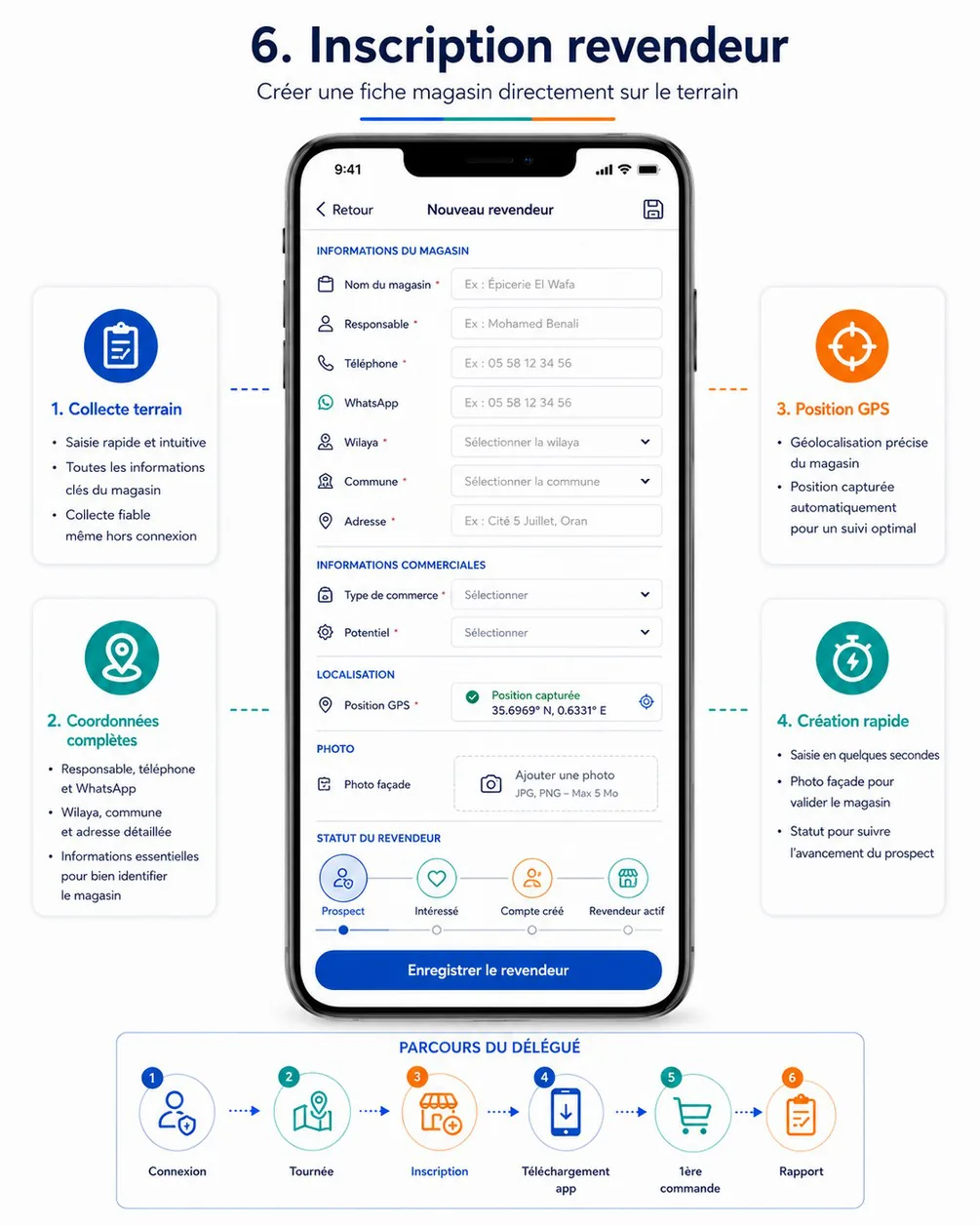
Purpose. Register a shop in the field in under two minutes, even without network: store and owner details, unique phone, wilaya and commune, business type, potential, the proposed customer type, GPS position and façade photo; the record is linked to the delegate and waits for back-office validation (cahier §6.5, FLD-11, CRM-03, CRM-10, SYN-04).
Entry points & exits. Entry: « + Nouveau » on DA-13, quick access Nouveau revendeur on DA-05, « Nouveau point de vente » in the add-visit sheet of DA-06, a saved draft. Exits: DA-09 of the new record (after « Enregistrer le revendeur »), with the next-step sheet; back keeps a draft.
Layout (one scrolling form, sections as in the reference; required fields marked with an asterisk).
- App bar — « Retour », « Nouveau revendeur », save-draft icon (« Enregistrer le brouillon »).
- Informations du magasin — Nom du magasin* (ex. Épicerie El Wafa), Responsable* (ex. Mohamed Benali), Téléphone* (ex.
05 58 12 34 56, live duplicate check), WhatsApp (switch « Identique au téléphone », on by default), Email, Wilaya* (searchable picker), Commune* (searchable picker filtered by the wilaya), Adresse* (ex. Cité 5 Juillet, Oran), Point de repère. - Informations commerciales — Type de commerce* (
BUSINESS_TYPE), Potentiel* (Faible · Moyen · Élevé), Type de client (segmented Super-gros · Demi-gros · Détail, plus « Je ne sais pas »), helper « Proposé par vous, confirmé par HOCO à la validation du compte. Il fixe les prix des commandes. » - Localisation — Position GPS*: captured automatically when the screen opens; card « Position capturée · 35,6969° N, 0,6331° O · ± 12 m » with « Recapturer »; mini-map with the pin.
- Photo — Photo façade* — camera tile « Ajouter une photo » (JPG ou PNG, 5 Mo max), preview with « Reprendre ».
- Statut du revendeur — segmented choice of the initial status: Nouveau prospect (default) · À contacter · Intéressé. Below it, a read-only stepper shows the funnel ahead (Compte créé → Première commande → Revendeur actif), driven by the system. The reference's stepper made Compte créé and Revendeur actif selectable; they are automatic.
- Note (optional, ≤ 1000) — first entry of the store's history.
- Sticky action bar — « Enregistrer le revendeur » (primary, enabled when the required fields are valid; the list of missing fields shows on tap otherwise).
Data.
| Field | API source | Offline source | Freshness |
|---|---|---|---|
| Wilayas, communes | reference.wilayas, reference.communes | wilayas, communes (all wilayas; communes of the zone's wilayas preloaded, others fetched on demand) | Reference |
| Delegate's zones (picker order and hors zone warning) | delegate.profile → zones[].areas[] | profile | At sign-in |
| Business types, customer types | reference.lists → BUSINESS_TYPE, CUSTOMER_TYPE, POTENTIAL | reference_items | Reference |
| Duplicate check | delegate.resellers.checkPhone → available, existing, assignedToMe, inMyScope | resellers (normalised phone index, scope only) | Online when possible, local otherwise |
| Position | Android location (high accuracy, best fix within 30 s) | — | On open and on « Recapturer » |
| Accuracy limit | appConfig.get → settings.field.gpsMaxAccuracyMeters | app_config | Reference |
| Draft | — | drafts (kind RESELLER), autosaved on every field change | Local |
| Created record | delegate.resellers.create → ResellerSheet (number, validationStatus, customerTypeConfirmed, zone) | resellers | On sync |
Actions.
- Phone field blur → normalise (
0558 12 34 56→+213558123456); online →delegate.resellers.checkPhone; offline → lookup in the localresellers. Results: available → green check; existing in scope → « Ce numéro est déjà enregistré : Magasin El Wafa (REV-000123) » with « Ouvrir la fiche », save blocked; existing outside scope → « Ce numéro est déjà enregistré pour un autre point de vente. Contactez votre superviseur. », save blocked. - Recapturer → new acquisition; if the best accuracy stays above 100 m after 30 s: « Précision insuffisante (± 180 m). Sortez devant le magasin et réessayez. » with « Réessayer » and, after two failures, « Enregistrer sans position » (reason
NO_FIX); permission denied → « Enregistrer sans position » (reasonPERMISSION_DENIED). - Photo façade → camera (gallery only as a fallback after a camera error); resized to 1600 px, JPEG 80, EXIF stripped, ≤ 5 MB; kept in app storage;
upload_queueentry (purposeSTORE_PHOTO). - Enregistrer le revendeur →
- One transaction: a
resellersrow with a client UUIDv7id,assignedToMe,validationStatus = PENDING; the outbox itemdelegate.resellers.createwith body{ id, storeName, ownerName, phone, whatsapp, email, wilayaCode, communeId, addressLine, landmark, location, locationUnavailableReason, businessTypeCode, potential, customerType, status, note, visitId, occurredAt }(facadePhotoFileIdis sent only when the upload already completed); a second itemdelegate.resellers.addPhoto(kind = FACADE) that depends on the creation and on the upload.Idempotency-Key= item ids;occurredAt= the tap. The draft is deleted. - Feedback:
mediumImpact; snackbar « Fiche enregistrée — envoi dès que possible » (offline) or « Fiche enregistrée »; navigation to DA-09 of the new record. - Next-step sheet: « Inviter à installer l'application » (DA-16, available once synced), « Ajouter à ma tournée » (unplanned visit, tour
IN_PROGRESS), « Aide à la 1ère commande » (DA-17), « Plus tard ».
- One transaction: a
- Back / save-draft icon → draft kept; listed under Brouillons on DA-13.
Rules.
- The main phone must be unique after normalisation (cahier §4.2, §6.5; CRM-03): Algerian mobile (
05,06,07) or landline accepted; the server is the final judge at replay (409 PHONE_ALREADY_EXISTS). WhatsApp numbers are not unique. - The record is linked to the creating delegate (cahier §6.5): source
DELEGATE_APP, created by and assigned to the caller. - The account may stay pending validation (cahier §6.5):
validationStatus = PENDINGuntil a validator approves it on BO-13 — the validator also confirms or changes the proposed customer type (§1b, AUTH-11). Until then, assisted-order prices use the proposed type, or Détail when none, with a warning (DA-17). - The GPS position becomes the store's reference for every later check-in: it must be precise (accuracy ≤
field.gpsMaxAccuracyMeters,422 GPS_ACCURACY_TOO_LOW); a record without position is accepted with a reason and flagged for the validator, and the first check-in proposes a position. - The façade photo is required by the form (FLD-11); the API accepts the record before the photo so that a slow upload never blocks the prospect.
- A commune outside the delegate's zones is allowed but flagged « hors zone » for the validator; the picker lists the zone's communes first.
- Coordinates are displayed in French decimal format with the hemisphere from the sign: Oran is 35,6969° N, 0,6331° O (the reference's « 0.6331° E » is wrong).
States.
| State | UI |
|---|---|
| Offline | Banner « Hors ligne : la fiche sera envoyée automatiquement »; duplicate check limited to local data (« Vérification complète à la synchronisation ») |
| Duplicate at replay | Item REJECTED with PHONE_ALREADY_EXISTS → DA-27 « Doublon : ce numéro existe déjà » with « Corriger le numéro » (opens DA-15 on the local record, new item) or « Supprimer cette fiche »; the photo item waits |
| Out of scope at replay | 403 OUT_OF_SCOPE (commune reassigned) → explained in the sync centre |
| Invalid fields | Inline, under each field (« Numéro invalide », « Choisissez une commune ») |
| Camera denied | « Autorisez l'appareil photo pour ajouter la photo de façade » |
| GPS states | Capturing (« Recherche de la position… ± 40 m »), captured, insufficient accuracy, permission denied |
Copy. « Nouveau revendeur » · « Informations du magasin » · « Nom du magasin » · « Responsable » · « Téléphone » · « WhatsApp » · « Identique au téléphone » · « Wilaya » · « Commune » · « Adresse » · « Point de repère » · « Informations commerciales » · « Type de commerce » · « Potentiel » · « Type de client » · « Super-gros » · « Demi-gros » · « Détail » · « Je ne sais pas » · « Localisation » · « Position capturée » · « Recapturer » · « Photo façade » · « Statut du revendeur » · « Enregistrer le revendeur » · « Fiche enregistrée ».
Acceptance criteria.
- A prospect created in airplane mode, with photo and position, appears in the back-office CRM after reconnection with its source, delegate, position, proposed customer type and façade photo (cahier §6.5 acceptance criterion).
- A phone already registered in the delegate's scope blocks the save and links to the existing sheet; outside the scope the message gives no detail (cahier §12 Prospect — no duplicate).
- Replaying the same creation twice (lost answer) creates one record.
- Compte créé and Revendeur actif cannot be chosen as initial status.
- Killing the app halfway through the form and reopening it offers the draft with every field kept.
- The proposed customer type is shown as « proposé » on DA-09 until the back-office validation confirms it.
DA-15 — Edit reseller / prospect
| Field | Value |
|---|---|
| French title | « Modifier la fiche » |
| Release | V1 |
| Design day | Day 14 — DES-14 |
| Build task | MDA-07 — new reseller (offline) & edit |
| Requirements | CRM-01 · CRM-04 |
| Reference screen | delegate-06-reseller-signup — shown below |
Purpose. Correct or complete a store record and move a prospect between qualification statuses (CRM-01, CRM-04).
Entry points & exits. Entry: « Modifier » on DA-09; « Corriger le numéro » in DA-27 (duplicate). Exit: back to DA-09.
Layout. The DA-14 form prefilled, plus:
- Statut — the allowed transitions only (
allowedStatusTransitions), with « Raison » (required for Non intéressé, 3–300 characters) and, for À relancer, a follow-up block (type, date, note). - Locked fields displayed read-only with a lock and the reason: Téléphone (« Le revendeur a un compte : il modifie son numéro dans son application »), Type de client (« Confirmé par HOCO »), Position GPS (« Position validée : signalez un déménagement par une note »).
- Sticky « Enregistrer ».
Data.
| Field | API source | Offline source | Freshness |
|---|---|---|---|
| Current values, version | delegate.resellers.get → the sheet, version, editableFields[], allowedStatusTransitions[] | resellers | On open |
| Reference lists | As DA-14 | reference_items, wilayas, communes | Reference |
Actions. Enregistrer → delegate.resellers.update queued with only the changed fields, version and occurredAt (and statusReason / followUp when needed); optimistic local update; snackbar « Fiche mise à jour ». A record created on this phone and not yet synced is edited in place: its pending creation item is rebuilt (compaction, new key) instead of queuing an update.
Rules.
- Phone editable only while the store has no account; customer type only while the record is pending validation (
422 FIELD_NOT_EDITABLEwithCONFIRMED_AT_VALIDATION; the reseller apps refuse it withFIELD_NOT_EDITABLE); position only while it is unknown, or while the record is pending validation and was created by the caller. - Status changes only between qualification statuses; funnel statuses are automatic (
409 RESELLER_TRANSITION_NOT_ALLOWED,details.reason = "AUTOMATIC_STATUS"when the prospect installed the app meanwhile). - A store reached only as a tour stop cannot be edited (
403 OUT_OF_SCOPE,READ_ONLY_STOP). - Concurrent edits:
409 VERSION_CONFLICTbecomes a conflict in DA-27 showing both versions; « Garder la version du serveur » or « Réappliquer mes modifications » (new item on the current version).
States. Offline (queued) · conflict · field locked · validation errors inline.
Copy. « Modifier la fiche » · « Statut » · « Raison » · « Enregistrer » · « Fiche mise à jour » · « Confirmé par HOCO » · « Position validée ».
Acceptance criteria.
- Changing a prospect to Non intéressé requires a reason and appears in the store history after sync.
- The customer type can no longer be changed once HOCO validated the account.
- Two delegates or a delegate and the back-office editing the same record produce a visible conflict, never a silent overwrite.
DA-16 — Invite a reseller
| Field | Value |
|---|---|
| French title | « Inviter un revendeur » |
| Release | V1 |
| Design day | Day 14 — DES-14 |
| Build task | MDA-08 — invitation (QR, share, tracking) |
| Requirements | IVT-01 · IVT-02 · IVT-03 |
| Reference screen | delegate-07-invitation — shown below |
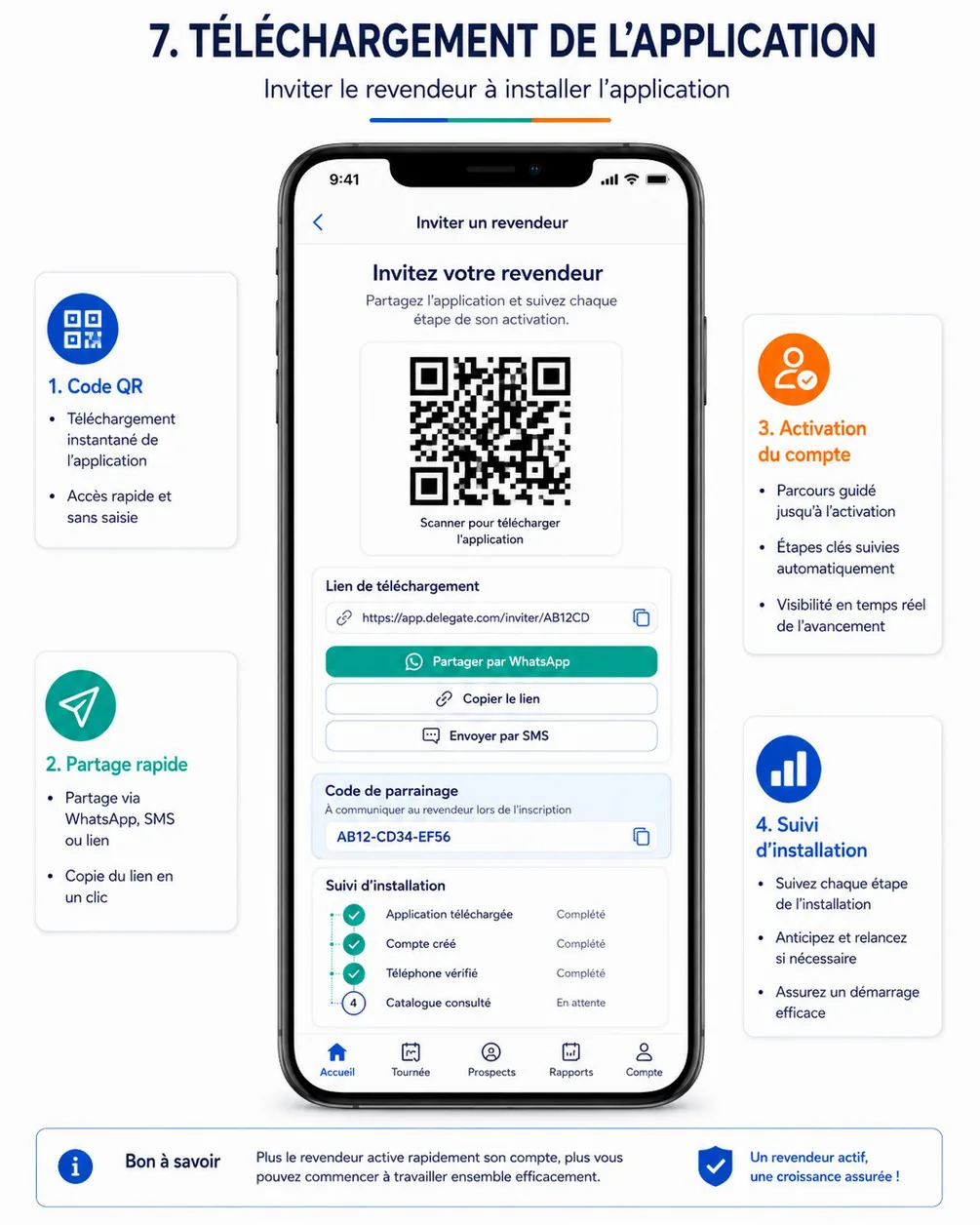
Purpose. Invite the shop owner to install the reseller app with a unique and secure link, QR code or referral code tied to the store and the delegate, and follow the activation live: app installed, account created, phone verified, catalog viewed, first order (cahier §6.6, IVT-01, IVT-02, IVT-03).
Entry points & exits. Entry: « Inviter » on DA-09, next-step sheet of DA-14, Envoyer le catalogue follow-ups (DA-19), notification invitation.step_completed (/invitations/:invitationId). Exits: WhatsApp, SMS app, clipboard, full-screen QR, DA-17 (« Aider à la 1ère commande » once the account exists), back.
Layout (top to bottom).
- App bar — back, « Inviter un revendeur ».
- Title « Invitez votre revendeur » and « Partagez l'application et suivez chaque étape de son activation. », store name.
- QR card — QR code (≥ 200 dp, quiet zone, high error correction) with « Scanner pour télécharger l'application »; tap → full screen with maximum brightness.
- Lien de téléchargement — the link
https://app.hoco.dz/i/K7MQ4R9Twith a copy icon; validity « Lien valable jusqu'au 4 décembre ». - Share buttons (56 dp, full width) — « Partager par WhatsApp » (primary), « Copier le lien », « Envoyer par SMS ».
- Code de parrainage — « À communiquer au revendeur lors de l'inscription », the code
K7MQ-4R9Tin large monospace type with a copy icon. - Suivi d'installation — the six steps of
InvitationStepas a vertical stepper: Invitation envoyée, Application téléchargée, Compte créé, Téléphone vérifié, Catalogue consulté, Première commande, each « Complété · 4 nov. 10:14 » or « En attente »; inferred steps marked « (déduit) ». - Help — « Bon à savoir » card: what the owner does after scanning (store → install → sign up with the phone → SMS code → choose the customer type).
- When the account exists: action « Aider à la 1ère commande ».
Data.
| Field | API source | Offline source | Freshness |
|---|---|---|---|
| Invitation | delegate.invitations.create (returns the active one or creates it) → id, code, displayCode, url, qrPayload, shareTexts.whatsapp, shareTexts.sms, expiresAt, active | invitations | Created online once; cached afterwards |
| Steps | delegate.invitations.get → steps[] (step, at, inferred), currentStep, shares[] | invitations | On open; live while visible (below) |
| Store phone and WhatsApp | delegate.resellers.get → phone, whatsapp | resellers | Delta |
| Validity | appConfig.get → settings.invitations.validityDays | app_config | Reference |
Actions.
- Opening the screen → if a valid invitation is cached, it shows at once; online,
delegate.invitations.createis called (direct,Idempotency-Keygenerated per opening and reused on retry, body{ occurredAt }) to get or create the active invitation, then cached. - Partager par WhatsApp →
https://wa.me/<store WhatsApp without +>?text=<shareTexts.whatsapp>(recipient prefilled); falls back to the system share sheet when WhatsApp is missing. Thendelegate.invitations.markSharedqueued (channel: WHATSAPP,occurredAt). - Envoyer par SMS →
sms:<phone>?body=<shareTexts.sms>;markSharedwithSMS. - Copier le lien / copy code → clipboard, snackbar « Lien copié »;
markSharedwithLINK. - QR plein écran → brightness to the maximum until the screen closes;
markSharedwithQR(once per invitation and day). - Live tracking → while the screen is visible and online: listens to
events.stream(invitation.step_reached) and refreshesdelegate.invitations.geton each event (or every 15 s as a fallback); each newly completed step playslightImpactand animates the stepper.
Rules.
- One active invitation per store; a code of 8 characters without ambiguous letters, unguessable; the link carries no personal data (cahier §6.6 « Le lien doit être unique et sécurisé »).
- The invitation stays linked to the delegate and the store (cahier §6.6); an active invitation of a previous delegate is revoked and replaced so the sign-up is attributed to the delegate who works the store now.
- Steps update automatically (cahier §6.6); Invitation envoyée is set by the first share, not by the creation.
- The link opens the reseller app or the store, else the web sign-up, and attributes the installation to the delegate (IVT-04, reseller side in RA-02 / RA-03).
- Not available for a store that already has an account (
409 RESELLER_HAS_ACCOUNT: the screen shows the funnel read-only), a suspended store (422 RESELLER_SUSPENDED), or a store reached only as a tour stop (403 OUT_OF_SCOPE). - Messages are sent by the delegate's own WhatsApp or SMS app; the platform sends nothing in V1.
States.
| State | UI |
|---|---|
| First creation offline | « Connexion requise pour générer l'invitation » with « Réessayer » |
| Store created offline, not synced | « Synchronisez la fiche pour générer l'invitation » with « Synchroniser maintenant » |
| Cached invitation offline | QR, link and code usable; steps « Mis à jour à 10:14 »; shares queued |
| Expired | « Invitation expirée » and a new code fetched online |
| Account already created | Funnel read-only, sharing hidden, « Aider à la 1ère commande » shown |
| WhatsApp missing | System share sheet |
Copy. « Inviter un revendeur » · « Invitez votre revendeur » · « Partagez l'application et suivez chaque étape de son activation. » · « Scanner pour télécharger l'application » · « Lien de téléchargement » · « Partager par WhatsApp » · « Copier le lien » · « Envoyer par SMS » · « Code de parrainage » · « À communiquer au revendeur lors de l'inscription » · « Suivi d'installation » · « Complété » · « En attente » · « Lien copié » · « Connexion requise pour générer l'invitation ».
Acceptance criteria.
- Scanning the QR code with a phone without the reseller app opens the Play Store; after installation and sign-up, the account is attributed to the inviting delegate (cahier §12 Invitation).
- While the screen is open, Application téléchargée and Compte créé become Complété within 15 s of the reseller's actions, without leaving the screen.
- Sharing by WhatsApp opens a chat with the store's WhatsApp number and the prefilled text, and Invitation envoyée is recorded with that time.
- Opening the screen twice returns the same code; a second delegate assigned later gets a new code and the first one stops working.
- With a cached invitation, the QR, link and code work in airplane mode.
DA-17 — First-order assistance
| Field | Value |
|---|---|
| French title | « Aide à la 1ère commande » |
| Release | V1 |
| Design day | Day 14 — DES-14 |
| Build task | MDA-09 — first-order assistance & orders |
| Requirements | ORD-08 · ORD-09 · ORD-02 |
| Reference screen | delegate-08-first-order — shown below |
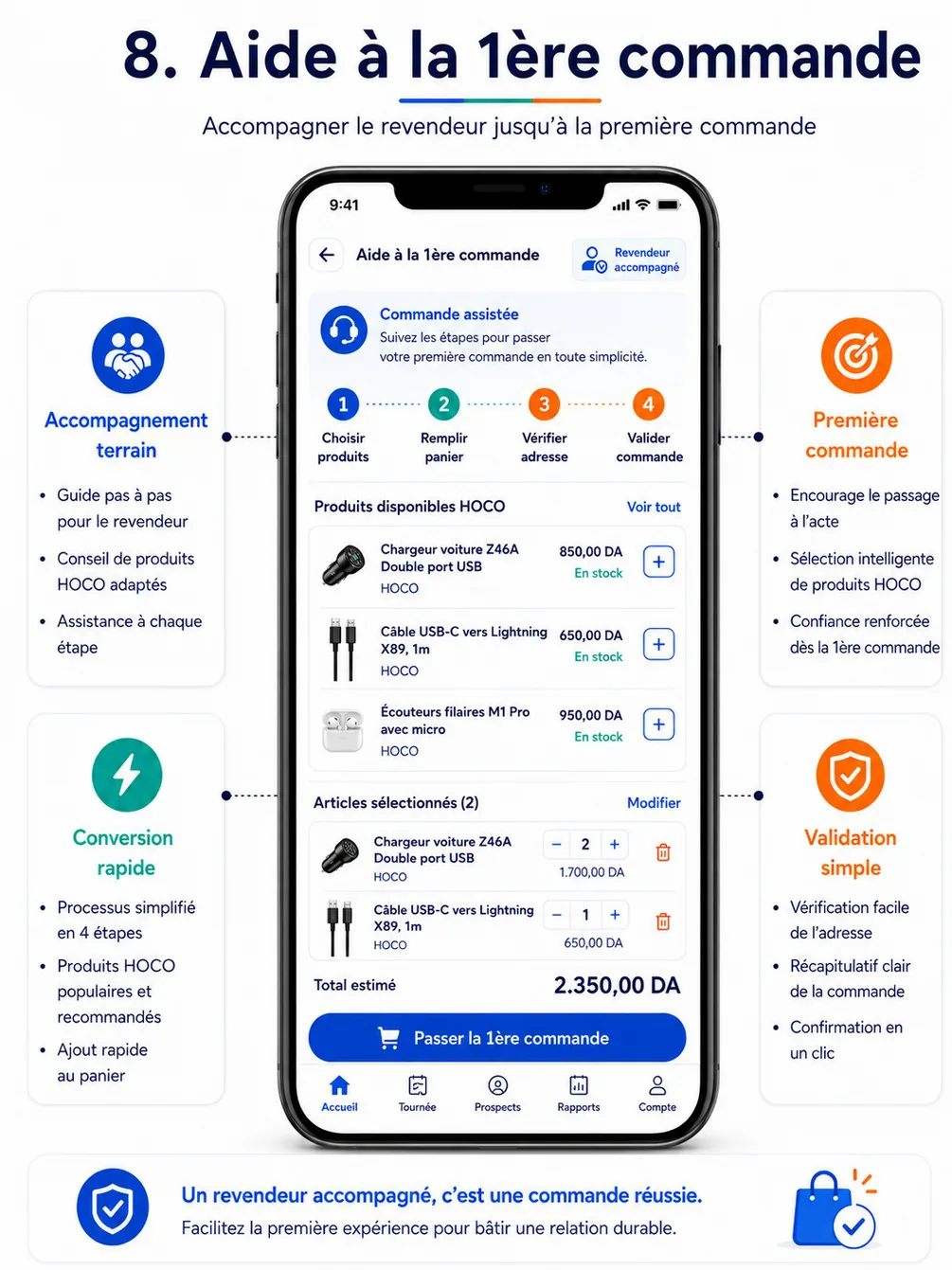
Purpose. Help the store owner choose HOCO, ACEFAST and BOROFONE products, set quantities, check the delivery address and prepare an assisted order that the reseller (or the administration) then confirms, and that the back-office finally confirms — with the same price, stock and credit controls as a normal order (cahier §4.4, §6.7, ORD-08, ORD-09, ORD-02, ORD-14).
Entry points & exits. Entry: Commande on DA-09, checklist item Aider à la 1ère commande HOCO on DA-10, next-step sheet of DA-14, DA-16 once the account exists, an open draft in DA-18 (/resellers/:resellerId/assisted-order). Exits: DA-18 (order sent), back (draft kept).
Layout.
- App bar — back, « Aide à la 1ère commande » (or « Commande assistée » when the store already ordered); chip « Revendeur accompagné » with the store name.
- Context banner — « Commande assistée — Suivez les étapes pour passer votre première commande en toute simplicité. »; customer-type chip « Tarif Demi-gros » (with « proposé, à confirmer par HOCO » while not confirmed, or « Tarif Détail par défaut » when unknown).
- Stepper — 1 Choisir produits · 2 Remplir panier · 3 Vérifier adresse · 4 Valider commande; completed steps tappable.
- Step 1 — Choisir produits — search field (name, reference, barcode) with a scan button; brand chips HOCO · ACEFAST · BOROFONE; category chips with sub-categories; « Filtres » button opening the advanced filter sheet (price range, category and sub-category, brand, attributes such as power, connector, cable length, colour, capacity, Bluetooth version, availability, promotion, new arrivals — each value with its count); sort (Populaires, Nouveautés, Prix croissant, Prix décroissant); product rows from the shared catalog widgets: image, name, reference, brand, the store's unit price (TTC large, HT small), promotion badge, availability pill « En stock » / « En rupture », « + » button (disabled when out of stock). Header « Produits disponibles » with « Voir tout ».
- Step 2 — Remplir panier — « Articles sélectionnés (2) » with « Modifier »; cart lines from the shared cart widgets: image, name, brand, quantity stepper (min quantity and step respected), line total, delete; issues inline under each line (« Prix modifié », « Article indisponible », « Quantité non disponible »); minimum-amount progress « Plus que 1 545,00 DA pour atteindre le minimum de commande ».
- Step 3 — Vérifier adresse — delivery card prefilled from the store: recipient (owner), phone, address line, landmark, commune and wilaya, map pin; « Modifier »; delivery note (≤ 300).
- Step 4 — Valider commande — summary of lines; totals (Sous-total HT, Remises, Livraison (« Offerte » when 0), TVA, Total TTC); payment method (enabled methods; Paiement à la livraison by default); confirmation route explained: « Le revendeur confirmera dans son application avant le 7 nov. à 14:32 » or « Ce magasin n'a pas encore de compte actif : l'administration HOCO confirmera la commande par téléphone »; then « HOCO confirmera ensuite la commande avant sa préparation ».
- Sticky bar — « Total estimé 2 350,00 DA » (estimé until the server prices the draft) and the step's primary button: « Continuer » (steps 1–3), « Envoyer pour confirmation » (step 4). The reference's « Passer la 1ère commande » is replaced: the delegate never places the order.
- After sending — success screen: order number
CMD-2026-000158, the three confirmation steps (Envoyée au revendeur ✓ → Confirmée par le revendeur → Confirmée par HOCO), countdown, « Relancer le revendeur », « Voir la commande ».
Reuse of hoco_catalog. The product list, product card, filter sheet, quantity stepper, cart line, issue banner and totals summary are the widgets of the reseller app's catalog and cart (RA-12, RA-13, RA-17, RA-18), parameterised for the delegate: the reseller context (resellerId) instead of the signed-in reseller, a local draft instead of the server cart, no favorites, no « Commander maintenant ».
Data.
| Field | API source | Offline source | Freshness |
|---|---|---|---|
| Products, prices, availability | catalog.products.list with resellerId (required for delegates) and the filters → items[] (ProductCard: name, brand, category, imageUrl, defaultVariantId, price.ttc, price.ht, promotion, availability) | catalog_products cached per customer type (the price depends only on the type and the promotions) | On open online; cache kept 24 h and labelled « Prix estimés » offline |
| Product detail and variants | catalog.products.get (resellerId) → variants[] (label, attributes, price, availability, limits.minQty, limits.qtyStep, limits.maxQtyPerOrder) | Cached on open | On open |
| Facets and counts | catalog.facets with the same filters and resellerId → categories and sub-categories, brands, price range, attributes, availability, promotion, new | — (offline: local brand, category and availability filters only) | Online only |
| Brands, categories | catalog.brands, catalog.categories (resellerId) | catalog_brands, catalog_categories | Reference |
| Barcode | catalog.products.byBarcode | Local lookup in catalog_products | On scan |
| Store, type, address | delegate.resellers.get → customerType, customerTypeConfirmed, hasAccount, accountStatus, validationStatus, addressLine, landmark, communeName, ownerName, phone, location | resellers | Delta |
| Draft and pricing | delegate.assisted.create / delegate.assisted.update → draft order: id, status = DRAFT, lines[] (variantId, quantity, unitPrice, lineTotal, availability, issues[]), totals (subtotalHt, discountTotal, deliveryFee, vatTotal, totalTtc), issues[] (code, severity, message), confirmation route | drafts (kind ASSISTED_ORDER): lines, address, note, payment method, last server totals | Re-priced on every change while online |
| Minimum amount, confirmation delay, price display | appConfig.get → settings.orders.minAmount, settings.orders.assistedConfirmationHours, settings.pricing.priceDisplay | app_config | Reference |
| Payment methods | reference.lists → PAYMENT_METHOD (enabled methods only) | reference_items | Reference |
| Sent order | delegate.assisted.submit → number, status = PENDING, AssistedConfirmation AWAITING_RESELLER, expiry | orders | Once |
Assumption — the draft response shape follows the shared Totals and Issue schemas of the API conventions; the assisted-orders API page owns the final field names.
Actions.
- Add / change quantity / remove → the local draft is the source of truth until sending. Online: each change (debounced 800 ms) calls
delegate.assisted.create(first line; body{ resellerId, lines, visitId, occurredAt }) ordelegate.assisted.update(fulllinesreplacement, address, note, payment method); each call has its ownIdempotency-Key; the server's totals and issues replace the estimate (selectionClickhaptic). Offline: the draft stays local with totals computed from cached prices, labelled « estimé »; on reconnection the draft is pushed with one create/update and re-priced, differences shown as issues (« Prix modifié »). These calls are direct, not outbox items: the delegate needs the priced answer on screen. - Scan → barcode scanner; the found variant is added with its minimum quantity.
- Continuer → next step (step 2 requires at least one line; step 3 requires a valid address).
- Envoyer pour confirmation (online only) → confirmation dialog « Envoyer la commande à Magasin El Wafa pour confirmation ? » →
delegate.assisted.submitwith anIdempotency-Keygenerated at the tap and kept with the draft until a definitive answer (a timeout retried later never sends twice). Success →mediumImpact, success screen; the draft is removed fromdraftsand the order stored inorders. - Abandonner le brouillon (overflow) → destructive confirmation →
delegate.assisted.discard(with anIdempotency-Key), local draft deleted. - Relancer le revendeur → WhatsApp or call to remind the owner to confirm in the app.
Rules.
- Attribution. The assisted order identifies the source delegate (cahier §6.7); a first order is flagged and attributed to the reseller and the delegate in the reports (ORD-09). The
visitIdlinks it to the visit when launched from one. - Prices = the store's customer type (§1b, PRC-01, PRC-02): every price shown is the store's super-gros, demi-gros or détail price with promotions on top — never another type's price, never the purchase price. While the type is only proposed, prices use it (or Détail when unknown) with the warning chip; if the validator changes the type, the order is re-priced at the reseller's confirmation (and the reseller sees the new totals).
- Availability only (§1b, STK-07): products and lines show « En stock » or « En rupture », never a quantity or « Plus que N »; out-of-stock products cannot be added; a quantity above the available stock is reported as « Quantité non disponible pour cet article » (
STOCK_INSUFFICIENT) without the number. - Same controls as a normal order (cahier §6.7): minimum amount (
ORDER_MIN_AMOUNT_NOT_MET), quantity rules (QUANTITY_NOT_ALLOWED), visibility (PRODUCT_UNAVAILABLE), stock (STOCK_INSUFFICIENT), credit for the credit payment method (CREDIT_LIMIT_EXCEEDED). Blocking issues disable « Envoyer pour confirmation » and name the line to fix. - Confirmation, then back-office confirmation — nothing automatic (cahier §4.4, §6.7; §1b; ORD-14):
- Envoyer pour confirmation → order
PENDING, AssistedConfirmationAWAITING_RESELLER, number allocated, expiry = now +orders.assistedConfirmationHours(72 h); the reseller gets a push and an SMS with a link to RA-23; the order appears in the back-office queue BO-41. - The reseller confirms in the app (account
ACTIVE), or the administration confirms on BO-41 after a phone call (stores without an active account — e.g. a prospect pending validation) → orderSUBMITTED. - A back-office user then confirms the order (
orders.validate) →VALIDATED, stock reserved, preparation starts. Validation also requires the store's account to be approved. - Rejected by the reseller or not confirmed within 72 h → order
CANCELLED; the delegate is notified and can start a new assisted order (the old one stays in history).
- Envoyer pour confirmation → order
- At most one assisted order awaiting confirmation per store (
409 ASSISTED_ORDER_ALREADY_PENDING); suspended stores cannot order (403 RESELLER_SUSPENDED); stores outside the scope or reached only as a tour stop are refused (403 OUT_OF_SCOPE). - A
DRAFTis invisible to the reseller and has no stock effect. - Money in French format with a narrow space for thousands: 2 350,00 DA;
pricing.priceDisplaydecides whether TTC or HT is shown large (decision to confirm).
States.
| State | UI |
|---|---|
| Loading products | Skeleton rows; cached products shown first when available |
| Offline | Banner « Hors ligne : brouillon enregistré sur le téléphone, prix estimés »; facets hidden; « Envoyer pour confirmation » disabled with « Connexion requise pour envoyer la commande » |
| Store not synced yet | « Synchronisez la fiche pour préparer une commande » |
| Customer type unknown | Chip « Tarif Détail par défaut — type de client à proposer » with a link to DA-15 |
| Blocking issues | Issue banner per line and above the totals; primary button disabled |
| Price changed | Line badge « Prix modifié » with old and new unit price |
| Already awaiting confirmation | 409 ASSISTED_ORDER_ALREADY_PENDING → « Une commande attend déjà la confirmation de ce revendeur » with « Voir la commande » |
| Suspended store | Entry hidden on DA-09; 403 RESELLER_SUSPENDED → « Ce revendeur est suspendu : commande impossible. » |
| Sent | Success screen with the three-step confirmation tracker |
Copy. « Aide à la 1ère commande » · « Commande assistée » · « Revendeur accompagné » · « Choisir produits » · « Remplir panier » · « Vérifier adresse » · « Valider commande » · « Produits disponibles » · « Voir tout » · « Filtres » · « En stock » · « En rupture » · « Articles sélectionnés » · « Modifier » · « Total estimé » · « Adresse de livraison » · « Mode de paiement » · « Paiement à la livraison » · « Envoyer pour confirmation » · « Envoyée au revendeur » · « Confirmée par le revendeur » · « Confirmée par HOCO » · « Relancer le revendeur » · « Abandonner le brouillon ».
Acceptance criteria.
- For a Demi-gros store, every price shown equals the variant's demi-gros price with active promotions, and no screen shows a stock quantity.
- A draft prepared in airplane mode keeps its lines and shows « Total estimé »; on reconnection it is priced by the server and any difference is shown as an issue; sending is impossible until then.
- After « Envoyer pour confirmation », the reseller receives the confirmation request (RA-23) and the order appears in BO-41; once the reseller confirms, the order is
SUBMITTEDand stays unprepared until a back-office user confirms it. - The first order is attributed to the store and the delegate in the reports (cahier §6.7 acceptance criterion, ORD-09).
- A total under the minimum amount blocks sending and shows the missing amount.
- The advanced filters return the same products and counts as the reseller app for the same store.
- Two taps on « Envoyer pour confirmation » send one order.
DA-18 — Assisted orders & orders of my resellers
| Field | Value |
|---|---|
| French title | « Commandes » |
| Release | V1 |
| Design day | Day 14 — DES-14 |
| Build task | MDA-09 — first-order assistance & orders |
| Requirements | ORD-08 · ACL-03 |
| Reference screen | None — order rows follow the reseller orders list RA-21 |
Purpose. Follow the assisted orders the delegate prepared — drafts, awaiting the reseller, confirmed, rejected, expired — and the orders of the stores in their scope, read-only, so they can answer the owner during a visit (ORD-08, ACL-03).
Entry points & exits. Entry: quick access Commandes on DA-05, « Voir les commandes » on DA-09 (filtered), success screen of DA-17, notifications assisted_order.* and order.*.delegate (/orders/:orderId). Exits: DA-17 (open a draft, « Nouvelle commande assistée »), DA-09, WhatsApp / dialer.
Layout.
- App bar « Commandes »; segments Commandes assistées · Mes revendeurs.
- Commandes assistées: groups Brouillons (from the phone), À confirmer par le revendeur (countdown « expire dans 46 h »), Confirmées, Refusées ou expirées.
- Mes revendeurs: status filter chips (
OrderStatus), store filter, search byCMD-number. - Row: number, store, date, total TTC,
OrderStatuspill, AssistedConfirmation pill for assisted orders, « 1ère commande » badge, channel icon. - Detail (pushed): header with number, store, status pills; the confirmation tracker for assisted orders (Envoyée au revendeur → Confirmée par le revendeur or par l'administration → Confirmée par HOCO → preparation and delivery steps); lines (product, quantity ordered, unit price, line total); totals; delivery address; payment method; history (status changes with time and actor); actions « Relancer le revendeur » (awaiting), « Nouvelle commande assistée » (rejected or expired: copies the lines into a new draft).
Data.
| Field | API source | Offline source | Freshness |
|---|---|---|---|
| Orders | delegate.orders.list (filters: assisted, status, reseller, cursor) → items[] (number, reseller, channel, status, assistedConfirmation, totalTtc, createdAt, isFirstOrder) | orders (last 50 viewed) | On open; live while open through events.stream (notification.created) and pushes |
| Detail | delegate.orders.get → lines, totals, address, payment method, status history, assistedExpiresAt | orders | On open |
| Drafts | — | drafts (kind ASSISTED_ORDER) | Local |
| Order status labels | OrderStatus, AssistedConfirmation | App l10n | — |
Actions. Open; filter; Relancer le revendeur (WhatsApp with a prefilled reminder including the order number, or call); Nouvelle commande assistée; pull to refresh. No order mutation here.
Rules. Read-only for orders of the stores in scope, assisted and direct (ACL-03); never purchase prices, margins, credit details or stock quantities (ACL-04, §1b). The tracker reflects the rule that every order waits for the back-office confirmation (§1b): Confirmée par le revendeur never means the order is validated. Delegate notifications per the matrix: confirmed, rejected, expired, refused, validated, modified, delivered, returned, cancelled.
States. Empty (« Aucune commande pour le moment ») · offline (cached list with « Mis à jour à … ») · expired (« Expirée — non confirmée à temps ») · rejected (with the reseller's reason) · out of scope after reassignment (403 OUT_OF_SCOPE → removed).
Copy. « Commandes » · « Commandes assistées » · « Mes revendeurs » · « Brouillons » · « À confirmer par le revendeur » · « expire dans 46 h » · « Confirmée par HOCO » · « 1ère commande » · « Relancer le revendeur » · « Nouvelle commande assistée » · « Aucune commande pour le moment ».
Acceptance criteria.
- An assisted order confirmed by the reseller shows Confirmée par le revendeur and, separately, waits for Confirmée par HOCO.
- An expired order shows « Expirée » and « Nouvelle commande assistée » recreates a draft with the same lines, re-priced.
- Orders of a store reassigned to another delegate are no longer listed after the next refresh.
- No order screen shows a purchase price or a stock quantity.