Profile and system
Messages and notifications, account hub, zone, settings, sync centre and system states of the delegate app (DA-23 to DA-28).
These screens hold the délégué's account and the app's own health: the inbox and the supervisor's messages, the profile and zone, the settings with the location transparency page, the sync centre that makes the offline queue visible (cahier §7.3 « L'utilisateur voit l'état : synchronisé, en attente ou en erreur »), and the system states that can interrupt any screen.
DA-23 — Messages & notifications
| Field | Value |
|---|---|
| French title | « Messages » |
| Release | V1 |
| Design day | Day 14 — DES-14 |
| Build task | MDA-11 — messages, settings & sync centre |
| Requirements | NOT-01 · NOT-07 |
| Reference screen | None — the bell and the Messages tile of delegate-02-home are its entry points |
Purpose. One inbox for the notifications the delegate receives (tours, follow-ups, invitations, orders, account validations) and the announcements sent by the back-office (Messages) (cahier §6 « Voir les objectifs du jour et les notifications », §6.1 « Accéder aux prospects, rapports et messages »; NOT-01, NOT-07).
Entry points & exits. Entry: bell of every tab root, quick access Messages on DA-05, Notifications on DA-24, push announcement.published (/messages/:announcementId). Exits: the target route of each notification (deep links), announcement detail.
Layout.
- App bar « Messages », overflow « Tout marquer comme lu ».
- Tabs Notifications (3) · Messages (1).
- Notification rows: category icon, title, body (2 lines), relative time, unread dot; grouped Aujourd'hui, Hier, Plus ancien.
- Message rows: sender (« Direction commerciale »), title, excerpt, date, unread dot; detail page with the full text, attachments and « J'ai lu ».
Data.
| Field | API source | Offline source | Freshness |
|---|---|---|---|
| Notifications | notifications.list (cursor, unread filter) → items[] (title, body, category, route, readAt, createdAt) | notifications (last 100) | On open; live through events.stream notification.created while the app is open; push otherwise |
| Unread badge | notifications.unreadCount | Local count | On open, on push |
| Announcements | announcements.list → title, body, attachments, publishedAt, readAt | announcements | On open + push |
Actions. Tap a notification → mark read and open its route; notifications.markRead queued (idempotent by nature, sent with an Idempotency-Key). Tout marquer comme lu → notifications.markAllRead. Open a message → « J'ai lu » → announcements.markRead queued.
Rules. Only the delegate's own notifications and the announcements targeted to them. A notification whose target is gone or out of scope opens Home with « Élément introuvable ou retiré de votre périmètre ». Transactional and security notifications cannot be disabled (DA-26).
States. Empty (« Aucune notification » / « Aucun message ») · offline (cached, marking read queued) · loading (skeleton rows).
Copy. « Messages » · « Notifications » · « Tout marquer comme lu » · « J'ai lu » · « Aujourd'hui » · « Hier » · « Aucune notification ».
Acceptance criteria.
- A message sent from the back-office (BO-57) reaches the delegate as a push and appears under Messages; « J'ai lu » is visible in the back-office.
- Tapping a
tour.updatednotification opens the updated tour. - The bell badge equals the number of unread notifications and messages, offline included.
DA-24 — Profile hub
| Field | Value |
|---|---|
| French title | « Compte » |
| Release | V1 |
| Design day | Day 11 — DES-11 |
| Build task | MDA-01 — home, profile, zone, objectives |
| Requirements | FLD-01 |
| Reference screen | delegate-01-login-profile — shown below |
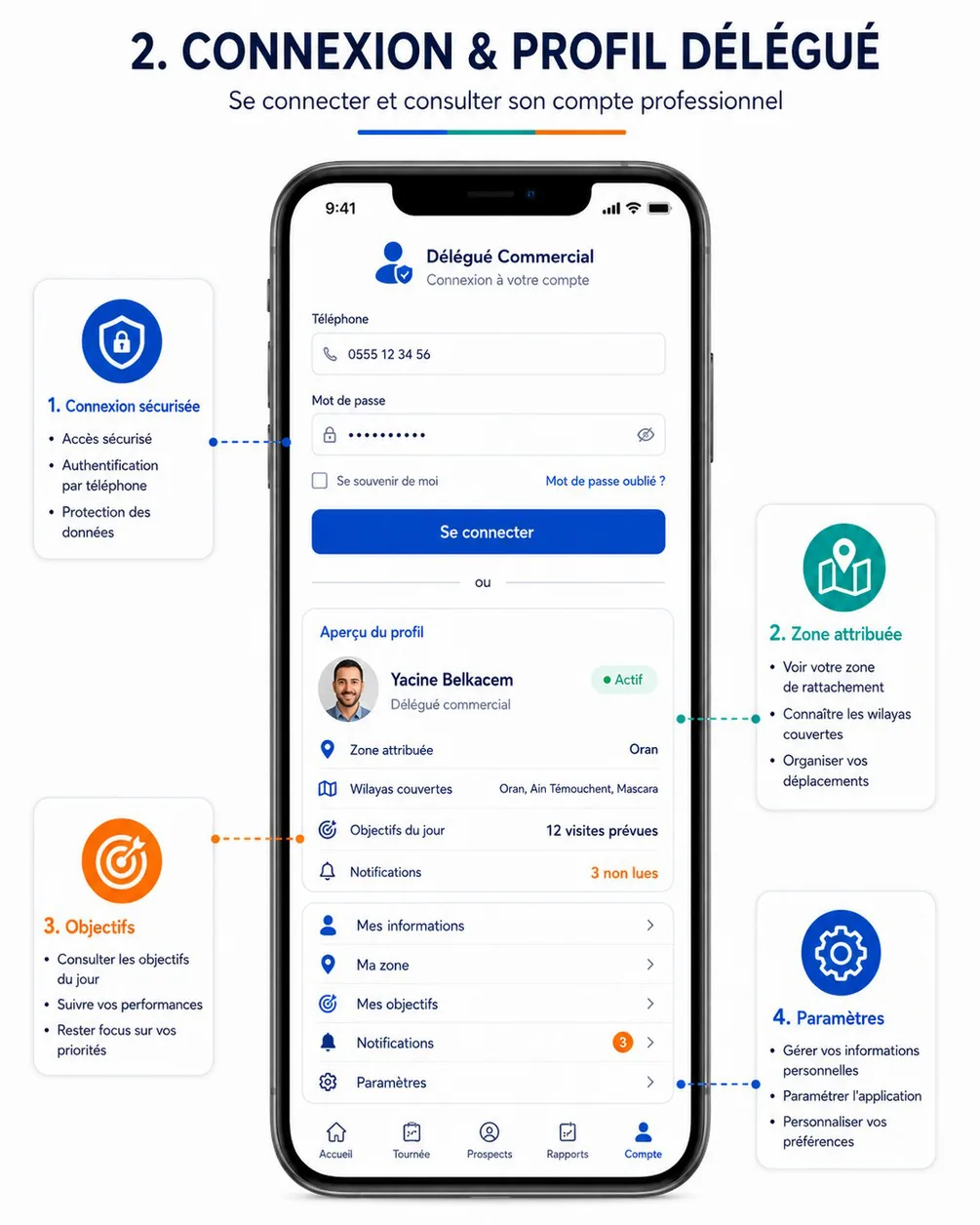
Purpose. Show who the delegate is and what they cover — status, zone, wilayas, today's objective, unread notifications — and give access to their information, zone, objectives, notifications, settings, the sync centre and sign-out (cahier §6, FLD-01).
Entry points & exits. Entry: Compte tab. Exits: Mes informations (sub-page), DA-25, DA-22, DA-23, DA-27, DA-26, DA-02 after sign-out.
Layout.
- Aperçu du profil card — avatar, name, « Délégué commercial »,
AccountStatuspill (« Actif »), then rows Zone attribuée (Oran), Wilayas couvertes (Oran, Aïn Témouchent, Mascara), Objectifs du jour (« 12 visites prévues »), Notifications (« 3 non lues »). - Menu (56 dp rows with chevrons) — Mes informations · Ma zone · Mes objectifs · Notifications (badge) · Synchronisation (state: « À jour », « 3 en attente », red « 1 erreur ») · Paramètres · Aide (« Appeler mon responsable », support contacts).
- Se déconnecter (destructive text button), version line.
- Mes informations (sub-page) — name, phone, email, delegate code (
DLG-007), supervisor with a call button, « Depuis le 12 oct. 2026 »; « Modifier la photo » (me.updateavatarFileId); « Changer le mot de passe » (auth.password.change); « Appareils connectés » (auth.sessions.list, revoke withauth.sessions.revoke).
Data.
| Field | API source | Offline source | Freshness |
|---|---|---|---|
| Identity, status, code | me.get → displayName, avatar, status, delegate.code; delegate.profile → title, phone, email, supervisor, since | profile | At sign-in, daily, on open when online |
| Zone and wilayas | delegate.profile → zones[] (name, isPrimary), wilayas[] | profile | Same |
| Today's objective | delegate.profile → objectivesToday[] | objectives | On open |
| Unread | unreadNotifications | Local count | Live |
| Sync state | — | outbox, upload_queue, location_pings, sync_state | Live-local |
Actions.
- Se déconnecter → if the outbox, upload queue or ping queue is not empty: dialog « 5 éléments ne sont pas encore synchronisés. Synchronisez avant de vous déconnecter. » with « Synchroniser » and a destructive « Se déconnecter et supprimer ces données » (second confirmation typing SUPPRIMER). Otherwise « Se déconnecter ? » →
auth.logout(revokes the session and the push token) when online; the local database, photos and secure storage are wiped; sampling stops; → DA-02 with the phone prefilled. - Password change: current + new + confirmation; other sessions revoked by the server; snackbar « Mot de passe modifié ».
Rules. The delegate cannot change their zone, code or status (back-office BO-18). Sign-out while a tour is IN_PROGRESS warns « Votre tournée est en cours : la localisation sera arrêtée. »
States. Offline (cached profile; password change and sessions unavailable) · avatar upload failing (retry).
Copy. « Aperçu du profil » · « Délégué commercial » · « Zone attribuée » · « Wilayas couvertes » · « Objectifs du jour » · « Mes informations » · « Ma zone » · « Mes objectifs » · « Synchronisation » · « Paramètres » · « Aide » · « Se déconnecter » · « Changer le mot de passe » · « Appareils connectés ».
Acceptance criteria.
- The card shows the zone and wilayas configured in the back-office for the delegate.
- Sign-out with pending items is refused unless the destructive path is confirmed; nothing is lost silently.
- After sign-out, no data of the delegate remains readable on the phone.
DA-25 — My zone
| Field | Value |
|---|---|
| French title | « Ma zone » |
| Release | V1 |
| Design day | Day 11 — DES-11 |
| Build task | MDA-01 — home, profile, zone, objectives |
| Requirements | GEO-02 · FLD-01 |
| Reference screen | None — the Zone attribuée rows of delegate-01-login-profile are its entry |
Purpose. Show the zones, wilayas and communes the delegate covers, with the number of points of sale, prospects and active resellers per commune, to organise trips (cahier §6 « Consulter le profil et la zone attribuée »; GEO-02, FLD-01).
Entry points & exits. Entry: Ma zone on DA-24. Exit: DA-13 filtered by the chosen commune.
Layout. Map fitted to the zone bounds with commune markers sized by count; below, per zone (primary first) and wilaya, the communes with Total · Prospects · Revendeurs · Actifs · Non assignés.
Data.
| Field | API source | Offline source | Freshness |
|---|---|---|---|
| Zones, wilayas, communes, counts | delegate.zone → zones[] (name, isPrimary, bounds, center, totals, wilayas[].communes[] with center and counts) | Last response cached in profile | On open; offline « Mis à jour à … » |
Actions. Tap a commune → DA-13 with the commune filter. Read-only.
Rules. Counts cover only the delegate's scope. Zone geometry is a viewport hint, not a boundary drawn to the metre.
States. Offline (cached) · loading (skeleton) · no zone assigned (« Aucune zone ne vous est attribuée. Contactez votre responsable. »).
Copy. « Ma zone » · « Prospects » · « Revendeurs » · « Actifs » · « Non assignés ».
Acceptance criteria.
- The communes listed equal the zone configured on BO-19.
- Tapping a commune opens the prospects list filtered on it with the same count.
DA-26 — Settings
| Field | Value |
|---|---|
| French title | « Paramètres » |
| Release | V1 |
| Design day | Day 11 — DES-11 |
| Build task | MDA-11 — messages, settings & sync centre |
| Requirements | NOT-06 · FLD-15 |
| Reference screen | None — the Paramètres row of delegate-01-login-profile is its entry |
Purpose. Let the delegate set what they are allowed to set — language, notification preferences, photo upload on mobile data — and see, transparently, what the app records about their location (cahier §6 « Gérer les paramètres autorisés », §10; NOT-06, FLD-15).
Entry points & exits. Entry: Paramètres on DA-24; the location chip's explanation sheet; DA-28 states. Exits: DA-04 (« Revoir le consentement »), Android settings.
Layout.
- Langue — Français; العربية and English listed as « Bientôt disponible » until
settings.i18n.enabledLocalesenables them. - Notifications — one switch per category: Commandes et compte and Sécurité (locked on), Activité terrain, Annonces; Android notification permission state with « Ouvrir les réglages ».
- Localisation et transparence — status (« Autorisée — position exacte »), consent date and version, what is recorded, when, how often (« toutes les 5 min ou tous les 200 m pendant une tournée en cours »), retention (« 90 jours »), who sees it; « Politique de confidentialité »; « Revoir le consentement »; « Retirer mon consentement » (destructive).
- Photos — « Envoyer les photos uniquement en Wi-Fi » (off by default; a warning explains it can delay the closing).
- Stockage — space used by photos and data; « Libérer de l'espace » (deletes only synced photo files older than 7 days).
- À propos — version, « Rechercher une mise à jour », device id (for support).
Data.
| Field | API source | Offline source | Freshness |
|---|---|---|---|
| Locales | appConfig.get → settings.i18n.enabledLocales; me.update locale | app_config, profile | Reference |
| Notification preferences | notifications.preferences.get / notifications.preferences.update | Last values in profile | Online to change |
| Location values | appConfig.get → settings.field.locationIntervalSeconds, .locationDistanceMeters, .locationRetentionDays; me.get → consents.locationTrackingVersion, .locationTrackingAcceptedAt | app_config, profile | Reference |
| Permission states | Android | — | On resume |
Actions. Language → me.update locale and immediate UI switch. Preference switch → notifications.preferences.update (online; offline the switch is disabled with « Connexion requise »). Retirer mon consentement → confirmation « La localisation sera arrêtée et vous ne pourrez plus démarrer de tournée ni enregistrer vos arrivées. » → me.update consents.locationTracking.accepted = false queued; sampling stops immediately.
Rules. Transactional and security notifications cannot be disabled. Transparency values come from the settings, never hard-coded. Withdrawing consent while a tour is IN_PROGRESS stops sampling but does not suspend the tour.
States. Offline (preferences read-only) · permission denied (status line in danger tone with « Ouvrir les réglages »).
Copy. « Paramètres » · « Langue » · « Notifications » · « Localisation et transparence » · « Revoir le consentement » · « Retirer mon consentement » · « Envoyer les photos uniquement en Wi-Fi » · « Libérer de l'espace » · « Rechercher une mise à jour ».
Acceptance criteria.
- The transparency page shows the sampling frequency, distance and retention configured in the back-office.
- Withdrawing consent stops location pings within one interval and disables « Commencer la tournée ».
- The Commandes et compte and Sécurité switches cannot be turned off.
DA-27 — Sync centre
| Field | Value |
|---|---|
| French title | « Synchronisation » |
| Release | V1 |
| Design day | Day 14 — DES-14 |
| Build task | MDA-11 — messages, settings & sync centre |
| Requirements | SYN-05 · SYN-06 |
| Reference screen | None — specified from cahier §7.3 (synchronisé, en attente, en erreur) |
Purpose. Make the offline queue visible and controllable: what is waiting, what failed and why, what the delegate must do, and how fresh the data on the phone is — so nothing recorded in the field is lost or silently duplicated (cahier §7.3, SYN-05, SYN-06).
Entry points & exits. Entry: the global sync indicator of every tab root, Synchronisation on DA-24, error badges, the blocking items of DA-20, the 48-hour local notification (/sync). Exits: the record behind an item (DA-10, DA-09, DA-15…), back.
Layout (top to bottom).
- App bar — « Synchronisation ».
- Status header — large icon and one of: « Tout est synchronisé » (success) · « 3 éléments en attente » (info) · « 1 erreur à traiter » (danger) · « Hors ligne depuis 10:12 — 5 éléments en attente » (neutral) · « Synchronisation en cours… 12 / 20 » (progress). Sub-lines « Envoi : il y a 2 min » and « Réception : il y a 5 min ».
- Age warning (when the oldest pending item is 48 h old) — « Des données attendent depuis 2 jours. Elles seront refusées après 72 h : connectez-vous dès que possible. »
- Primary button « Synchroniser maintenant » (disabled offline, with « Connexion requise »).
- À traiter (errors, red section) — one card per item in error: icon, label, subject, time of the action, the server message, what to do, and the actions of the table below.
- En attente — ordered list (oldest first): type icon, label (table below), subject (store name), action time, state (« En attente », « Envoi… », « Nouvel essai à 10:45 », « Bloqué par : Nouveau revendeur — Magasin X »), attempts.
- Photos — per file: thumbnail, size (« 1,2 Mo »), progress bar, state; « 12 photos · 18,4 Mo ».
- Positions — « 14 positions en attente » (one line, no detail).
- Données reçues — freshness per scope: Tournée du jour (07:42), Points de vente (07:40), Relances (07:40), Listes de référence (hier), Catalogue (hier); « Tout recharger » (only when nothing is pending).
- Diagnostic — app version, device id, last cursor time, clock offset (« Horloge du téléphone : +3 s »); « Envoyer un diagnostic » (logs and queue metadata — never the content of reports or photos — to Sentry with a reference given to support).
Item labels.
| Operation | Label | Subject |
|---|---|---|
delegate.tours.start · suspend · resume | Démarrage · Suspension · Reprise de tournée | Tour number |
delegate.tours.reorder · delegate.tours.addVisit | Nouvel ordre des visites · Visite ajoutée | Tour / store |
delegate.tours.close | Clôture de tournée | Tour |
delegate.visits.arrive · start · end | Arrivée · Début de visite · Fin de visite | Store |
delegate.visits.checklist · note · report | Checklist · Note rapide · Rapport de visite | Store |
delegate.visits.addPhoto | Photo de visite | Store |
delegate.visits.notDone | Visite non réalisée | Store |
delegate.resellers.create · delegate.resellers.update | Nouveau revendeur · Modification de fiche | Store |
delegate.resellers.addNote · delegate.resellers.addPhoto | Note · Photo du magasin | Store |
delegate.invitations.markShared | Partage d'invitation | Store |
delegate.tasks.update · delegate.tasks.complete | Relance reprogrammée · Relance terminée | Store |
me.update (consent) | Consentement localisation | — |
notifications.markRead, announcements.markRead | Not listed (silent) | — |
Data.
| Field | API source | Offline source | Freshness |
|---|---|---|---|
| Pending and failed items | Per-item results of sync.batch (SyncItemResult, HTTP status, error envelope) | outbox (op, entity, occurredAt, status, attempts, nextAttemptAt, lastErrorCode, lastErrorMessage, dependencies) | Live-local |
| Photos | files.createUpload, files.completeUpload | upload_queue (local path, size, progress, state) | Live-local |
| Positions | sync.locationPings | location_pings (count only) | Live-local |
| Received data | sync.delta cursors per scope; delegate.tours.today snapshot time | sync_state | Live-local |
| Clock offset | appConfig.get → serverTime | sync_state | Each call |
| Value | UI label (fr) | Meaning |
|---|---|---|
APPLIED | Synchronisé | |
REPLAYED | Déjà synchronisé | Same Idempotency-Key seen before; original result returned. |
CONFLICT | Conflit | State changed on the server; the client must show it in the sync centre. |
REJECTED | Rejeté | Validation or permission error; never retried automatically. |
RETRY | À réessayer | Transient server error; retried with backoff. |
Actions.
- Synchroniser maintenant → uploads first, then
sync.batchin batches of 50 (new batchIdempotency-Keyper request, items keep theirs), thensync.locationPings, thensync.deltafor every scope; progress in the header. - Réessayer maintenant (item waiting for a retry) → resends with the same key.
- Corriger (rejected item that the delegate can fix: duplicate phone, invalid field) → opens the record (DA-15 for a reseller, DA-12 for a report); saving rebuilds the item with the corrected body and a new key; dependants are released after it is applied.
- Réessayer (rejected item whose cause was external, e.g. scope restored by the back-office) → new key, same body.
- Garder la version du serveur (conflict) → drops the local item, reloads the record from the server, and drops dependants that no longer make sense (with a summary of what was discarded).
- Réappliquer ma modification (conflict on an editable record: reseller fields, checklist, note, report before lock) → new item on the current server version, new key.
- Abandonner (any error) → destructive confirmation « Cette action sera définitivement perdue. »; the local change is reverted to the server state.
- Contacter mon responsable (errors only the back-office can settle:
OCCURRED_AT_OUT_OF_RANGE, check-in refused after replay, tour cancelled) → call the supervisor; the item stays until resolved or abandoned. - Libérer / Tout recharger / Envoyer un diagnostic as described in the layout.
Rules.
- Automatic sync triggers: network regained, app foreground, 2 s after any recorded action, every 5 min in the foreground while online, every 15 min in the background (WorkManager) while a tour is
IN_PROGRESSor items are pending, and on push data messages. - Order and dependencies as on the overview; an item never jumps ahead of an earlier item of the same record.
- Results:
APPLIEDandREPLAYEDremove the item (a replay proves the server already had it — never a duplicate);RETRYbacks off 5 s, 10 s, 20 s… up to 10 min (±20 % jitter);REJECTEDis never retried automatically;CONFLICTwaits for a decision. - What the delegate sees for each conflict family:
| Situation | Server answer | Shown as | Choices |
|---|---|---|---|
| Duplicate phone on a new prospect | 409 PHONE_ALREADY_EXISTS | « Doublon : ce numéro existe déjà (Magasin El Wafa, REV-000123) » | Corriger le numéro · Ouvrir la fiche existante · Abandonner |
| Record edited elsewhere | 409 VERSION_CONFLICT | « Fiche modifiée entre-temps » with both values side by side | Garder la version du serveur · Réappliquer ma modification |
| Visit locked or cancelled meanwhile | 409 VISIT_LOCKED | « Visite terminée ou annulée : modification refusée » | Garder la version du serveur · Contacter mon responsable |
| Tour cancelled, reassigned or not startable | 409 TOUR_TRANSITION_NOT_ALLOWED, 403 NOT_ASSIGNED_DELEGATE | « Tournée annulée ou réaffectée »; its visit items blocked | Contacter mon responsable · Abandonner |
| Check-in refused at replay | 422 GPS_OUT_OF_TOLERANCE / GPS_ACCURACY_TOO_LOW | « Arrivée refusée par le serveur (420 m) »; the visit's other items blocked | Contacter mon responsable |
| Reorder on a changed tour | 409 VERSION_CONFLICT | « L'ordre a été modifié par votre responsable » | Automatic: server order kept, item dropped |
| Store reassigned | 403 OUT_OF_SCOPE | « Point de vente retiré de votre périmètre » | Abandonner |
| Action too old | 422 OCCURRED_AT_OUT_OF_RANGE | « Action enregistrée il y a plus de 72 h » | Contacter mon responsable · Abandonner |
| Same key, different body | 409 IDEMPOTENCY_KEY_REUSED | Never shown: logged to Sentry; the item is rebuilt with a new key | — |
- The detailed protocol (batch format, cursors, conflict codes) is owned by the sync API and offline sync; this screen only displays it.
- Nothing is deleted from the phone without either a server acknowledgement or an explicit Abandonner by the delegate.
States.
| State | UI |
|---|---|
| All synced | Success header, empty lists collapsed, freshness section |
| Pending, online | Info header, items progressing |
| Offline | Neutral header with the offline time; « Synchroniser maintenant » disabled |
| Errors | Danger header; errors first; the Compte tab shows a red dot |
| Maintenance / forced update | « Synchronisation en pause : maintenance jusqu'à 14:00 » / « Mettez l'application à jour pour envoyer vos données » (the queue survives the update) |
| Session expired | « Reconnectez-vous pour envoyer vos données » → DA-02, queue kept |
Copy. « Synchronisation » · « Tout est synchronisé » · « éléments en attente » · « erreur à traiter » · « Hors ligne depuis » · « Synchroniser maintenant » · « À traiter » · « En attente » · « Nouvel essai à » · « Bloqué par » · « Corriger » · « Réessayer » · « Garder la version du serveur » · « Réappliquer ma modification » · « Abandonner » · « Contacter mon responsable » · « Données reçues » · « Envoyer un diagnostic ».
Acceptance criteria.
- In airplane mode, a check-in, a photo and a note show three items « En attente » plus one photo; the global indicator shows « 3 en attente ».
- When the network returns, the items are sent in order without any action, disappear one by one, and the server holds exactly one record per action; replaying the same batch returns
REPLAYEDfor every item (cahier §12 Hors ligne). - A prospect with a duplicate phone appears under À traiter with Corriger; its photo item shows « Bloqué par » until the correction is applied.
- An item pending for 48 h triggers the warning banner and a local notification.
- « Synchroniser maintenant » is disabled offline and explains why.
- Abandonner asks for confirmation and restores the server state of the record.
DA-28 — System states
| Field | Value |
|---|---|
| French title | « États système » |
| Release | V1 |
| Design day | Day 14 — DES-14 |
| Build task | MOB-10 — Location, maps & consent foundation |
| Requirements | SYN-06 · FLD-07 · ADM-07 |
| Reference screen | None — catalogue of overlays and banners shared by every screen |
Purpose. Define once how the app behaves when the network, the GPS, a permission, the version policy, the session, the clock or the storage gets in the way — so every screen reacts the same way and the delegate always knows what to do (SYN-06, FLD-07, ADM-07).
Entry points & exits. Raised by any screen or by the background services; each state names its exit below.
| State | Trigger | UI | Copy | Exit |
|---|---|---|---|---|
| Offline | No network or every call timing out (10 s) | Banner under the app bar, neutral tone, never blocking | « Hors ligne — vos actions sont enregistrées et seront envoyées automatiquement. » | Disappears when a call succeeds |
| Weak network | Calls slower than 5 s three times in a row | Same banner, info tone | « Réseau faible — envoi en arrière-plan. » | Normal calls |
| GPS off | Location services disabled | Card on the screen needing a position; chip in danger tone during a tour | « Localisation désactivée. Activez-la pour enregistrer vos arrivées. » · « Activer » (system dialog) | Services on |
| Permission denied | Location permission denied or approximate only | Card with explanation | « Autorisez la position exacte pour valider vos arrivées. » · « Ouvrir les réglages » | Permission granted |
| Accuracy too low | Best fix above field.gpsMaxAccuracyMeters after 30 s | Inline progress then dialog | « Position trop imprécise (± 180 m). Placez-vous à découvert et réessayez. » | Better fix, or the out-of-tolerance path when allowed |
| Out of tolerance | Distance above field.gpsToleranceMeters | Dialog of DA-10 | « Vous êtes à 420 m du point de vente (tolérance 150 m). » | Retry, justification (when allowed), not done |
| Mock location | Fix flagged mock | Blocking dialog | « Position simulée détectée : désactivez l'application de localisation fictive. » | Real fix |
| Forced update | Version below minVersion or 426 UPGRADE_REQUIRED | Full-screen, blocking | « Mise à jour obligatoire — vos données en attente seront envoyées après la mise à jour. » · « Mettre à jour » (storeUrl) | Updated app |
| Update available | updateAvailable | Dismissible sheet once per version | « Une nouvelle version est disponible » | Dismiss or update |
| Maintenance | maintenance.enabled or 503 MAINTENANCE | Banner; sync paused; app usable offline | « Maintenance en cours jusqu'à 14:00. Vous pouvez continuer hors ligne. » | until reached |
| Session expired | 401 UNAUTHENTICATED | Sheet over the current screen | « Votre session a expiré. Reconnectez-vous : vos données en attente sont conservées. » | DA-02, same delegate resumes the queue |
| Account suspended | 403 ACCOUNT_SUSPENDED | Full-screen, blocking; local data kept but locked | « Votre compte est suspendu. Contactez votre responsable. » | Reactivation, then sign-in |
| Temporary password | 403 PASSWORD_CHANGE_REQUIRED | Change-password sheet | « Choisissez un nouveau mot de passe pour continuer. » | Password changed |
| Wrong clock | Offset to serverTime above 5 min | Banner, warning tone | « L'heure du téléphone semble incorrecte (écart de 12 min). Activez l'heure automatique. » · « Ouvrir les réglages » | Offset under 5 min; actions keep the corrected time meanwhile |
| Old pending data | Oldest outbox item 48 h old | Banner + local notification | « Synchronisez vos données : elles seront refusées après 72 h. » | Queue sent |
| Storage full | Free space under 200 MB or a write failure | Banner; camera disabled | « Espace de stockage insuffisant. Libérez de la place pour continuer à prendre des photos. » | Space freed |
| Battery saver killing the sampler | Foreground service stopped by the system during IN_PROGRESS | Banner when the app resumes | « La localisation a été interrompue par le téléphone. Autorisez HOCO Délégué à fonctionner en arrière-plan. » · « Voir comment » | Exemption set (DA-04 step 4) |
| Start-up error | Database cannot be opened | Full-screen | « Impossible d'ouvrir les données de l'application. » · « Réessayer » · « Envoyer un rapport » | Retry succeeds or support |
| Generic error | 500 INTERNAL_ERROR on an online-only call | Snackbar with retry | « Une erreur est survenue. Réessayez. » (+ requestId in the diagnostic) | Retry |
| Empty states | No data for a list | Illustration, one sentence, one action | Per screen | Action |
Rules.
- Offline is a normal state, not an error: no red, no blocking dialog; only actions that truly need the network are disabled, each with its reason.
- Blocking full-screen states are limited to forced update, suspended account and start-up error.
- Banners stack in order of severity and never hide the primary action of the screen.
- Every state is reachable in the widget gallery of MOB-04 for design QA (DQA-03).
Acceptance criteria.
- Turning the network off on any screen shows the offline banner within 10 s and every offline-capable action keeps working.
- With
minVersionabove the installed version the forced-update screen blocks the app, and the queued items are sent after updating. - With the phone clock set 15 min ahead, the wrong-clock banner appears and queued actions are not refused by the server.
- A sampler stopped by the system during a tour is reported to the delegate on the next resume.
- Every state above has a French message that tells the delegate what to do.
Prospects and conversion
Prospects and points of sale, field sign-up, editing, invitation to the reseller app, first-order assistance and orders of the delegate app (DA-13 to DA-18).
Back-office
Information architecture, page templates, global elements and the index of every page of the HOCO back-office dashboard.